

Closed (fixed)
Project:
Field Group
Version:
7.x-1.0
Component:
Miscellaneous
Priority:
Normal
Category:
Bug report
Assigned:
Unassigned
Reporter:
Created:
11 Jul 2011 at 12:38 UTC
Updated:
20 Sep 2011 at 20:28 UTC
Jump to comment: Most recent file



Comments
Comment #1
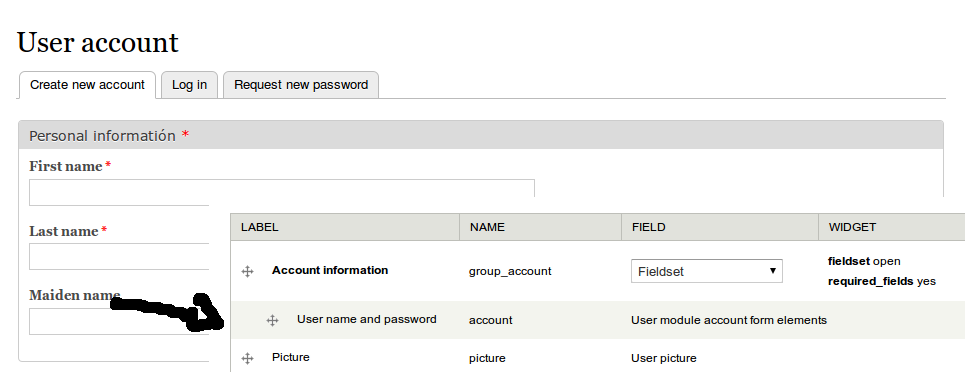
bmango commentedI'm having same problem. When I add the username and password, timezone or picture into a fieldset for the user registration form they disappear. When I add user fields I've created myself, they work fine. I'm using Drupal 7.4 with user fields, not the profile module. See screenshot.
Edit
I forgot to say, this is a great module. I've been looking for ages to split my form into two columns, and this has given me a way to do it.
Comment #2
Arnion commentedI solved it by adding a hook for user_register_form form_alter and one for user_profile_form:
This error occurs because the condition is not met in field_group.module:1204.
Comment #3
andreicio commentedThank you for the workaround.
Can you please be more specific about the condition not being met? Line 1204 in the field_group.module file is a comment in the 1.0 version.
Comment #4
Arnion commentedIn field_group.module: 1204, evaluates whether the form element have permission to show, and if it was processed. In this case, element $form['account'] no have type attribute, which is not processed and not added to show on the fieldgroup. What I do is add an type attribute that is processed. I hope you understand, I'm not good at writing in English.
Comment #5
nils.destoop commentedCan you check if this is working now? It works for me, and is probably fixed because of the new way of checking empty groups. (http://drupal.org/commitlog/commit/16266/f536f082b2c890280d2b8be72593d3c...)
Comment #6
jbergeron commentedThis is still not working. I just installed the latest version of Field Group and the user module account form elements are not showing up on the user registration form when they are included in a group. Once they are removed from a group they show up fine.
Comment #7
Stalski commentedI tested this as well and see nothing bizar.
Can you tell us which fields and how you grouped them? People should be aware that when posting issues, maintainers need a bit of information on how to reproduce things.
Thx in advance.
Comment #8
Crell commentedI get this as well. On a User entity, if I create two horizontal tab items and put them in one group, and then put the user password/email pseudo-field into one of the tab groups, it simply does not display. If it is outside of a tab group, it works fine.
Comment #9
Stalski commentedI'll take another look at it with that set-up. It is certainly not working in 7x-1.0, but I thought it finally worked in the dev version.
Comment #10
Crell commentedAh, I hadn't tried the dev version yet, only the 1.0. It's been a few months, is it time for a 1.1? :-)
Comment #11
Stalski commentedWell, in fact it is, we worked hard to clear the issue queue and it looks promising ;)
Comment #12
hydra commentedFor me this works in dev perfectly, I retested it with every displayset, we should close this issue.
Comment #13
Stalski commentedIndeed. I am waiting on horizontal tabs in elements to get approved to release. This issue came up in 3 issues since it takes a bit too long to the new release.
Comment #14
Stalski commented