Have some code (OCaml) on our Drupal-based site. Upgraded core on a test instance from 6.22 to 7.4, and in the text instance, the code blocks no longer have color, though formatting seems intact.
I've tried stripping down the filter stack to just GeSHi, to no avail. GeSHi library proper does return colorized code, so there seems to be an issue with something squelching the color.
Tech details:
Drupal 7.4
GeSHi Filter 7.x-1.0
|-> Configured identically to GeSHi filter in 6.22 install.
GeSHi library: 1.0.8.10
Additional formatting filters:
Markdown Filter 7.x-1.x-dev
Typogrify 7.x-1.0-rc2
PHP 5.3.3





Comments
Comment #1
soxofaan commentedCan you provide a view on the generated markup? e.g. save the page as file or make a screenshot of "view page source" in your browser.
Comment #2
pmay commentedHere are the screenshots.
Two 6.22 and two 7.4. I'm using Opera's "Inspect Element" feature to reveal the relevant source code. If that is insufficient for troubleshooting, please let me know and I'll do full source saves.
There is a clear indication that the 6.22 variant has a lot more formatting applied to it, hence the color. I've tried all the possible permutations of GeSHi filter configuration available under the "Styling, layout and CSS" category, to no avail.
It is worth noting that it is entirely possible that I've simply not checked a checkbox somewhere to indicate to Drupal that the code blocks should be treated somehow differently from regular posting text, which causes them to lack color.
Drupal is a rather new setup for me, so pointing out obvious things for me to check would not be considered an affront. Rather, it'd be welcomed.
Comment #3
acrollet commentedAre you by chance trying to use Geshi with the filtered html format? I was having the same issue and switched to the full html format, with much better results...
Comment #4
pmay commentedComment #5
pmay commentedI've tried that, too, and to no avail.
Am I correct in my understanding that the Full HTML and Filtered HTML input methods only differ by role? Seems like if I alter the "Filtered HTML" method to not have the HTML filters running, I should basically nullify the difference between the two?
Comment #6
danjuls commentedhave the same problem, tags
<drupal5> <drupal6>is highlighting but not<htm><jquery><css><php>of those ive tested. As i can see it in the html is doesnt add any span tags around the code when its presented on the page.Comment #7
jcscoobyrs commentedI had the same issue and while I was able to make it work changing the Story to "Full HTML", I was also able to make "Filtered HTML" work by dragging the Geshi Filter to the bottom of the Processing Order.
Comment #8
venkman commentedI'm having this exact same issue since updating Drupal. As in the images pmay has posted, the block itself gets correctly marked with:
But inside the block, no processing happens.
I've tried this with Drupal 7.2, 7.4 and now 7.7. I'm using the 7.x-1.0 version of Geshi Filter and version 1.0.8.10 of the Geshi library, and I've tried with different other filters (Markdown, Filtered HTML, Full HTML) configuring one first then Geshi, or Geshi first then the other... All to no avail. Code is not highlighted.
I've also configured Geshi Filter to use inline styles or CSS classes. The result is the same.
Comment #9
Yousef.H commentedI had exactly the same problem, switching to Full HTML instead of Filtered HTML solved my problem
Comment #10
kenjiru commentedI have the same problem in Drupal-7.8. Switching to Full HTML didn't solve the problem in my case.
After coping the 'geshi' library inside the 'geshifilter' module folder, it started to work again.
Comment #11
gastewart commentedRan into the same problem, syntax highlighting didn't appear to be working.
Turns out that not many languages are enabled by default. <drupal5|6>, <c> and <cpp> are though. The problem is that it is rather convoluted to navigate to the settings, you need to find the GeShi Filter General Settings page:
Administration » Configuration » Content authoring » Text formats » GeSHi Filter
OR
http://[yourdomain]/admin/config/content/formats/geshifilter
If you have the administration menu module, this is dead easy to locate, if you don't then the only way is:
- get to: Administration » Configuration » Content authoring » Text formats
- "configure" your text format where you have enabled geshifilter. (If you enabled GeSHi Filter for the "Filtered HTML" format, you will need to make sure that GeSHi comes after "Limit allowed HTML tags")
- you will find a link to "general GeSHi filter settings", this gets you to the above mentioned location.
Finally: Choosing the "Languages" page lets you enable the syntax highlighting you need.
Comment #12
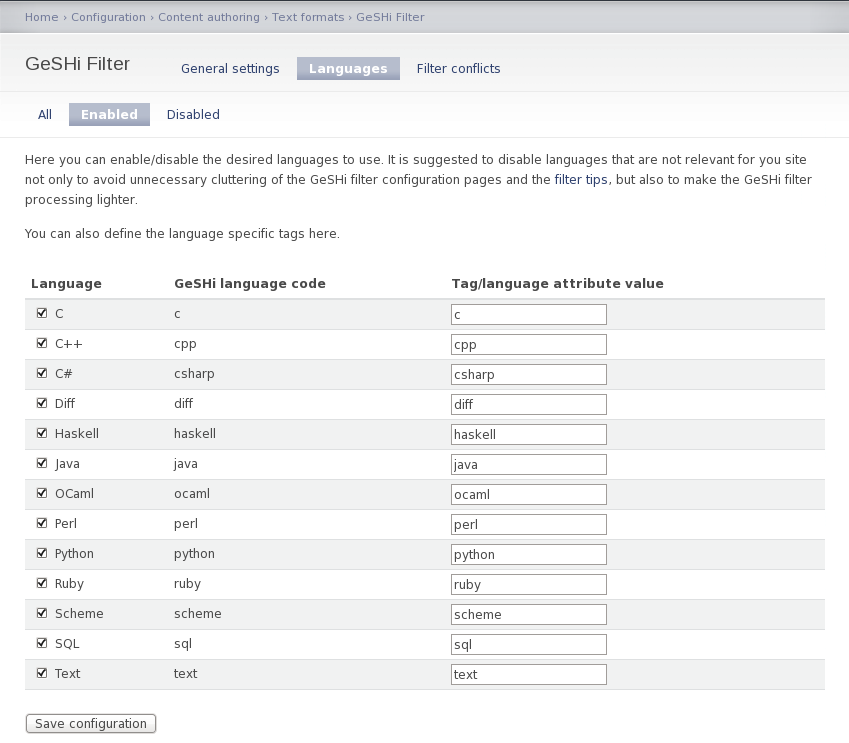
pmay commentedSo, attached is a screenshot of Drupal 7.10's GeSHi module config. Does that look sane? It seems odd to me that there are 3 column headings, but only one is filled out.
Comment #13
gastewart commentedNo, that doesn't look right.
I have attached a screenshot on Drupal 7.10 with the Seven admin theme.
Comment #14
soxofaan commented@pmay: that issue has been fixed by http://drupalcode.org/project/geshifilter.git/commitdiff/39f0e4f
the fix is not in version 7.x-1.0, but it is in 7.x-1.x-dev
Comment #15
pmay commented@soxofaan:
Ah. Much thanks. Grabbed the latest/greatest 7.x-1.x-dev. The
<code>(and<ocaml>) blocks are still black-n-white, but now the admin UI does show the enabled languages correctly.For the sheer and unadulterated fun of it, I have disabled *all* other filters leaving only Geshi Filter to try and do its thing. No joy. Much sadness ensued.
On the off-chance that there is an issue with the language definition for ocaml (or my sample code was odd in some way), tried to feed Geshi Filter a simple C program. Still no color.
Comment #16
pmay commentedComment #17
pmay commentedSomething I've noticed in the screenshot provided by gastewart: for each language enabled for parsing, its corresponding tag was actually enclosed in <> (so, C ==
<c>), whereas in my Admin UI, they weren't. Put up the <>. No apparent change, but makes me wonder if there is something else lingering that I cannot see.Comment #18
soxofaan commentedhi, how does the generated markup look like? Is there GeSHi-related stuff (classes, CSS)? See screenshot of what I get with default GeSHi setup on a fresh Drupal 7 install.
Comment #19
pmay commented@soxofaan
Thanks for looking at this. Here's what I get:
Comment #20
soxofaan commented@pmay:
can you add a debugging line to function _geshifilter_process from geshifilter.pages.inc (around line 232):
This will show the output of the geshifilter module filtering, before possibly other modules put their hands on it.
Note that because of the caching mechanisms in drupal, you have to change the body text (add a space/newline/random letter), in order to trigger re-filtering
Comment #21
pmay commented@soxofaan:
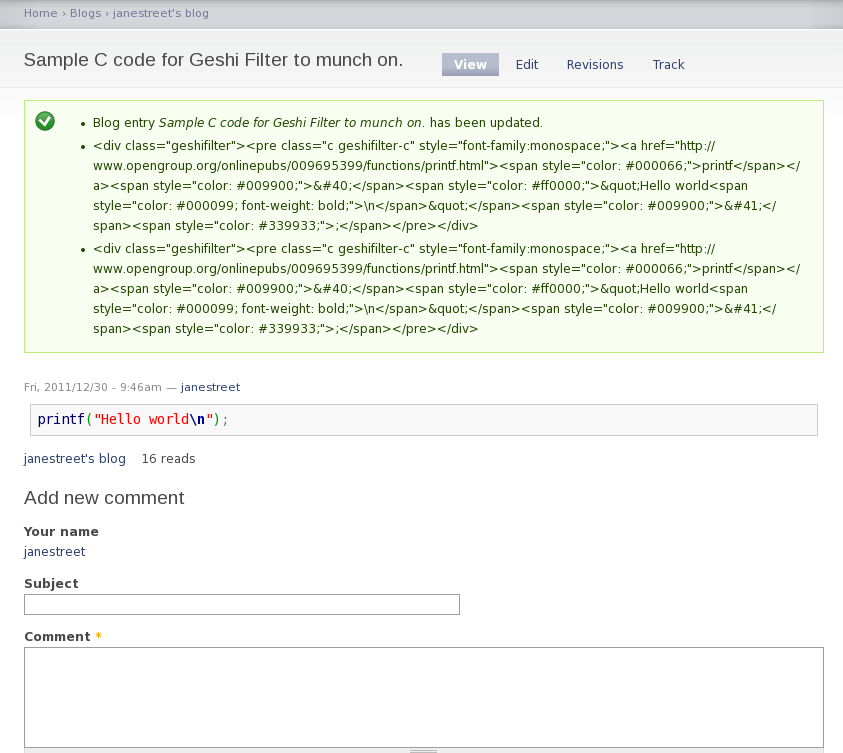
As you've requested, added the debug code line, updated the post. Seems like the Geshi filter isn't generating any color.
Edit (Add): My current settings for "Filtered HTML" and "Full HTML" have only the GeSHi filter enabled. Tried flushing the GeSHi cache.
Comment #22
pmay commentedCurrent GeSHi Filter enabled messages and general settings. Sorry about having to zoom out on the settings page - tried to fit as much as I could onto one screen.
Comment #23
soxofaan commented@pmay: I really have no clue what is wrong here.
Can you try the following variation of #20:
Warning: don't do this on a live site: all your geshi filtered nodes will have the same "hello world" body, regardless the input.
Comment #24
pmay commented@soxofaan
Well, that second piece of debugging code worked. Now, what in my setup did I do that I made things eat the colors?
Comment #25
pmay commented@soxofaan
Well, this is ODD.
I've backed out the second debug change from the .inc file and made a trivial change to the post to flush the cache. Now colors work.
o_O
Comment #26
soxofaan commentedWell, good to hear that it's fixed now
Seems like this was a caching issue. Can you create a new node with different source code and see if it works from the first time?
If not, please reopen this issue
Comment #27
pmay commented@soxofaan:
New posts with "code" blocks now pick up color. Didn't before. Still very confused as to why things didn't work and now do, but we can at least proceed with our migration/upgrade plans.
Thanks for the help.
Comment #28
stattler commentedApologies for reopening the issue.
I had the same issue, and doing the debug procedure actually detected another problem.
I was initially using the same name for the language-tag as the language name. For example, for rsplus language, I was using
<rsplus>. It gave me error message when I tried to save the languages after running the debug. I had to give it a different name.Hope this will help others who are facing the same issue.
Comment #28.0
stattler commentedNon-british spelling of colour :)