
FAQ using Views
Drupal 7 will no longer be supported after January 5, 2025. Learn more and find resources for Drupal 7 sites
Here is a recipe for creating an FAQ using nodes and Views. I did this in Drupal 7 but it should work in D6 also, although some steps will be different due to the new D7 user interface.
I am using the Administration Menu module with the Administration menu Toolbar style submodule enabled, and my directions to navigate to pages reflect that.
You will need the Token module installed.
Step 1: Create the FAQ content type
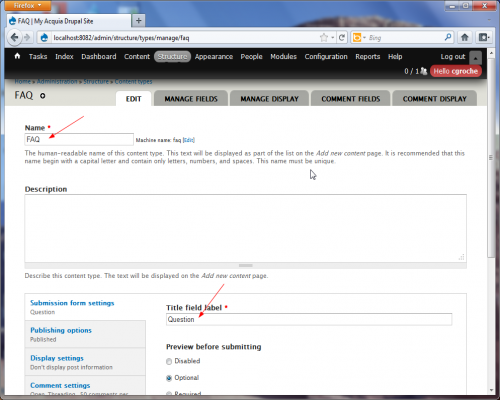
- Go to Structure -> Content types -> Add content type.
- Give the content type the name "FAQ".
- Change the title field label to "Question"
- I recommend unchecking "Promoted to front page" and "Display author and date information" and disabling comments.
- Save the content type and go to "Manage fields"
- Delete the body field.
- Add a new field called "Answer" of type long text (i.e., an HTML text area)
- Here are the settings I used for the Answer field:
- Check required field
- 20 Rows
- Text processing: Filtered text
- Number of values: 1
- If you want to be able to control exactly what order the FAQs are shown in, you could also add an integer field called "Sort order".
Step 2: Create some FAQ nodes
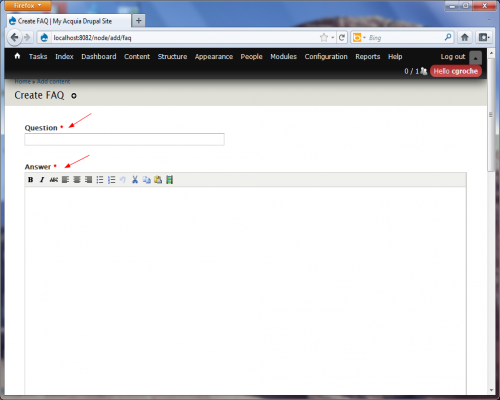
- Go to Content -> Add content -> FAQ.
- Fill in the question and answer fields and save.
Step 3: Create Views
Now we will create two views (actually two displays in one view): one for the table of contents and one for the full-body list of the FAQs. One display will be a page and the other can be an attachment or a block. I found using a block makes it easier to apply the desired CSS, since using an attachment marks up the page as one view inside another.
Initial view configuration
Here is where there is a difference between D6 and D7. In Drupal 7 I needed to make the table of contents the block view and make the full-body faq list the page view since the block is rendered above the page display. I believe (but haven't confirmed) in D6 you would do the reverse: the table of contents would be the page view.
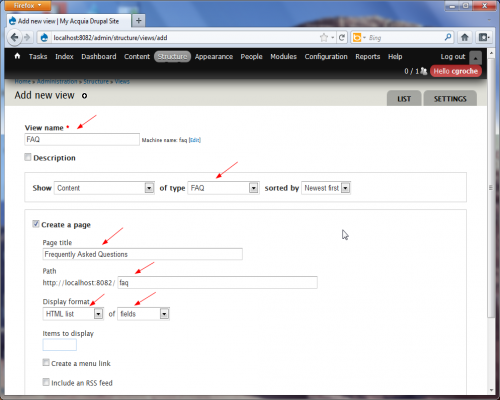
- Go to Views-> Add new view
- On the configuration page that takes you to:
- Call the view "FAQ".
- Show content of type FAQ sorted by (your desired sort order)
- Create a page
- Page title: Frequently asked questions
- Path: faq
- Display format: HTML list of fields
- Items to display: (leave blank)
- Create a menu link (if desired) in the desired menu (probably Main) with Link text: FAQ
- Create a block
- Block title: (Title of your choice)
- Formatted list of titles
- Items per page: (leave blank)
- Continue and edit
Table of contents display configuration
This will create a list of the questions that link to the full FAQ node farther down on the page.
In the "Fields" section
- Add field: Global: View result counter
- Check "Exclude from display"
- Starting value: 1
- Edit field: Title
- Uncheck "Create a label"
- Under "Rewrite results", check "Output this field as a link" and set link path as faq#[counter]
In Drupal 6 the result counter field will need to come before the title.
Full-body display
In the "Fields" section
- Add field: Global: View result counter
- Check "Exclude from display"
- Starting value: 1
- Edit field (or create if not there): Title
- Uncheck "Create a label"
- Under "Rewrite results", check "Rewrite the output of this field" and set Text to <a name="[counter]">[title]</a>
- Add field: Content: Answer
- Uncheck "Create a label"
- (Optional: link back to top of page) Add field: Global: custom text
- Uncheck "Create a label"
- Set Text to <a href="faq#main-content">Back to Top</a>
Step 4: Configure block
- Go to Structure->Blocks
- Find your new block and move it into the Content section (assuming your theme has a region called "content")
- Show the block only on the lists pages: faq
- Save block
Help improve this page
You can:
- Log in, click Edit, and edit this page
- Log in, click Discuss, update the Page status value, and suggest an improvement
- Log in and create a Documentation issue with your suggestion
