

Postponed (maintainer needs more info)
Project:
Page Title
Version:
7.x-2.7
Component:
User interface
Priority:
Major
Category:
Support request
Assigned:
Unassigned
Issue tags:
Reporter:
Created:
12 Jul 2011 at 18:23 UTC
Updated:
27 Nov 2012 at 02:50 UTC
Jump to comment: Most recent file


Comments
Comment #1
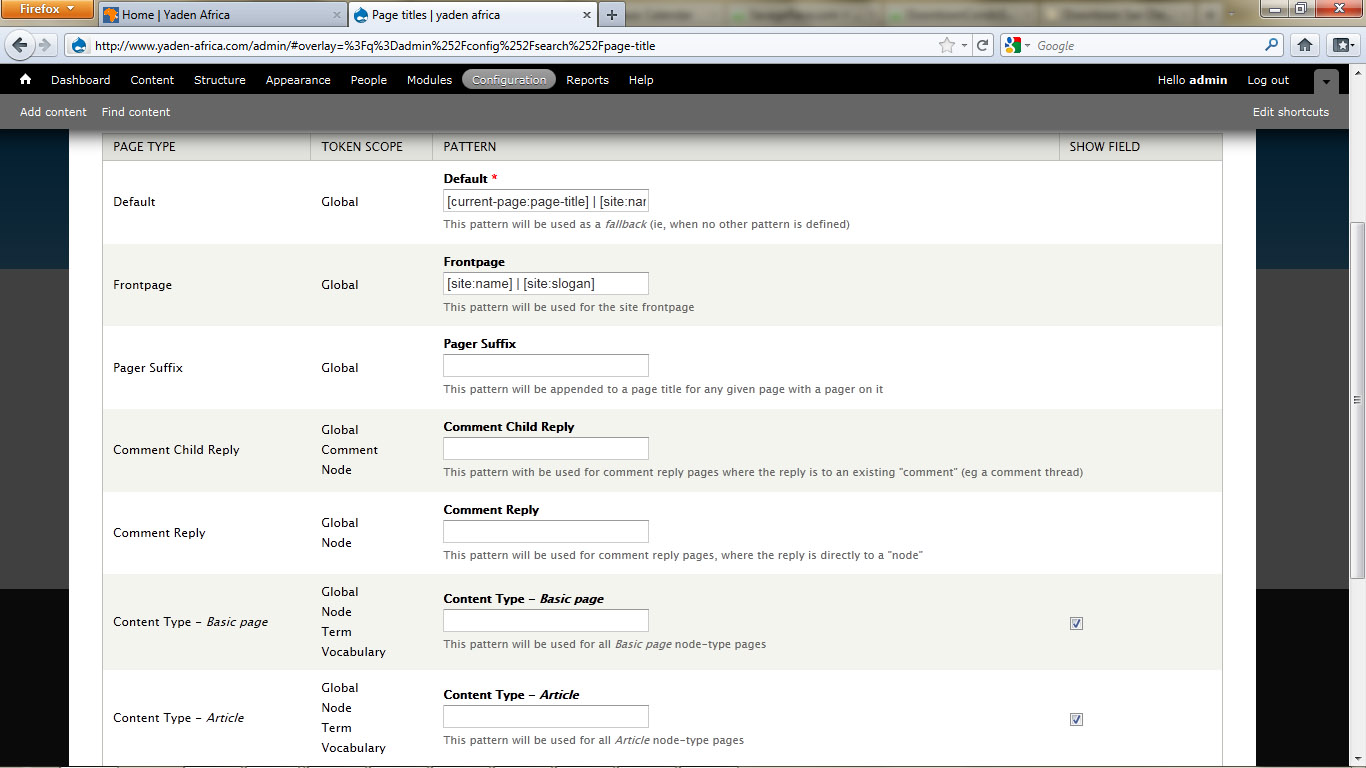
nicholasthompsonCould you screenshot your settings page please?
Page Title is now in the Vertical Tabs, usually between Comment Settings and Author Information.
Comment #2
yannisc commentedsame problem with Drupal 7 version.
Comment #3
nicholasthompsonI'm running the D7 2.5 release on my blog (www.thingy-ma-jig.co.uk) and on a local devbox... and I *do* get the box.
I'm not saying there isn't a bug - however I am saying that "same problem" doesn't help diagnose the issue ;-) hehe.
So - to clarify - in settings you have enabled the "show field" checkbox on a content type and when you go to create or edit nodes of that same type, you do not get Page Title in the Vertical Tabs at the bottom?
Comment #4
yannisc commentedI'm sorry, I was not clear enough. I rushed to reply, but my problem, although maybe related to afrs's one, is different.
My problem was that even though I had setup the default page title and taxonomy terms were shown with the proper title, after upgrading page_title AND drupal (from 7.0 to 7.4), page titles were not shown for taxonomy terms. Maybe because I was using the page-title token. I changed that to taxonomy-name AND downgraded to 2.5 and now works!
I hope the above details help.
Comment #5
afrs commentedYes, that is correct..I have enabled the "show field" checkbox and when I go to edit nodes I do not see the Page title section at the bottom.
I can edit settings for Page_title module when I am in /admin but once go to edit nodes and is now in /user, I do not see the page_title module under the Administer menu.
Btw, what screenshots do you need?
thanks! :)
Comment #6
nicholasthompson@yannisc - Different problem. Do you have Views enabled? It could be related to that (Therefore #1203768: Taxonomy Term View overrides the Vocabulary Pattern settings.). In any case - it's a different issue ;)
Comment #7
nicholasthompson@afrs:
Sorry - I dont understand this... What happens on node/[nid]/edit? Why is /user even part of the problem?
Screenshot-wise... One of the node/[nid]/edit screen and one of the Page Title settings form would be good...
Comment #8
afrs commentedsorry for the confusion i'm really not that familiar with drupal :( .. what i meant by /user is that when I login to the website the url is www.yaden-africa.com/user and that is where I can edit content..but yes, i should have just said node/[nid]/edit..
i've attached some of the screenshots..
Comment #9
nicholasthompsonInteresting... It looks like Node 1 is a page (according to the body class in the html source code) and, according to that screenshot, Show Field is enabled.
Are you logged in as admin (user 1) when you edit? If not, does the user you log in as have a role with permissions to set the page title?
Comment #10
afrs commentedhi! yes, i am logged in as admin.
Comment #11
afrs commentedhi! any update on the issue? we still are not able to use the page_title module. :(
Comment #12
aquariumtap commentedWhich theme are you using?
Comment #13
afrs commentedIt says here under Adminstration Theme: Seven.
Bartik 7.0 is the default theme but they are using the theme Seven.
:(
Comment #14
Tokoh commentedMy site uses 7.4 and page titles didn't seem to be working. All of my sites titles were "|site-name" IE nothing is listed to the left of the pipe symbol. If I created an new basic page and gave it a Title, Body and Description no page titles appeared. I went to the page titles configuration page and checked the box next to basic page and then filled the field with a title token, nothing seemed to work.
But when I cleared the cache it all appeared. I haven't checked all this out fully but after I cleared the cache the page titles appeared and the page title settings appeared on the menu items at the bottom of the actual content page. My guess is that after you check the check box you must then clear the cache.
Comment #15
BenK commentedSubscribing
Comment #16
ookami.kb commentedI've installed module, and checked the box for some content type. When I create or edit node of his type, I have a fiel for Page Title. When I set the value for this field, it appears in database, but on the node page nothing changes - page title is still default. I have a default theme - Bartik, drupal core - 7.4
Comment #17
edario commentedI have a similar issue, I'm using a custom sub-theme from Zen, I have it all enabled with the check box as well next to the page content type, and the page title box appears in the content page I want to add a title, but the title doesn't show up it still shows the default [current-page:page-title] | [site:name], any ideas as to what I'm doing wrong? Thanks in advance.
Comment #18
bwoods commentedSame as #17. I'm using a sub-theme from Zen. Adding the page title field and entering info doesn't change the page title itself. I wonder if there's a conflict with the token module, as I'm just now trying to dig into it.
Comment #19
gleenk commentedSame problem here.
Installed:
views
token
sub-zen theme
Comment #20
spyderpie commentedSame problem. But I am seeing it as missing tokens when I go to configure the defaults for page title.
Julie
Comment #21
autoport commentedThe same problem. Token, Adaptive theme. How did you solve the problem?
Comment #22
jiddisch commentedsame problem. there is no page title on edit page.