Hi, did you take a look at this project?
http://drupal.org/project/imagefield_crop
It has the best usability and easiness between this kind of modules, however, it is buggy, the issues are not being attended, the d7 version is in early dev, it doesn't work with filefield sources, and there is a critical issue with months to be solved.
I was hoping that we could add an option to Manual Crop so the user can choose if he wants Modal-cropping or inline cropping, like imagefield_crop.
It uses JCrop - http://deepliquid.com/projects/Jcrop/demos.php?demo=thumbnail
I can try to help, but I'd need directions on what functions to mess with. Feel free to ignore this feature request if you have too much on your hands for the moment.



Comments
Comment #1
matthijsI've tried Jcrop when I started working on this module, but it switched to imgAreaSelect because this one is more stable.
What do you mean with inline crop? Showing a small preview thumbnail?
Comment #2
Fidelix commentedimgAreaSelect can do everything jCrop can, I just didn't realize this before, sorry.
But what I mean, and what I'd really like on this module, is Inline Crop.
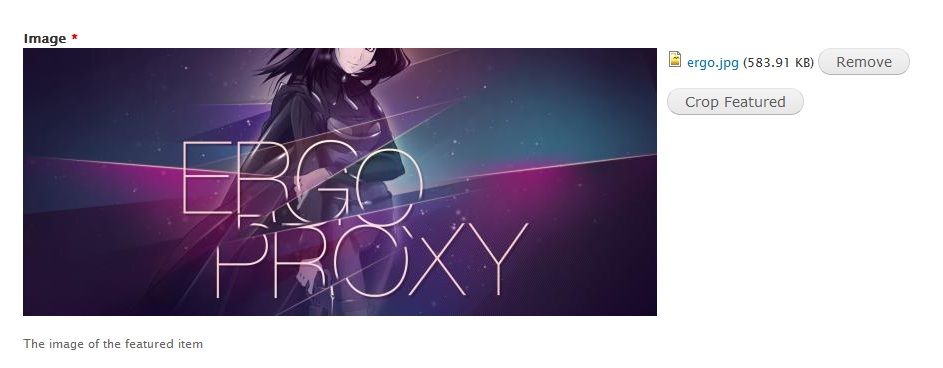
Look at my attachment, and you'll see how practical Imagefield Crop is.
An option to allow inline croping when using a single preset would make Imagefield Crop obsolete.
Comment #3
matthijsI'm not going to implement this soon (because it's a lot of work for only a small benefit), but maybe in a later version... Any more people that would like this?
Comment #4
afeijoI agree with Fidelix! It would be great :)
Comment #5
matthijsI've thought a bit about this and came to the conclusion that it would be a nice feature... So I'll donate some free time to it and hopefully I can release this feature somewhere at the end of September! So be patient :-)
Comment #6
mstrelan commentedMy client would very much like this feature. Thanks Matthijs, your hard work on this module is much appreciated. I've already used it one 1 production site and have 2 more in development. With this feature I feel it will really be the leader above the other alternatives.
Comment #7
matthijsDue to a lack of time I haven't started on this yet, sorry for that. I'll try to get on this as soon as possible, but it might take a while, so please be patient.
Comment #8
matthijsThanks for the patience guys, I've just added a first implementation of inline cropping to the dev version. You should activate it in the widget settings.
Please note that I'm still working on this (together with issue #1314066: Suggested improvements for instant image preview updating), but if you already have some feedback, just let me know!
Comment #9
Fidelix commentedThanks for putting the time into this, Matthijs!
Suggestions:
1. This info:
Makes cropping a little less user friendly. Editors won't ever use that practically. Would be nice if you could remove this or make it an option.
2. It would really be great if we could get an option for getting an instant preview of what we're cropping, just like the imagefield_crop.
3. The most important, in my opinion:
An option (or using this behavior as default would make sense too) for making the cropping widget appear instantly (as soon as the image is uploaded) would be perfect.
Some way making the crop required would be great too...
Do you want me to open separate issues for these feature requests?
Thanks for the great work!
Comment #10
Fidelix commentedIf you apply the first suggestion, you could change these action links into buttons:
Remove selection -> "Discard" or "Remove" or "Cancel"
Save selection -> "Save" or "Apply"
Would make it even more usable...
Comment #11
Fidelix commentedOne more>
When a user sends the image, he will see the "Remove" and "Crop [nameof_the_preset]" (in this case "Crop Featured") buttons.
This makes no sense for most setups.
A simple "Crop Image" or "Crop" string would be more than enough, and much more user friendly.
Comment #12
matthijsHi Fidelix,
Thanks for all your feedback, I'll review and implement your suggestions as soon as possible.
Do you have any suggentions for theming the widget? Or should I keep it simple as it is?
Comment #13
Fidelix commentedNo suggestions regarding theming, Matthijs. Maybe in the coming months (which I'll be using this module on a lot of projects)...
Anyhow, I will try to dive into the code and submit a patch implementing some of the changes I suggested in order to reduce the amount of time you need to work on them.
Comment #14
Fidelix commentedOK, here's a patch with the following changes:
Removes the cropping technical info
As pointed before, it makes cropping less user friendly. No one will ever use that practically (except for developers debugging).
Improves usability of action links
Change the action links into buttons, as well as their labels:
"Remove selection" is now "Cancel"
"Save selection" is now "Apply"
Improves usability of first cropping button
When a user sends the image, he will see the "Remove" and "Crop [nameof_the_preset]" buttons.
This makes no sense for most setups.
A simple "Crop Image" is more than enough, and much more user friendly.
Comment #15
matthijsHi Fidelix,
Thanks for the patch, but I'm not going to apply it because I did these things already. I'm currently working on the crop preview but that's not completely finished so I didn't push anything yet... Sorry for that!
Regards,
Matthijs
Comment #16
Fidelix commentedPlease, ignore this last patch.
The preview stopped working with it. This one fixes that:
Comment #17
Fidelix commentedOh, alright. No problem, Matthijs!
Let me know if there is ANYTHING at all I can do to help.
I was also trying to do the crop preview, and I was able to do it, but it turned out that it was using the image from the preview style, thus, upscaling it. There result is a very poor image quality for the preview.
I guess the original image should be used on the preview, and maybe with some replacement technique, we'd be able to get the original image, overwrite the one that imagecache generates for the preview, and then use it for the preview, using a div with a width/height set based on the preview style size, overflow:hidden and dynamic negative margins based on the crop selection values.
Comment #18
matthijsI just finished working on this, sorry for the insanely long wait. If you have some spare time, give it a test drive and let me know what you think about it...
Comment #19
Fidelix commentedAwesome, thanks Matthijs
Where can I grab the latest copy? Git was latest updated on January 23
Comment #20
matthijsWeird, as you can see on the project home page my last push was about 2 hours ago:
Matthijs - 80 commits
last: 2 hours ago, first: 1 year ago
You can't pull those?
Comment #21
Fidelix commentedNope. I think d.o doesn't sync automatically.
If you could put a tar.gz or zip here so I could test...
Comment #22
matthijsThe dev-version download has been updated by the Drupal packager, you can try it out now.
Comment #23
Fidelix commentedOkay, I have tested the dev version from January 29.
This module is really the best of the kind, and it's only getting better!
All the options work fine, except for the "Crop after upload". This one unfortunately doesn't work yet. Yes, I only have 1 style selected. I assume you only put the option there as a placeholder, as I couldn't find any JS errors or actions being taken after the upload.
Usability Improvements:
1. The "Discard" and "Apply" links could be turned into buttons, just like the "Crop" button. Their current position is good.
2. When the user clicks "Crop", or is taken to the "Crop" action, a default crop boundary should be defined (probably the highest crop size possible respecting the ratio). This helps him understand that this is how he will crop the image, and that he should crop it only if he wants to do so.
These are the 2 last suggestions I have. After these, I think my grandma would crop images with Manual-Crop with no problems!
Comment #24
matthijsThanks for your feedback, I'm glad that's it getting better and not worse :-)
The code to crop after upload can be found in ManualCrop.init(), this function is being invoked by the $(document).ajaxSuccess() implementation at the bottom of manualcrop.js. This works fine in Firefox and Chrome on Windows 7.
What browser are you using? Could you check if the init() function is being executed after a file upload (place an alert in it or so)?
Thanks!
Comment #25
matthijsI just improved the crop-after-upload setting, hopefully it works now. I shall also turn both links into buttons, but can you create a separate issue for the default crop boundary?
Thanks for all your feedback.
Comment #26
matthijsPushed last changes.
Comment #28
phreestilr commentedHm, I'm having trouble with this too. I have "Crop after upload" checked and only one cropping style available, but the cropping tool doesn't open on upload of an image. Any ideas?
Thanks so much!
Comment #29
matthijsTake a look at #1564128-1: Crop after upload not working, if you could do this to it would be really helpful. You may post additional feedback in that issue.