Closed (won't fix)
Project:
Drupal.org security advisory coverage applications
Component:
module
Priority:
Normal
Category:
Task
Assigned:
Unassigned
Reporter:
Created:
15 Jul 2011 at 16:19 UTC
Updated:
15 Dec 2012 at 11:37 UTC


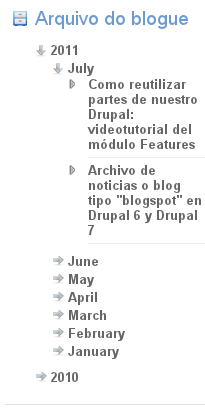
The Cronologic archive block is a very simple module that improve the archive module by adding a cronologic archive block. That's basicly a 3 levels unordered list: years, months and posts, with links to the archive pages and to the posts.
dependencies:
The user interface is improved with the jquery_menu style, but since the necesary js and css are included, no jquery_menu module is required.
| Comment | File | Size | Author |
|---|---|---|---|
| cronologic_archive_block.png | 12.67 KB | akalam |

Comments
Comment #1
Milena commentedHi,
I'm really unexperienced with reviewing modules, but I hope I will be able to help a little.
First of all - run your module through Coder module (with "minor (most)" option checked). You have some problem with spaces. Please, read Coding best practices.
What's more - when I tried to use archive module and your module on fresh drupal installation i've got an fatal error (http://drupal.org/node/1238706) I know that is not your module, I'm just mentioning.
In your arrays you have following code:
Place a comma after each of last elements, reffering to http://drupal.org/node/318#array
You have some strange structures in your code:
There are theme functions for creating lists or links. Use them instead of writing an HTML code yourself.
There is a theme for creating menu items also.
They are listed on documentation page: http://api.drupal.org/api/drupal/includes--theme.inc/7
If you want to find a function to create links search for l() function.
Using API Functions allows people to use something they know, they do not have to learn new HTML classes and HTML structures. They can style all left menus with the same style rules if they want to. And in my opinion it should stay that way.
Two of your files are:
hook_block_view() always prepares the content. Documentation is good, but better not to write obvious lines. Of course it is not an error or a bug.
You have css for choosing the right element and add background. There is no need to put an empty element. You've also used the same classes on li element. Use background-position and repeat property for li element instead of span.
Your image - controls.png has white background. It looks bad on default drupal 7 theme. Transparent background would be better.
In my opinion it will be better if your .js and .css files have cronologic_archive_block prefix. But I can't find anything about it, so it is probably my imagination rather than naming standard.
I know some of these are really minor, but some other should be fixes, for instance coding standards.
Comment #2
Milena commentedSorry, I forgot about status.
Comment #3
misc commentedThe applicant has been contacted to ask if the application is abandoned.
Comment #4
akalam commentedSorry, I had a lot of work for last months, I'll try to make this work this week
Comment #5
misc commentedThe applicant has again been contacted to ask if the application is abandoned.
Comment #6
akalam commentedSorry for being so late. I think I solved everything. Could you cheack it?
I'm waiting for your answer!
Thank you in advance
Comment #7
Milena commentedHello desarrollo2.0
.css file
Style attributes should be ordered alphabetically - http://drupal.org/node/302199
You have also wrong intendation in a few lines.
These are not blockers, but you should correct it.
.module file
while ($node = $result->fetchObject() )Consider using foreach instead of while.
http://drupal.org/node/1251174
Probably you should also use theme function instead of
Line 54:
//Remove it.
.js file
Remove // $Id: jquerymenu.js,v 1.7 2010/05/05 07:50:55 aaronhawkins Exp $
Remove any commented code from your file.
Automatic review
It appears you are working in the "master" branch in git. You should really be working in a version specific branch. The most direct documentation on this is Moving from a master branch to a version branch.
Fix also the issues mentioned on http://ventral.org/pareview/httpgitdrupalorgsandboxdesarrollo201219826git
I do not see any major bugs (checking http://drupal.org/node/45111 page) so I'm setting RTBC status.
I'm not experienced enough in reviewing process so if anyone thinks that is should have needs work status feel free to change.
Comment #8
Milena commentedComment #9
akalam commentedI fixed most of the issues, also the automatic review ones. I created the 7.x-1.x branch and deleted the master branch.
With the thing, I'm not sure if I must to create a custom theme function, since this span should have this classes to work property with the js file, and the styles can be easly overwritten in a custom theme for showing diferent arrows, for example.
If you think that this must be fixed, feel free to comment
Comment #10
Milena commentedAs this issue was marked as RTBC I do not think that is it necessary.
But I believe some users would like to have their own scripts for your module. Of course they can unbind your events and add their own, but with just removing classes it would be easier.
Of course you are risking that some unexperienced themer will do some harm to the module.
It is really up to you, thats why i set RTBC :)
Your explanation looks good enough for me. What's more I'm still pretty new in reviewing modules, so I believe some of my comments and advices are just wrong ;)
Comment #11
akalam commentedOK, thanks for all
Comment #12
klausiComment #13
klausiThis sounds like it could go directly into the archive module, right? Fragmentation and duplication is a big problem on drupal.org. Please open an issue in the the queue of archive module and get in contact with the maintainer. If you can successfully add the feature to it please close this issue, otherwise set it back to needs review if that was rejected for whatever reason.
Comment #14
klausiClosing due to lack of activity. Feel free to reopen if you are still working on this application.