

 The 2026 Drupal Business Survey is open. Your response will help shape the future of the Drupal business ecosystem.
First off I love this theme. The way it looks and everything. My problem is that I started using the Amazon Store module and it aligns the item description right next to the purchase box. When I use Bartik, it aligns correctly. When I use this theme, it puts the Item description at the top to the left (where it should be) then it puts the purchase box to the right, but below it. I believe this can be solved if I can put the theme into a 2 column layout. But how?
Edit: I didn't mean to assign this to me. Sorry.
| Comment | File | Size | Author |
|---|---|---|---|
| #5 | dmgames.jpg | 268.7 KB | gtsopour |
| #2 | correct.png | 233.85 KB | dmgames |
| #2 | incorrect.png | 97.59 KB | dmgames |



Comments
Comment #1
dmgames commentedComment #2
dmgames commentedComment #3
gtsopour commentedHello dmgames
is your Drupal installation with CorporateClean theme live? I would like to see the final html/css output with Firebug.
Thanks
/George
Comment #4
dmgames commentedYes it is live: http://www.dmgamesonline.com
Comment #5
gtsopour commentedHello dmgames
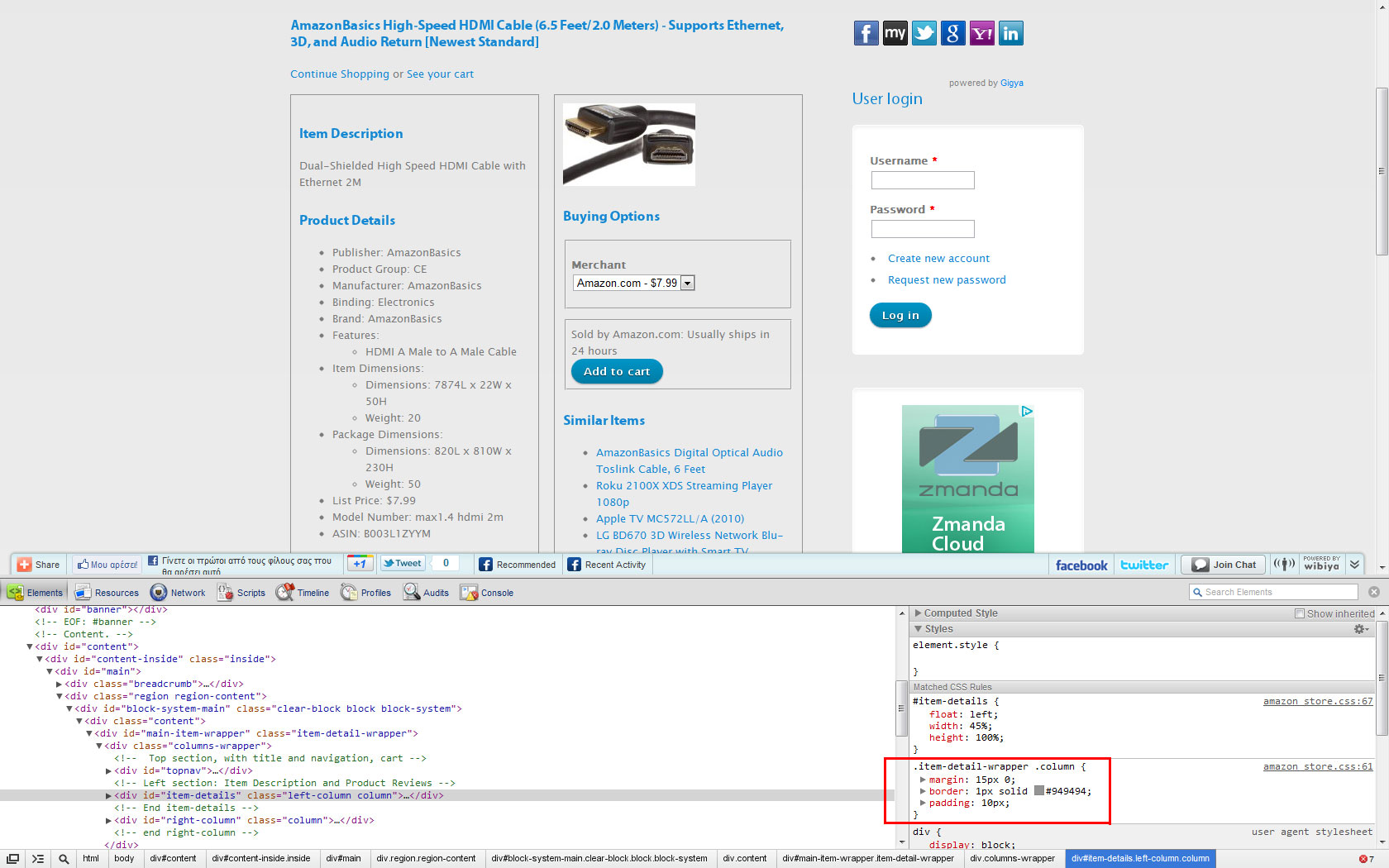
This seems to be caused by the style rules of amazon_store.css ("http://www.dmgamesonline.com/web/sites/all/modules/amazon_store/amazon_s...") in conjunction with available CorporateClean theme column space. The amazon_store.css is loaded/imported by the amazon_store module.
I worked a little with your issue and I noticed that the amazon_store.css imported to head before the default style.css of CorporateClean theme. So you could override the amazon_store.css styles.
I suggest you the following override. Just put the following code at the bottom of CorporateClean style.css (see also attached image dmgames.jpg).
Thanks
/George
Comment #6
dmgames commentedThank you so much! You have no idea how much that helped me out! I <3 this theme.
Comment #7
sergy_dot commentedHello Guys,
I'm using Drupal 7.8 and CorporateClean 7.x-1.3.
I tried to overwrite .item-detail-wrapper .column as gtsopour suggested. This didn't work for me. Any clues how could I make 2-column layout at my page?
Unfortunately, my page is still offline.
Thanks
Chris
Comment #8
alexandreracine commentedIs this corrected in the latest version? Let us know if not. Closing for now.
Comment #8.0
alexandreracine commentedEdit to OP