

Closed (fixed)
Project:
Lightweight Directory Access Protocol
Version:
7.x-1.x-dev
Component:
Code
Priority:
Major
Category:
Bug report
Assigned:
Issue tags:
Reporter:
Created:
20 Jul 2011 at 19:19 UTC
Updated:
28 May 2012 at 01:57 UTC
Jump to comment: Most recent file



Comments
Comment #1
cpierce commentedLooking at the log i recieve this error message. When it tries looking up to create/assign the role.
LDAP ldap_search error. basedn: CN=Intranet Drivers,OU=Security Groups,DC=fubar,DC=com, filter: member=CN=Doe\, John,OU=InformationTechnology,OU=CITYNAME,DC=fubar,DC=com, attributes: Array ( [0] => cn ) , errmsg: Bad search filter, ldap err no: -7,
Hope someone can lead me in the right direction. Thanks in advance.
Comment #2
cpierce commentedComment #3
johnbarclay commentedMy guess is the "Doe\, John" part is causing the problem. I'm working on a fix for this bug and should have it up shortly.
Comment #4
johnbarclay commentedThe fix for this is in head of 7.x-1.x. The only change was around link 338 of ldap_authorization.inc
- $pairs = explode(',', $user_ldap_entry['dn']);
+ $pairs = ldap_explode_dn($user_ldap_entry['dn'], 0);
+ $count = array_shift($pairs);
By exploding on "," the escaped \, was not being dealt with correctly.
Please let me know if this fixes the issue.
Comment #5
johnbarclay commentedComment #6
cpierce commentedThank you for your response! It's greatly appreciated.
LDAP ldap_search error. basedn: dc=COMPANY,dc=com, filter: member=CN=DOE\, JOHN,OU=InformationTechnology,OU=TOWNNAME,DC=COMPANY,DC=com, attributes: Array ( [0] => cn ) , errmsg: Bad search filter, ldap err no: -7,
Still same error message. It does have something to do with the "\," because I created a user without a "," in the full name and it worked perfect mapping the correct role to that user. The only problem is my whole company uses the format: Last, First. I removed line 338 and inserted the two lines with no luck. Do I need to uninstall/install the module for this to work?
Comment #7
johnbarclay commentedI found another related bug that may help. I pushed the fix and related simpletests to head.
In ldap_authorization.inc, the following
was replaced with:
I believe the replacing of the \\2C (escaped comma) needs to be added in stategy 1 around line 341 also because the ldap_explode_dn() function returns the commas escaped. I'll look at that and write a simpletest for it later.
Comment #8
cpierce commentedStill have the same issue. I'm actually using strategy 3 groups as entries. Does strategy 1 still get executed?
Comment #9
johnbarclay commentedBack to comment 1.
I believe the filter:
member=CN=Doe\, John,OU=InformationTechnology,OU=CITYNAME,DC=fubar,DC=com
should be:
(member="CN=Doe\, John,OU=InformationTechnology,OU=CITYNAME,DC=fubar,DC=com")
The changes are in head and were in ldap_authorization.inc from:
to:
This is where the mock framework for the simpletests break down. This has to be tested on a real server as the mock framework can't represent the way an ldap server will treat quoted and escaped strings.
I also added some logging in the ldap query when detailed ldap logging is enabled to help debug such things. One concern I have I don't know how a case such as cn="Doe\, John...." is dealt with by ldap servers. Should the comma still be escaped or not when its quoted.
Please try and let us know.
Comment #10
cpierce commentedNo luck with that either.
Manual Query to AD:
member=CN=Doe\, John,OU=InformationTechnology,OU=CITYNAME,DC=fubar,DC=com
This works fine when I do a custom search. The results are all of the groups the user is a member of which is what I'm trying to get. Something in the query isn't right. Watchdog shows a comma after "DC=fubar,DC=com," in the log. I'm not sure if that is getting passed to AD or not.
LDAP ldap_search error. basedn: dc=dtlinc,dc=com, filter: member=CN=DOE\, JOHN,OU=InformationTechnology,OU=CITYNAME,DC=fubar,DC=com, attributes: Array ( ) , errmsg: Bad search filter, ldap err no: -7,
Thanks for your help!
Comment #11
cpierce commentedIs it possible the attributes is messing up the query?? I'm not trying to search by attribute so is it required?
Comment #12
johnbarclay commentedthe query should be:
(member="CN=Pierce\, Chris,OU=InformationTechnology,OU=FTDODGE,DC=dtlinc,DC=com")
So the bad query must be coming from line 317 of ldapServer.class.php which is the only place we haven't quoted the filter values.
should change to:
(this is in head)
When you turn on detailed ldap logging on the main ldap config page, what do the query logs look like? This should show what the filter string looks like before it goes into the ldap function.
Comment #13
johnbarclay commentedthe error your getting is the filter syntax, so I don't think this will help. But to debug that go with the following which will return all attributes, but will not try to use the cn.
Comment #14
cpierce commentedAfter that change it doesn't allow me to log in. It fails to bind to the server.
Comment #15
cpierce commentedIt still shows: ",attributes: Array ( )" after the user DN. How can I remove it from the filter?
Comment #16
cpierce commentedAlso the error type is listed as LDAP and not LDAP authorization....
Comment #17
johnbarclay commentedchange line 239 of ldapServe.class.php
from
function search($base_dn = NULL, $filter, $attributes = array(), $attrsonly = 0, $sizelimit = 0, $timelimit = 0, $deref = LDAP_DEREF_NEVER) {
to
function search($base_dn = NULL, $filter, $attributes = NULL, $attrsonly = 0, $sizelimit = 0, $timelimit = 0, $deref = LDAP_DEREF_NEVER) {
Comment #18
cpierce commentedWith that change it binds fine with the server but says incorrect username or password. The logs are still saying the same thing.
Comment #19
johnbarclay commentedI ended up taking the quotes out of the filter. It was causing a problem in test cases. The filter should now be:
(member=CN=Pierce\, Chris,OU=InformationTechnology,OU=FTDODGE,DC=dtlinc,DC=com)
Comment #20
cpierce commentedThanks for the reply John! Still no luck with it though. I've been doing some research and it looks like the backslash needs to be escaped?
This site says that you need to replace a backslash with: \5c
I'm not sure how I would accomplish this or if it is right at all.
http://msdn.microsoft.com/en-us/library/aa746475%28v=vs.85%29.aspx
Thank you for your help
Comment #21
mfulz commentedHi,
I've searched since yesterday on an issue I had with Authentication and Authorization, which is now some kind messed up.
For the information (it's somehow related to this thread, because it's related to the quotation):
Yesterday evening I installed the last ldap package and it had in "LdapServer.class.php":
$filter = '('. $this->user_attr . '="' . $ldap_username . '")';
which needs to be:
$filter = '('. $this->user_attr . '=' . $ldap_username . ')';
This is already fixed in the actual dev release, but for the filter in the "ldap_authorization.inc", it is still:
$filter = '(' . $consumer_conf->deriveFromEntryAttr . '="' . $user_ldap_entry['dn'] . '")';
which needs to be:
$filter = '(' . $consumer_conf->deriveFromEntryAttr . '=' . $user_ldap_entry['dn'] . ')';
Further even if by using 2.C (group configuration) in the authorization plugin, I cannot use the dn of my "groupOfNames", instead I need to use only the cn for the plugin to work.
My ldap entry for groupOfNames is:
# test, drupal, olznet.de
dn: cn=test,ou=drupal,dc=olznet,dc=de
objectClass: groupOfNames
cn: test
member: uid=mfulz,ou=users,dc=olznet,dc=de
The mapping in 3 is set to:
test|basic
with:
cn=test,ou=drupal,dc=olznet,dc=de
which should be used (suggested by the help) its not working.
So perhaps the thread creator here, has the same problem?
Comment #22
cpierce commentedThis is still not working with the newest release. If anyone else has any suggestions that would be great.
Thank you!
Comment #23
johnbarclay commentedI applied this to head. This would have affected those using stategy 3 (or C), group as entries.
Comment #24
cpierce commentedIn drupal 6 the module works perfect. The answer has to be in this file. Something is not getting filtered right somewhere or a query is wrong. I wish I had the know how to pin point this. If anyone can shed any light it would be greatly appreciated.
Thank you!
Attached is the file from the LDAP drupal 6 module. It works fine so I dont know what is getting done different but it has to show in this file.
Comment #25
cpierce commentedAnyone out there?
Comment #26
johnbarclay commentedD7 stable release blocker
Comment #27
cpierce commentedI have the latest beta release installed with no luck. I'm still getting the LDAP search error. It says the filter is bad.
Comment #28
mkadin commentedI've discovered that the article linked to by cpierce in #20 has the solution. Just solved our problem. Patch attached. I wonder if this has only applies to AD and not LDAP stuff in general? And I wonder if this is the best place to do the replacement?
cpierce, you can add this line of code before line 280 of ldap_servers/LdapServer.class.php
$filter = str_replace("\\","\\5c",$filter);so the final code should look like:
Comment #29
cpierce commentedGreat that did the trick!!!
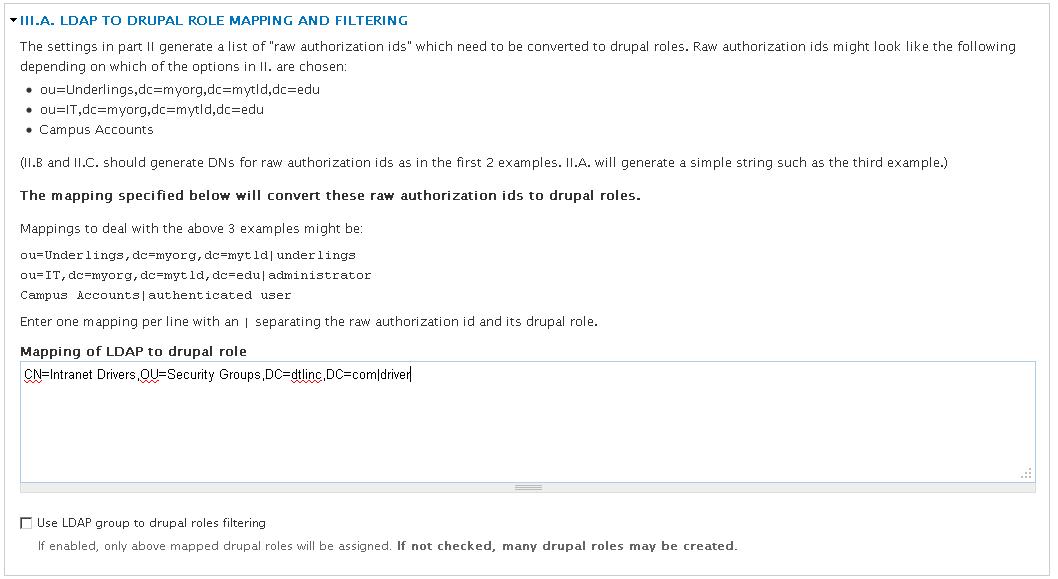
One more problem. When I specify groups to create roles from it doesn't work at all.
When I uncheck the box (shown in attachment) it works just fine bu creates unnecessary roles.
Comment #30
cpierce commentedNevermind. Rather than using the DN to map the group to the Drupal Role it is just the name:
Intranet Driver|driver
rather than
CN=Intranet Drivers,OU=Security Groups,DC=dtlinc,DC=com|driver
You guys rock!! Thanks for your help
Comment #32
jrsinclair commentedI can confirm that #28 got things working for me. Could we have it rolled into a release?
Comment #33
johnbarclay commentedI think this could be applied. It definately seems to help AD implementations. Can anyone confirm it doesn't break non AD implementations? Or should I only apply it if the server type is set to Active Directory?
Comment #34
johnbarclay commentedthis is in 7.x-1.x and 7.x-2.x now.
Comment #36
jrsinclair commentedMany thanks, this module makes building intranets on Drupal so much easier. It allows us to say, "Yes, Drupal will 'integrate' with your AD server just fine".