Closed (fixed)
Project:
Drupal core
Component:
file system
Priority:
Critical
Category:
Bug report
Assigned:
Unassigned
Reporter:
Created:
29 Oct 2004 at 09:37 UTC
Updated:
10 Oct 2005 at 03:40 UTC
Jump to comment: Most recent file


The private downloads are not working properly..
How to reproduce:
Goto 'http://www.your-site.com/admin/settings' and set the 'Download method' to 'Private - files are transferred by Drupal'. Now, you make a new item (blog/story/page/poll, whatever) and upload an image.
You should use this image inside your post, by doing an ' ' inside your post, where $path is the url which is given in the 'Attachments' form-group on the submission page. (Something like 'system/files?file=$yourfile.ext')
Then click 'Preview' and do not submit the node!
Now, have a look what we see..
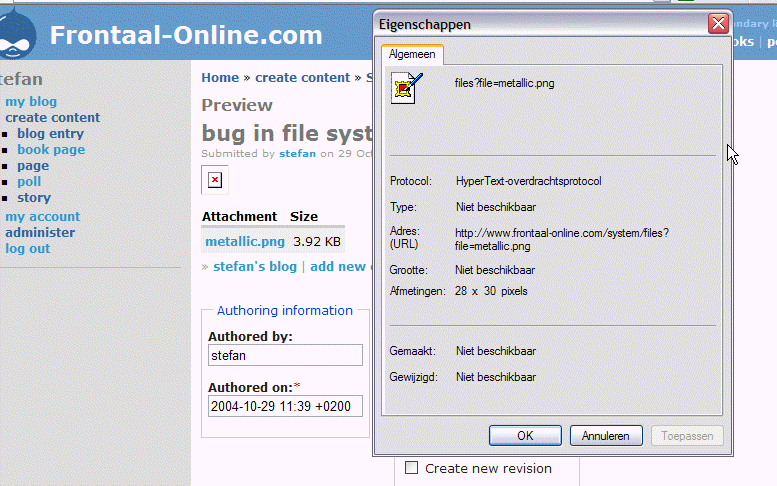
We see that the image inside the post isn't displayed properly. The image is broken. If we ask the properties of the image it points to the right location ('system/files?file=$yourfile.ext'), but isn't displayed.
If we take a look at the properties of the table under the node (attached files table with 'Attachement', and 'List') we see that the attachment is pointing to something like 'http://www.frontaal-online.com/$file-system-path/$yourfile.ext' instead of the private download url..
I'm not sure how to fix this, but I think it's a bug inside function file_create_url() which could be found inside file.inc.
| Comment | File | Size | Author |
|---|---|---|---|
| #6 | upload-4-5.patch | 1.36 KB | walkah |
| #5 | upload-private-files.patch | 1.88 KB | walkah |
| #3 | properties-of-metallic-link-in-attachments-table-under-node.png | 53.52 KB | Stefan Nagtegaal |
| #2 | node-preview-and-image-properties.png | 78.18 KB | Stefan Nagtegaal |
| #1 | upload-and-body.png | 19.87 KB | Stefan Nagtegaal |



Comments
Comment #1
Stefan Nagtegaal commentedScreenshot after upload en filling in the body.form
Comment #2
Stefan Nagtegaal commentedNow we are previewing the node with a broken image in it.. See the properties of the image, which points to another location as the 'metallic.png' hyperlink inside the 'Attachment'-table under the node preview.
Comment #3
Stefan Nagtegaal commentedThe properties of the 'metallic.png'-link inside the table under the node preview differs from where the source points us to.. The url inside the table works, (which is the same as in public_dowloads), but the url inside the body isn't...
Comment #4
Stefan Nagtegaal commentedThis bug is also appearing inside drupal 4.5...
Comment #5
walkah commentedhere's a small patch to fix. basically the custom url rewriting (for when files haven't been yet saved to their final location) wasn't taking into account FILE_DOWNLOADS_PRIVATE. this fixes that
(oh, and it also fixes an sql error in upload_download as well).
Comment #6
walkah commentedhere's a version for 4.5 as well ... (where the SQL wasn't broken).
Comment #7
Steven commentedIsn't that SQL 'error' there to make query rewriting work?
Comment #8
Steven commentedBy the way, I still think we should alter the autop filter so it uses & rather than making this one use a numbered entity. 'amp' is the most common notation out there, and it's shorter too.
Comment #9
killes@www.drop.org commentedDoesn't apply anymore. Is this still an issue?
Comment #10
moshe weitzman commentedthis one is marked critical. Walkah, Stefan - please comment on whether this is still a bug.
Comment #11
shane birley commentedThis might point some people in the correct direction. It isn't completely the same issue, but related, I would think and might need to be fixed prior.
http://drupal.org/node/17364
Comment #12
Stefan Nagtegaal commentedThis is still an issue in 4.6 RC and can still be reproduced by follwing exactly what I propose above..
While this is a longstanding bug, and with drupal 4.6 I'll changed status to patch.. Maybe some other people ould have a look at this?
Comment #13
chx commentedThis is the link for the file:
and file_create_url
basically, the preview link and the final link is very, very differnt in private case: if it's a preview (no fid) you get a URL without a query unlike in the final stage. To say the least, it's not trivial to fix.
As Dries said: private file downloads need to be rewritten.
Comment #14
dries commentedOn a related note yet slightly off-topic, someone I know is looking into using Drupal for a high-traffic site. They'll have at least 5 front-end servers running Drupal on top of a single database. Most of their users use avatars and they wonder how to go about this. If user A uploads his avatar to server 1, it must become immediately visible on all 5 servers. Using rsync did not sound like a solution, as the other servers would have spawned a lot of 404s by the time the avatars are synced. The obvious solution is to store the avatars in the database, but Drupal doesn't allow this and if it would, it would have a significant performance impact given there are pages with 100+ avatars.
As it stands Drupal is pretty much written for single-server machines. But as bigger projects adopt Drupal, with more complex setups, efficient file handling/uploading might become an issue. It might be a good idea to think this true a little while rewriting parts of file.inc.
It's an interesting problem so that should be fun. ;-)
Comment #15
killes@www.drop.org commentedI've just uplaoded an image (using image.module) to a 4.6.2 site and there was a thumbnail shown on the preview . I suppose this got somehow fixed.
Comment #16
(not verified) commentedComment #17
(not verified) commentedComment #18
(not verified) commentedComment #19
(not verified) commentedComment #20
(not verified) commented