

Closed (works as designed)
Project:
Secure Pages
Version:
6.x-1.9
Component:
Miscellaneous
Priority:
Normal
Category:
Support request
Assigned:
Unassigned
Reporter:
Created:
24 Jul 2011 at 17:33 UTC
Updated:
28 Mar 2012 at 16:11 UTC
Jump to comment: Most recent file

Comments
Comment #1
grendzy commentedI haven't been able to reproduce this - Chrome works fine for me.
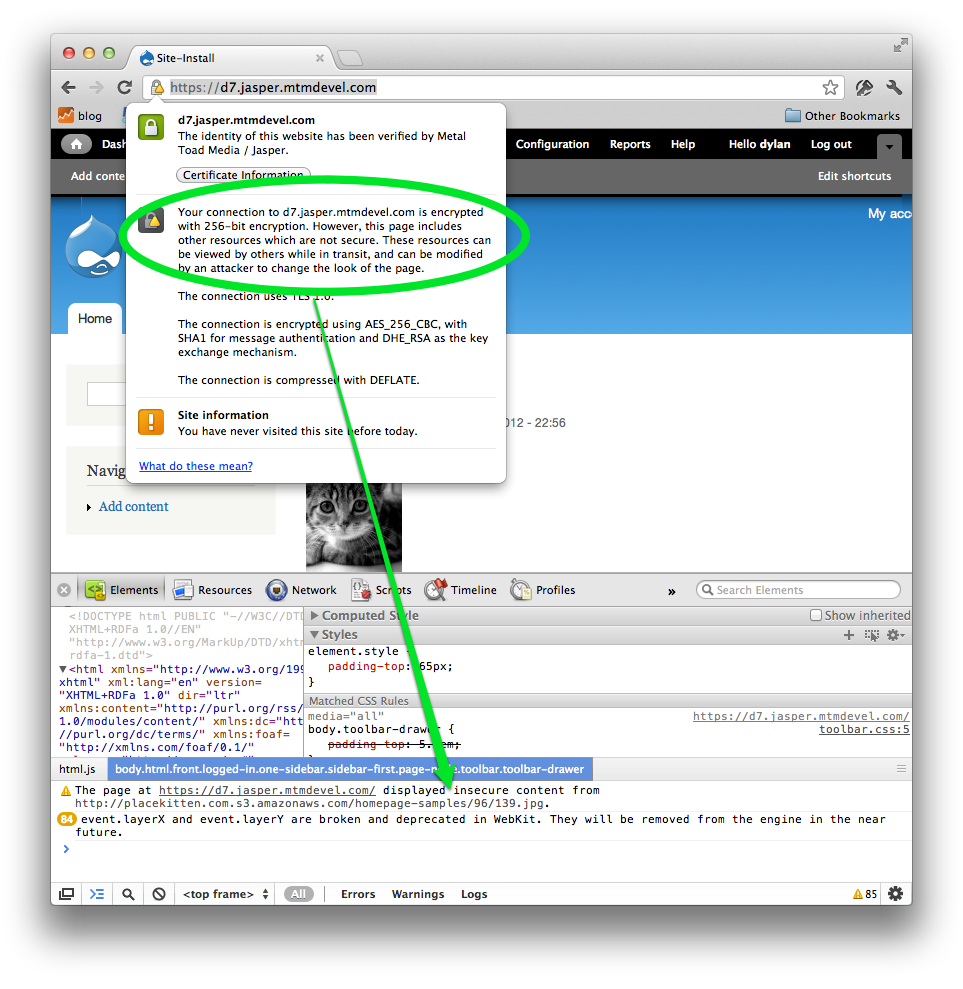
You can get a list of insecure resources by checking Chrome's error log under View -> Developer -> Developer Tools.
Comment #2
eeyorrI'm seeing the "includes resources that are not secure" issue in Chrome, as well. This appears to be more of a Chrome issue. Apparently, Chrome throws that warning whenever a secure page serves a resource from a non-secure address. So an image served by an http address could cause this. In my case, my non-secure domain is the same as my secure domain. So http://example.com/catalog gets redirected to https://example.com/catalog. In looking at Chrome's resource list, I see that both url's are listed. The http address is listed as a 302 redirect, so I guess Chrome considers that a security breach.
Edit: Updating to Chrome 13 fixed my problem.
Comment #3
grendzy commentedGlad to hear that Chrome 13 improves the situation. Anyway, mixed content problems can be caused by many things and is beyond the scope of securepages.
Comment #4
thedavidmeister commentedI'm having the same problems with no "mixed content". Just getting a lock with a cross in it that I don't see in other browsers.
Comment #5
grendzy commentedClicking the lock icon in chrome will give a more detailed explanation of the icon. Opening the error console will show even more details. Here's an example of what this looks like when I intentionally added an insecure image to a page body: