Active
Project:
Maestro
Version:
7.x-1.x-dev
Component:
User interface
Priority:
Normal
Category:
Feature request
Assigned:
Unassigned
Reporter:
Created:
4 Aug 2011 at 10:51 UTC
Updated:
27 Oct 2011 at 00:42 UTC


I don't know if this is a bug or a feature.
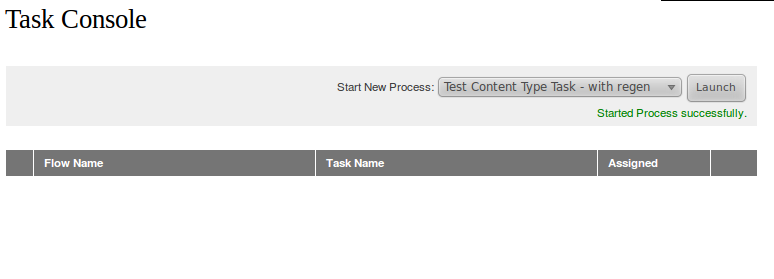
When a new process is launched a message says that a it has been started (Started Process successfully). When the first task has the initiator as assignee the new created task is not shown until you refresh/reenter into the console. This is confusing for user who uses to click the launch button creating a new process. The new created task could (should?) be shown.
Proved with FireFox 5, Chromium 12.0 and Epiphany 2.30.
| Comment | File | Size | Author |
|---|---|---|---|
| new-process.png | 14.09 KB | slerby |

Comments
Comment #1
aron novakThis is clearly a feature that things are not real-time here, the orchestrator or the reload of task console can trigger the exeuction of the queue. (AFAIK).
Maybe if maestro would visualize the content of a queue in a basic way, it would be helpful for the users.
Comment #2
jurgenr commentedI've experienced the same problem yesterday.
Until this is featured I've worked my way around with some jQuery.
(Had to set a Timeout because if not an error returned)
Comment #3
_randy commentedRefreshing the task console on process start from the drop down makes the assumption that the person starting the process is indeed the one who would get the first executable task.
I have not found this to be the case in many workflows.
To complicate matters, the first human executable task may not be the task right after the "Start" placeholder in the Maestro workflow. A refresh of the task console would not necessarily do any good for those flows. To further complicate matters, having the orchestrator execute through the task console refresh is great for testing, but not advisable for production.
Comment #4
jurgenr commentedFirst of all, I appreciate your fast answer!
Ok I understand what you are saying.
But I have a situation where the person starting the process is actually the one performing the first task.
So he wants to start his task right after clicking on launch.
Say, as documented in the readme.txt working with the orchestrator running every lets say 10 minutes, worst case he has to wait 10 minutes to start the task.
This is an expensive delay.
So are there any other possibilities and what are the risks using the task console refresh?
Comment #5
_randy commentedThere is another thread in the issue list about how to run the orchestrator manually.
The issue is that if your manually-run instance of the orchestrator runs at the same time as the scheduled orchestrator runs, you may get duplications.
If your first task is something like a content type task, i would suggest you use a rule or trigger/action to kick off a flow.
Comment #6
slerby commentedCan you post an example code, please?
Thx
Comment #7
kokaku commentedThis is confusing for a non-tech user who might be the first person in the workflow. For example, create new X which will then be passed along to a reviewer before being published. Yes, it's easy enough to say 'refresh the page to see the new workflow', but it's not user friendly at all.