

Closed (cannot reproduce)
Project:
Administration Language
Version:
7.x-1.x-dev
Component:
Code
Priority:
Normal
Category:
Bug report
Assigned:
Reporter:
Created:
6 Aug 2011 at 15:10 UTC
Updated:
20 Feb 2013 at 11:08 UTC
Jump to comment: Most recent file


Comments
Comment #1
ataimist commentedProbably related: I get the same for the admin user with the proper permissions (Select administration language & Use all enabled languages) with Hide administration language on user form disabled.
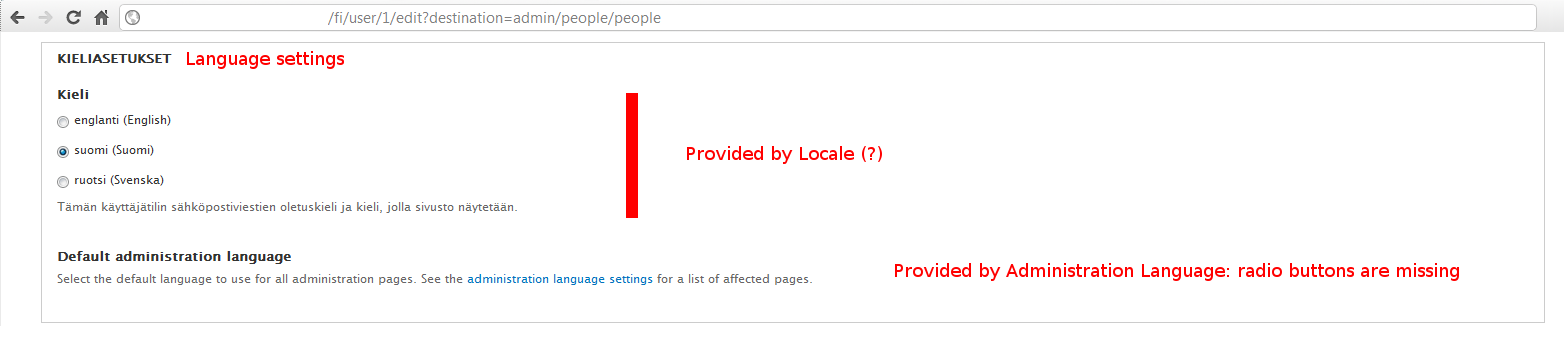
LarsKramer, is the fieldset completely empty? I get the Language radio buttons (defined by Locale, I think?) and the title and description defined by admin language ("Default administration language" and "Select the default language to use ...", respectively), but none of its radio buttons.
Comment #2
LarsKramer commentedCan you attach a screen capture?
Comment #3
ataimist commentedHere's the relevant part. This is from user/1/edit.
Comment #4
LarsKramer commentedThis is how it is supposed to look I think. I have the same screen, but if you have only two languages in total, and enable the option "Hide administration language on user form", you will get a completely empty form like i the attached image. "Sprogindstillinger" is Danish for Language settings :-)
Comment #5
ataimist commentedNo, I think it's supposed to display a bunch of radio buttons between the title ("Default administration language", in bold) and the description - otherwise, the whole thing is kind of pointless, since you can't actually SELECT the default administration language anywhere (except on a global scale in the language list, but the whole point of displaying that option in user settings is to allow per-user configuration) ;) Also, it defines a bunch of radio buttons in the code, but they never get printed for some reason.
I still think the problems are related, however - this probably has something to do with the whole 'remove current default administration language from the list' function thingamajig in the code. Maybe everything gets removed by accident or something :)
Still, funny how the entire fieldset is empty for you - are you sure the core Locale module is enabled? I can't see why (or how, or where) admin language would clear stuff defined by another module :o
Comment #6
LarsKramer commentedYou should be able to reproduce this bug (as a normal user without admin language permission) if you disable one of your three languages, only leaving admin and one more, and select Hide administration language on user form".
The thing is local.module doesn't display the language settings if there is only one language to choose from, which makes sense. But since there are two languages of which one is "hidden", an empy fieldset shows up instead.
I do agree with you that it is not of much use without an extra set of radio buttons for admin language, for a discussion of this topic see #1239204: Use preferred language on per-user basis instead of global setting.
Comment #7
ataimist commentedYes, I can confirm this bug - following your instructions resulted in a empty Language settings fieldset.
I'm already following that other issue, as I'm the one who initially reported it ;)
Comment #8
LarsKramer commented@ataimist: Right, sorry I didn't notice. In fact, from your initial proposal in that issue ("Use the user's own preferred language (from user settings)") I interpreted that you were referring to the already existing language preference, not a new one. And I guess wulff draw the same conclusion.
Comment #9
fuzzy76 commentedSubscribing, seeing this in 6.x-1.x-dev
Comment #10
wulff commentedI have committed a few changes to the 6.x and 7.x versions. Administration language selection has been moved to a separate fieldset to make it easy to hide the standard language selection fieldset if no options are available.
Please test the new snapshots when they become available.
Comment #11
wulff commentedThis seems to work as intended in the 7.x version. Marking as closed for now.