

 Come together with the global Drupal community in Rotterdam, 28 Sept – 1 Oct 2026. Sessions, contribution, connection, and Early Bird savings until 8 June.
Hello,
I'm pretty new with drupal and not sure whether this is a problem of kcfinder, ckeditor or me. I installed ckeditor and kcfinder together with wysiwyg in my local installation and it works fine. Now I uploaded the local installation to an internet server and I have problems with the upload path. Like in my local installation „sites/default/files/kcfinder“ is configured as „Upload path URL “ in the kcfinder configuration. But the images are uploaded to sites/all/modules/kcfinder/kcfinder_files/... . I'm using the upload tab in the editor popup for uploading my images. The Image info tab afterwards shows me the URL /images/ and my image was not found. After clicking on the Browse Server button I can see the uploaded image. But after choosing it and coming back to the Image info tab the displayed value in the URL field is now a absolute URL http:///images/ and the image is not included in the preview. I can't see a problem in the file path to sites/default/files/kcfinder.
Can you tell me under which conditions kcfinder uses the different upload path sites/all/modules/kcfinder/kcfinder_files/...?
I had the same problem with kcfinder-7.x-1.82.
| Comment | File | Size | Author |
|---|---|---|---|
| #6 | KCfinder.PNG | 19.93 KB | tompri |


Comments
Comment #1
Carol11 commentedHello,
during the installation of the newest version 7.x-1.83 the directory sites/all/modules/kcfinder_files was removed and uploading files ist not possible.
Comment #2
Carol11 commentedComment #3
danyalejandro commentedPlease wait a couple of days. The KCFinder library project will publish a new release with some integration adaptations so we can make it a separate download... The releases will be activated by then, and a new version of this module will be published.
Comment #4
danyalejandro commentedNew version is out! please delete old one, uninstall, and install this new one. Remember to download KCFinder files separately!
Comment #5
danyalejandro commentedComment #6
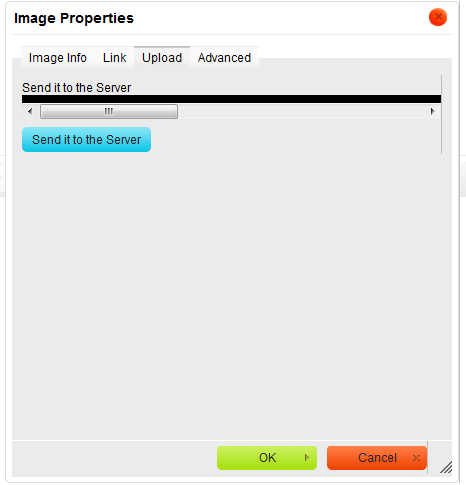
tompri commentedWhen I click on Send it to server button (in image Properties window) I see a long narrow black line with a scroll bar. Clicking on OK I receive the message - image source URL missing. Am using KCfinder 2.5, CKeditor 3.6.1, latest Dev WYSIWYG, Drupal 7.7. Library path = /sites/libraries/kcfinder-2.5 (I also tried kcfinder). Upload path = /sites/default/files/kcfinder (the folder is there). Any thoughts?
Comment #7
danyalejandro commentedtechietom: Could you try to put the library inside "sites/all/libraries" and rename the folder to "kcfinder"? What result do you get? Can you normally browse images with other methods?
Comment #8
tompri commentedMake requested changes. Now get "Don't have permission to upload files".
Comment #9
danyalejandro commentedtechietom: Did you assign the "KCFinder access" permission properly?
Comment #10
tompri commented"KCFinder access" checked for admin and authenticated user.
Comment #11
danyalejandro commentedplease upload a screenshot of the whole window when the error happens...
Comment #12
tompri commenteddanyalejandro: Problem solved. Path to library was incorrect. Incorrect path was http://. Correct path is http://www.
Module appears to be working as advertized. Thank you for your time and help.
Comment #13
danyalejandro commentedIm glad to hear that :) closing this issue. Please open a new one if you find any problems.