

Closed (outdated)
Project:
Content Access
Version:
6.x-1.2
Component:
User interface
Priority:
Normal
Category:
Task
Assigned:
Unassigned
Issue tags:
Reporter:
Created:
9 Aug 2011 at 15:48 UTC
Updated:
24 May 2020 at 14:00 UTC
Jump to comment: Most recent, Most recent file


Comments
Comment #1
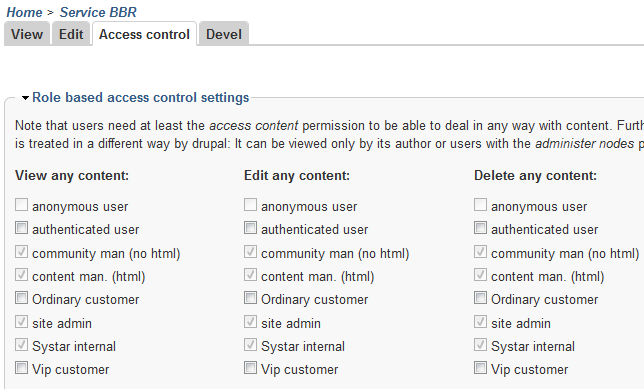
IreneKraus commentedI have the same issue, but in my case Content Permissions is allowing roles who are NOT given permissions to edit or delete content that permission. Or so it appears so when viewing the access controls section for a given type of content. This is a very serious issue as those in those roles are not supposed to have such control!
Comment #2
francis55 commentedI managed to solve my problem.
The options were checked because I had in the permissions page (admin/user/permissions) I had permissions checked in the "administer content types" line.
This apparently allows users to do all sorts of things, even if the corresponding permissions are unchecked.
Finding out the secret connections in the pages and pages of the permissions page is really not easy...
Comment #3
IreneKraus commentedI was also eventually able to resolve my challenges too, but it was not easy. Like you (I think) I had to go back and forth more than a few times between the generalized permissions page and those set as the default state (most restrictive) for roles within the content type section to correct things. In my case, it was some other module I had installed at a later time where the permission settings for roles was a bit too loose. I'm sure I'm not the only one to fall into that trap as once you grant permission for a role to do something, you can't take it back by any other means.
My lesson from this is to be a bit more careful in the granting of permissions when installing new modules!
Comment #4
good_man commentedActually if you hover the mouse over the disabled checkbox you see'll why, but it needs some usability improvement.
Comment #5
gisle