

Closed (fixed)
Project:
D7 Media
Version:
7.x-2.x-dev
Component:
Media Browser
Priority:
Normal
Category:
Support request
Assigned:
Unassigned
Reporter:
Created:
11 Aug 2011 at 00:02 UTC
Updated:
7 Feb 2019 at 21:37 UTC
Jump to comment: Most recent, Most recent file



Comments
Comment #1
arthurf commentedDo you see the youtube image on the browser where you are pasting in the youtube URL?
Comment #2
glennnz commentedSame problem for me with the latest dev version, and no, there's no YT logo
Comment #3
glennnz commentedSetting status
Comment #4
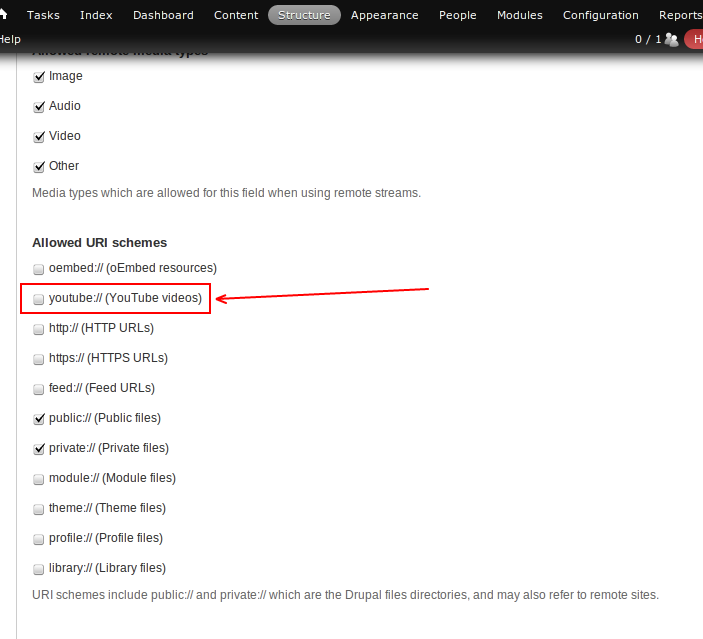
dave reidIn your field's settings to you add the 'youtube://' stream to be allowed?
Comment #5
glennnz commented@Dave
I don't see this anywhere.....
I can only allow 'Upload,' 'Library,' 'View Library' or 'Web'.
None of these give me any further settings.
Comment #6
donhajicek commentedI'm having the same issue. Still no resolution more than a month later?
Comment #7
primsi commentedI don't know if this is the same error, but in our case on node edit we can add the video, on node create we can't - getting the error mentioned above.
Comment #8
dave reidThis must be enabled on your file field to allow YouTube to be used:
Comment #9
aaronpinero commentedI have this same problem when using rc2. I have properly checked the allowed URI schemes in the field settings. The only way I've been able to make this work is to first go to the media library under "content" and add the video there. Then go back to the node I'm editing and add the video from the library.
Comment #10
aaronpinero commentedFolks, you might want to try this also: http://drupal.org/project/video_filter. I have generally tried to do what I can to avoid Media Module due to the current bug:feature ratio.
Comment #11
dave reid@aaronpinero: Can you please explain what exactly isn't working for you? Maybe screenshots would help us figure it out so no one else encounters this?
Comment #12
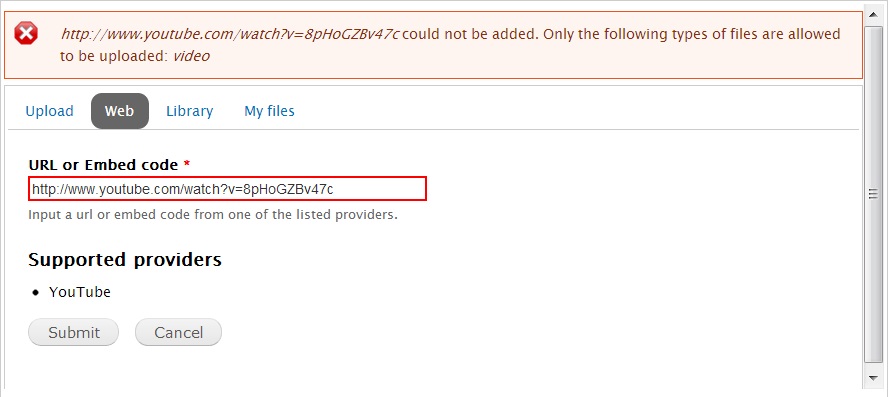
aaronpinero commentedI'm having the same problem as the person who originated this issue. I have a content type on a website that "multimedia asset" field that uses the "media file selector" widget. I've enabled "video" and "other" as the allowed media types and made sure that YouTube and Vimeo are among the allowed URI schemes (as in the screen shot posted previously on this issue). When I go to add or edit a node of this content type, I launch the media browser to be able to add a link to hosted video. I click on the "Web" tab in the browser and enter the URL of the resource into the field (basically, the URL of a YouTube video). When I submit, the media browser responds:
"[url] could not be added. Only the following types of files are allowed to be uploaded: "
With nothing after. As I said before, the only way I am able to get this to work is to go to the media library under "Content" and add a link to a video there. Then I go back to the node add/edit form and select the video I want from the "library" tab in the media browser.
My other complaints about Media module come from a complete lack of end user features. I'm sure Media module is a potential solution to an important problem in Drupal and might get incorporated into core eventually, but it is useless as a tool to help content editors add, size, and position, and annotate media within content (WYSIWYG) -- the one thing most end users are most interested in. This is something you could easily do with Image Assist in Drupal 6. Sadly, it appears an update for Image Assist was postponed because of the promise of Media. That hasn't panned out. I abandoned efforts to move sites to D7 because of this one serious lack. And until something comes along as a viable replacement, I'll stick with D6 as much as possible.
Comment #13
dave reid@aaronpinero: Thanks for posting the problems you've been having. I haven't been able to replicate your YouTube error either on 1.x or 2.x. I wonder if you need to re-save your field configuration for your multimedia asset field because it sounds like something went screwy when saving its settings, based on the empty 'following types of files' in the error message.
Comment #14
aaronpinero commentedIf only it had been that simple. Sadly, it is not. I've looked around again at all the various configuration screens related to Media and the media field in my content type, but I had no success.
Comment #15
dave reidThen I'm not sure what I can do any more here. I've asked for screenshots and have tried to replicate this and have been unable to do so.
Comment #16
swafran commentedI had this problem using FCKEditor, switching to CKEditor the problem disappeared.
Comment #17
drew reece commentedMy 2 cents incase this gets resolved…
I'm seeing this locally, but not on a remote server. This is with the latest media-7.x-2.x-dev & media_youtube-7.x-2.x-dev.
I suspect it may be due to the PHP build & the included stream wrappers?
LOCAL Registered PHP Streams https, ftps, compress.zlib, php, file, data, http, ftp
REMOTE Registered PHP Streams https, ftps, compress.zlib, compress.bzip2, php, file, data, http, ftp, ssh2.shell, ssh2.exec, ssh2.tunnel, ssh2.scp, ssh2.sftp, zip
The remote server also has mime_magic installed.
The error does say 'Only the following types of files are allowed to be uploaded: image, audio, video' & the video does have youtube:// enabled in the settings.
I altered the error message on line 150 of media/modules/media_internet/media_internet.module to be sure it was that module & not the media_youtube module creating the message.
Comment #18
thelocaltourist commentedI'm having the same issue as #12, using the latest media-7.x-2.x-dev & media_youtube-7.x-2.x-dev
Comment #19
raphael apard commentedUsing the latest media-7.x-2.x-dev & media_youtube-7.x-2.x-dev
I have no more the table "media_type" (not used anymore ?).
Uploading dailymotion give me the error "video could not be added. Only the following types of files are allowed to be uploaded:" because of function :
I can pass validation if i implements hook_file_type() in media_dailymotion module like this :
This is a good solution ?
In this case this issue will be for media youtube module.
Comment #20
raphael apard commentedre-opening with correct version.
Comment #21
ParisLiakos commentedSee #1812976: Register video/youtube mimetype and provide an upgrade path for an explanation why this happens in latest media 2.x dev version
Comment #22
yanniboi commentedProblem is still happening in media-7.x-2.x-dev
Thanks Raphael! #19 works great! Although I would recommend putting the fix into a custom .module file rather than directly into media_dailymotion.module (or im my case youtube.... )
Comment #23
Barry Tielkes commentedSame here, ) #19 works!.
Using: Media: YouTube 7.x-2.0-rc1
Comment #24
icampanaI was having the same problem, tried that solution and it worked flawlessly, I guess that this should go into the media_youtube module, maybe we should move this issue to that module queue.
Comment #25
ParisLiakos commentedit is already in..check issue @#21
Comment #26
jc22 commentedI am experiencing this same issue with media 2.x and media:youtube 2.x which I downloaded on Feb 7 2013 ... =(
Comment #27
rnyberg commentedOh yes, updated Media and Media: Youtube yesterday and this bug is back. I have correctly enabled Youtube from the File Types / Video and in the Fields settings as well, all content that had working Youtube videos now only display the "file icon" instead.
Works now as I added this to my module with adding "video/youtube" manually to the allowed mimetype list afterwards.
Media: Twitch doesn't render correctly for anything except for "Original" style tho. Something is definately bonkers.
Comment #28
ParisLiakos commentedYou need this exactly version from media_youtube: 7.x-2.x-dev and run update.php..
if after running update.php, the problem persists please open an issue in media: youtube queue.
thanks
Comment #29
sillo commentedCan anyone please help me?
i keep getting the error message when i paste youtube video, it says only types supported: video ... and yes i did check the youtube link etc. all is set the right way ..
i dunno where to paste:
can someone please help me ?
Comment #30
Road Kill commentedHi Sillo you might want to try this out if you looking to add youtube video's without a hassel
http://drupal.org/node/1279830
Comment #31
sillo commentedHi R.K , Thank you very much for your contribution :) i found an alternative to paste youtube videos to website .. but thank you very much.
Comment #32
dgtlmoon commentedworked for me, just had to ensure the correct file type was enabled in the content type field settings too
Comment #33
robbe-1 commentedNormally I'm not the commenting type, but this is an easy fix without custom modules.
(I first tried the custom module mentioned in #23 and it also worked, but it was one more of those minifix modules I did not really need)
Comment #34
dgtlmoon commentedcould it be documentation issue? hmm unsure
Comment #35
dave reidA reminder, this is *already* fixed if you use Media: Youtube 7.x-2.x. All you need to do is update to the latest dev.
Comment #36
jwilson3Actually, Dave, I've updated to 7.x-2.x-dev with drush, which grabbed me a version of the code called 7.x-2.0-rc2+3-dev dated 2013-03-23, I've also used 7.x-2.0-rc3 which is dated 2013-05-01, and has exactly the same contents.
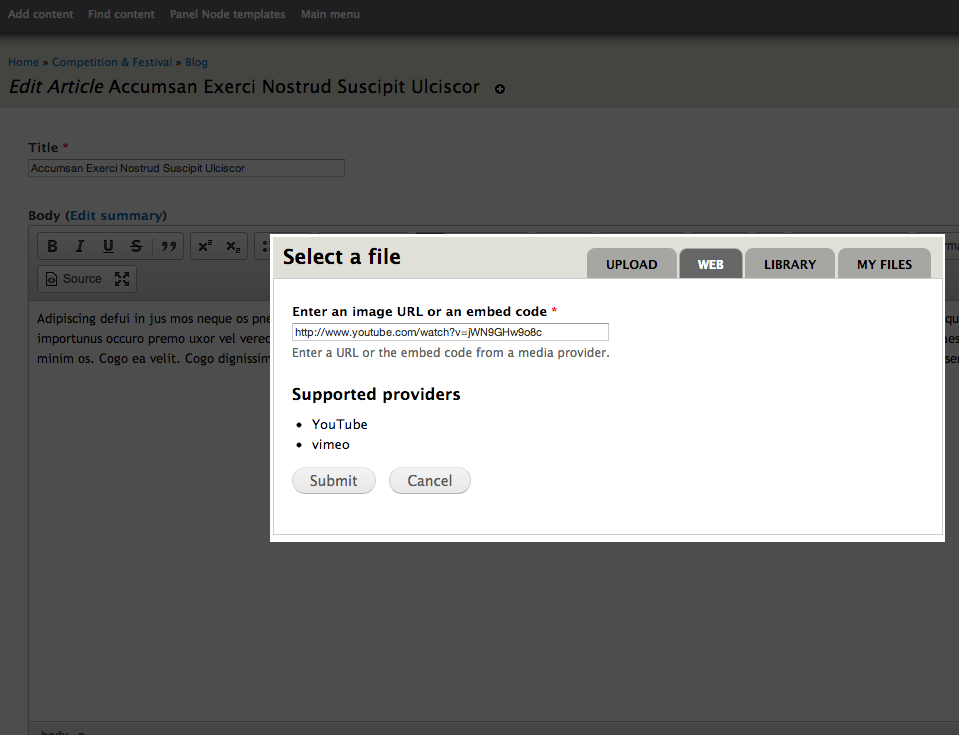
I'm still getting this error trying to embed a video into a wysiwyg CKeditor via the "add media" button + media browser popup, with the same error message being produced as the OP.
I do see both youtube and vimeo enabled in the "Web" tab of the Media Browser, and it appears that that there is no longer an option to specify the protocols by name (eg "youtube://") anymore.
The only way to fix this was to complete the steps in #33 by hand. I'm not sure why this wasn't done automatically by the module when I installed it. I won't re-open unless someone else can confirm this too, but I'm not 100% sure this can be considered fixed.
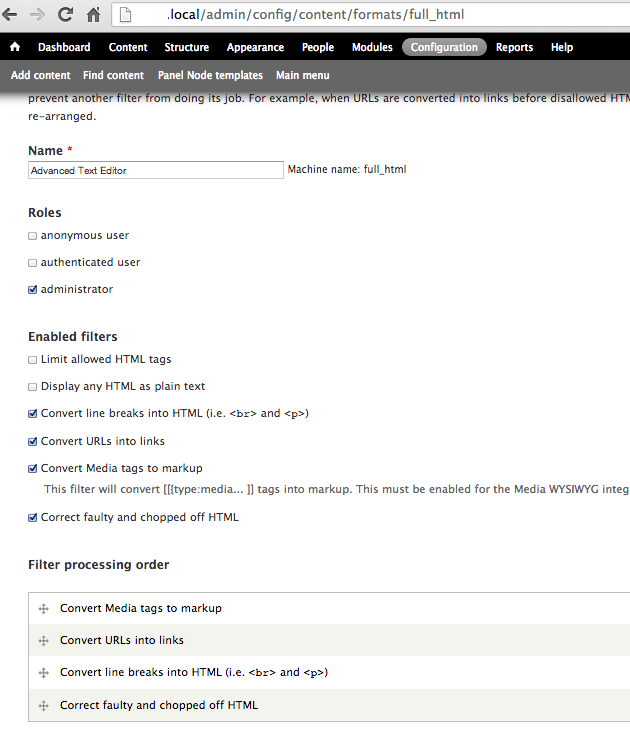
A couple snapshots are attached.
Comment #37
jwilson3I think this makes more sense in the Media_YouTube queue.
Comment #38
dave reidDid you also update to the latest File entity and Media 7.x-2.x-dev? There were some fixes in File entity to default the video file type to use a wildcard (video/*) by default.
Comment #39
jwilson3I had the latest media dev, but not file_entity... (still had an older dev snapshot) and can confirm that updating it fixed the problem.
After grabbing latest file_entity and running the update the mimetype list on admin/structure/file-types/manage/video/edit looks like:
It's strange that video/vimeo was (and still is) present in the mimetype list even before the file_entity update, but not video/youtube. Oh well, I guess the wild card works too.
And, forgot to say, thanks for the tip to update file_entity!
Comment #40
dave reidOk yeah sorry I did not included the *other* critical information about updating to File entity dev as well.
The double entries for vimeo should be fixed for new users upgrading with #1950188: Remove media_vimeo_update_7200() and media_vimeo_file_default_types_alter().
Comment #40.0
dave reidMake error message more visible
Comment #41
pdcarto commentedI'm running media and file_entity alpha2, and am still getting this error. Running admin/structure/file-types/upgrade seemed to have no effect (the {file_types_mimetypes} table remains empty). The mime types are encoded fine in {file_type}.mimetypes (a serialized array), and CRUD correctly at /admin/structure/file-types/manage/%filetype/edit. However the types that are populated in the #validate arguments for the media browser form are not being populated from these. It seems to just be putting in the file type ('video' in this case) rather than the available mimetypes.
Furthermore, the MY_MODULE_file_type fix isn't working for me because it runs *after* media_file_validate_types is called (and returns error).
I managed to hack something that works with hook_media_browser_params_alter:
I suspect that this isn't a problem on new-installs, and that the problem stems from the upgrade path that my particular site took. But the existence of the file_types_mimetypes table is very puzzling, since file_entity seems to ignore it after creating it.
Comment #42
mastoll commentedI am using the latest dev releases of Media, 7.x-2.0-alpha3+79-dev,
File Entity, 7.x-2.0-alpha3+18-dev, and
MediaElement 7.x-1.2+2-dev, not Media:YouTube
and am receiving the same error as OP with all file types listed.
I've read so much about this issue I'm now confused about where to start? Is it a Media issue or not?
Comment #43
smasm commentedOoh I FOUND VERY EASY WAY TO FIX THIS PROBLEM..
if you want to add a youtube link to it. You basically have to change http to youtube
for example:
http://www.youtube.com/someFile
to
youtube://www.youtube.com/someFile
It worked with me. Hopefully that helps some of you.
Comment #44
alexberendei commented#43 worked! Thank you smasm !
Comment #45
nithinkolekar commentedI can confirm issue still exist and could be reproduced with recommended Media v 7.x-2.19, Media: YouTube v 7.x-3.5,
specifically with chrome browser but works fine with Firefox.(see update below)Update : after further digging by updating media_youtube to 7.x-3.7 I found that actual problem is with non-admin user role which causing this. Earliar I was testing with non-admin user in chrome and with admin user in firefox which makes me think its was browser specific but it wasn't. Sorry about that :(
Now actual issue: Even with permission "Add media from remote services","Use the media browser" and "View files" (Includes the following stream wrappers: SoundCloud audio, Vimeo videos, YouTube videos, Public files.) set to non-admin role for ex. siteadmin this error is raised irrespective of browsers.
Is there any other permission I need to set for that role?
Comment #46
muneender commentedI faced the same issue. I was able to create a Youtube video from admin login but I was unable to create Youtube Video from non-admin roles login.
Solution:
Edit the File Field setting "Allowed file types" and Unselect all options. Unselecting all options will allow all file types including Youtube.
Comment #47
felubraIn my case I've fixed the issue after granting the permission 'Add and upload new files' of the File Entity module.
Comment #48
jtjones23 commented#47 worked for me...thank you felubra