
On this page
- Date/time
- String to Unix timestamp
- Unix timestamp to Date
- Filter
- Keyword filter
- Required field
- HTML
- HTML entity decode
- HTML entity encode
- Make URLs absolute
- Strip tags
- List
- Explode
- Filter empty items
- Implode
- Unique
- Number
- Cast to integer
- Format a number
- Mathematical operation
- Other
- Calculate hash
- Copy source value
- Country to ISO code
- Entity Field Query finder
- Full U.S. state name to abbrev.
- Rewrite
- Set default value
- Text
- Convert case
- Convert to boolean
- Find replace
- Find replace REGEX
- Format string
- Pad a string
- Trim
- Truncate
- URL Decode
- URL Encode
Plugin list
This is a list of plugins for the Feeds Tamper contributed module.
Date/time
String to Unix timestamp
Take a string containing an English date format and convert it into a Unix Timestamp. See the PHP Manual on strtotime for examples of valid strings.
Unix timestamp to Date
Converts a Unix timestamp to a date string using PHP's date() function.
Filter
Keyword filter
Only import (or do not import) items that contain a list of specific words/phrases
Required field
Make this field required. If it is empty, the feed item will not be saved.
HTML
HTML entity decode
Convert all HTML entities such as & and " to & and ".
HTML entity encode
Convert all HTML special characters such as > and & to > and &.
Make URLs absolute
Make URLs in markup absolute. (i.e. <a href="/stuff/things"> to <a href="http://example.com/stuff/things">).
Strip tags
Remove all HTML tags except a user-specified list.
List
Explode
Break up sequenced data into an array with the option of setting a limit to the number of items returned. For example, "a, b, c" would get broken up into the array('a', 'b', 'c').
Filter empty items
If there are no values for a multi-valued field this plugin removes the empty row for this field. Else labels will show up even though there aren't any values for it.
Implode
Join array elements into a string using an user-specified "glue". For example, array('a', 'b', 'c') with glue "," would become "a, b, c".
Unique
Makes the elements in a multivalued field unique.
Number
Cast to integer
Convert a user-specified string to an integer.
Format a number
Add a user-specified number of decimal places, decimal point, and thousands separator.
Mathematical operation
Add, subtract, multiply or divide a number.
Other
Calculate hash
Makes the value a hash of the values being imported. This allows for importing content that does not have a unique ID.
Copy source value
Copy the selected source to or from another source in the feed.
Country to ISO code
Converts a field from a country name string to the two character ISO Alpha-2 code.
Entity Field Query finder
Searches for an entity based on a property or field of that entity and returns the entity id.
Full U.S. state name to abbrev.
Converts a string from a U.S. full state name name string to the two character abbreviation. For example, "alabama" will be converted to "AL".
Rewrite
Rewrite the source using token-based replacement. Each source in the feed is available as a token and available to append or reorder into a single string.
Example: [sku] is a number and a image string can be created from it.
http://example.com/sites/all/files/images/[sku].jpg
Set default value
Set a static default value for the field.
Text
Convert case
Convert to "Title Case", "lower case", or "UPPER CASE".
Convert to boolean
Convert a user-specified string to boolean, with the option of specifying what to do in the case of no match.
Find replace
Find and replace a user-specified word/phrase.
Find replace REGEX
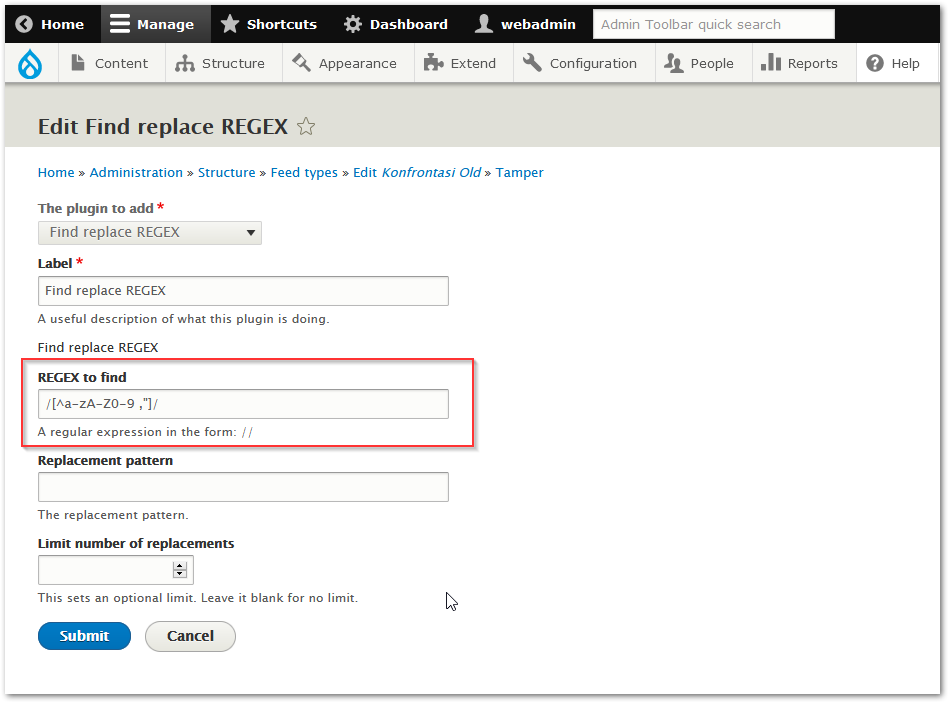
Find and replace a user-specified string using REGEX with an option to limit the number of replacements. See the PHP Manual on PCRE Pattern Syntax for a complete reference, or RegexPal for a quick tester.
NB: Regex syntax must enclosure by "/"
Example: /[^a-Z]/
Format string
Formats a string using PHP's sprintf() function.
Pad a string
Increase the length of a string to a minimum value using a user-specified string on the right, left, or both sides.
Trim
Trim a user-specified string from the left, right, or both sides of the source.
Truncate
Limit the source to a user-specified number of characters, with the option of adding ellipses to the end of the truncated text.
URL Decode
Decodes an URL-encoded string using PHP's urldecode() function.
URL Encode
URL-encodes a string using PHP's urlencode() function.
Help improve this page
You can:
- Log in, click Edit, and edit this page
- Log in, click Discuss, update the Page status value, and suggest an improvement
- Log in and create a Documentation issue with your suggestion

![http://example.com/sites/all/files/images/[sku].jpg](http://example.com/sites/all/files/images/[sku].jpg)