

 The 2026 Drupal Business Survey is open. Your response will help shape the future of the Drupal business ecosystem.
Hi there!
I´ve installed this module, enabled some fonts, and added them inside my .css file inside the font-family tag.
It works like a charm in chrome and firefox.
But it won´t work in IE (6, 7, 8 or 9! I´ve tried it with browsershots).
I´ve tried adding these lines inside the head of the page (page.tpl.php):
<link type="text/css" rel="stylesheet" href="http://fonts.googleapis.com/css?family=Chewy:regular" media="all" />
<link type="text/css" rel="stylesheet" media="all" href="/sites/default/files/google_fonts/google_fonts.css" />
But it still doesn´t work. I´ve clared the cache several times now.
Any ideas? It looks like crap in IE! :)
THANKS!
Rosamunda
| Comment | File | Size | Author |
|---|---|---|---|
| #4 | Schermafbeelding 2011-08-13 om 19.02.49.png | 37.04 KB | BarisW |

Comments
Comment #1
BarisW commentedWhat's the CSS declaration you added (the one in google_fonts.css)?
I made a screenshot in IE7 of http://www.google.com/webfonts/specimen/Chewy on http://ipinfo.info/netrenderer/ and it looks good, so the font itself is not the problem.
Comment #2
Rosamunda commentedThanks for your answer
I´m pretty sure that the font is ok, and I´m the problem here :)
I´m sorry.. what? I´didn´t touch the google_fonts.css file... I´ve read the instructions and all that they say is:
There´s no google_fonts.css file inside the module´s folder... what should I do with it?
Thanks again for your help!!
Rosamunda
UPDATE:
I´ve found the file (it´s empty) inside public_html/files/google_fonts what should I do with it?
Thanks again!
Comment #3
Rosamunda commentedFinal Update:
After a lot of trying and error, I´ve found (pretty much astonished) that the problem was the Google Fonts module itself.
Yes. I´ve uninstalled it, and went to http://www.google.com/webfonts, selected the fonts I wanted to use and did a quick copy/paste of the single line of code that Google gave me.
FYI, it was this line:
<link href='http://fonts.googleapis.com/css?family=Abel|Delius|Chewy|Rokkitt:400,700|Coustard' rel='stylesheet' type='text/css'>I put that inside the of page.tpl.php and voilá!
Not only the fonts, but everything else is working (the other CSS3 stuff that did look horrible up until now :)
Maybe something went wrong when I installed the module, and I know that the "just don´t use this module" solution it´s pretty lame. I´m very much sure that the problem that I´ve encounter is my own fault, but the fact is that the solution came when I uninstalled this module and just got Google Fonts from it´s source.
Rosamunda
Comment #4
BarisW commentedThe line you used that's generated by Google Fonts contains a lot more fonts than just Chewy.
<link href='http://fonts.googleapis.com/css?family=Abel|Delius|Chewy|Rokkitt:400,700|Coustard' rel='stylesheet' type='text/css'>The line that is generated by the module is this:
<link type="text/css" rel="stylesheet" href="http://fonts.googleapis.com/css?family=Chewy&subset=latin" media="all" />The only difference is that it adds the susbset (latin). But if you compare the output of http://fonts.googleapis.com/css?family=Chewy and http://fonts.googleapis.com/css?family=Chewy&subset=latin in your browser, you will see there is no difference.
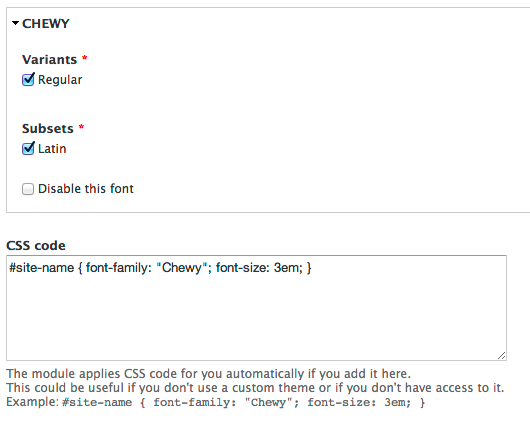
I'm not sure why it doesn't work using the module, I see no reason for the misbehavior. For your information, the google_fonts.css file is generated when you add something in the 'CSS code' field. This enables you to add CSS selectors for the font without having to add it to your own CSS files. See screenshot.
Anyhow, glad it's working now, with or without the module.
Comment #5
Rosamunda commentedThanks for your reply Baris!
Yes, I´ve added all the GFonts that I´m using in that single line. I´ve mentioned only chewy, but in fact the whole lot wasn´t working at all.
Thanks for the information about the .css file. I did put that code inside the css file of my own theme, so I think that shouldn´t be the problem.
Thanks!
Rosamunda