

Closed (outdated)
Project:
Calendar
Version:
7.x-3.x-dev
Component:
Miscellaneous
Priority:
Normal
Category:
Support request
Assigned:
Unassigned
Reporter:
Created:
12 Aug 2011 at 22:04 UTC
Updated:
21 Jul 2020 at 18:33 UTC
Jump to comment: Most recent, Most recent file

Comments
Comment #1
karens commentedBut it is possible that a fix I just committed for #1260380: Events for times after 6pm show up on following day in Day view. will also fix this. Test by getting the very latest dev versions of both Date and Calendar with today's commits, which will show up in tomorrow's tarball.
Comment #2
hs@henrikstrindberg.se commentedThank you Karen for looking into this!
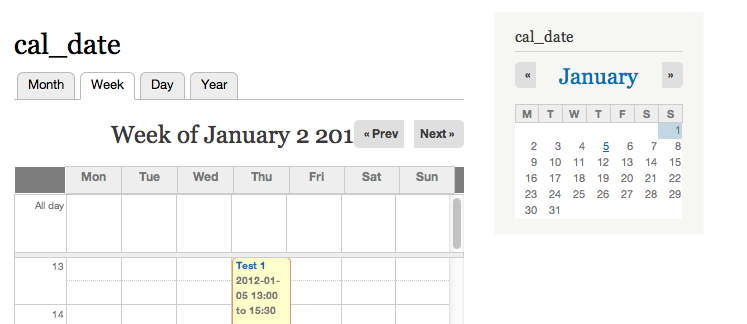
However there are still no dates in the week view. I also got error messages (only in the week view):
Using Calendar 7.x-3.x-dev (2012-Jan-01), Date 7.x-2.x-dev (2012-Jan-01) and Views 7.x-3.0
All best / Henrik
Comment #3
fleepp commented+1 calendar is working, but lost of error messages in the week-view...
Comment #4
Morn commentedSame errors as #2 with Calendar 7.x-3.0-alpha2 and Date 7.x-2.0-rc1
Comment #5
dhalbert commentedAlso same errors as #2, using latest dev versions of Date and Calendar, as of the date of this comment. (Just did a git pull on both.) Interestingly, I did not see these errors until updating to the dev versions. I updated my calendar views to use Calendar Entities instead of Calendar Items, but that made no difference.
Comment #6
Joel MMCC commented@#5 dhalbert, how did you switch to Calendar Entities, given #1394108: New Calendar Entities Format not working!?
Comment #7
dhalbert commented@Joel MMCC #6: I saw your reported bug, but I did not encounter it when switching to Calendar Entities.I cannot remember if I saved the entire View after changing each subpart of it. I did clear the cache beforehand, for other reasons. But otherwise I did exactly what you did in your scenario.
My Calendar view was a clone of the original Calendar view, from a few versions ago.
The versions of Calendar and Date I was using were the absolute latest versions (from git pull) at the time.
Comment #8
dhalbert commentedFollowup to #7 and perhaps crucial difference: I am not using the dev version of Views: I am using Views 7.x-3.0. (I see from your Dates stopped displaying entirely on about ½ of Events! report that you are using the dev version of Views.)
Comment #9
Joel MMCC commentedThanks, dhalbert. I use the -dev versions because KarenS’s instructions for her Date and Calendar modules say to always use the latest -dev versions of Calendar, Date, CTools, and Views, and to update them together.
Comment #10
GinaF commentedI've also experienced #2's errors in my week view only after updating to the latest versions:
http://drupal.org/node/1398584
Comment #11
karens commentedPlease use the latest dev versions of both Date and Calendar until I get a new release tagged. Start over and create a new view using the new template. You'll see a link at the top of the Views list that says 'Add view from template'.
Comment #12
Morn commentedI disabled my old (upgraded) Calendar View and customized the "official" one,
all problems gone !
I don't know why, because I couldn't find any difference between the Upgraded (old) View and the new
Cutomized View.
Environment:
Drupal core 7.12
Views 7.x-3.2, Chaos tool suite (ctools) 7.x-1.0-rc1,
Calendar 7.x-3.0-rc1, Date 7.x-2.1
I had the groupby_times error, an Ajax error and missing Date Entries in the week Calendar.
Comment #13
karens commentedIf moving to the latest code and using the provided views fixes the problem, this is taken care of.
Comment #15
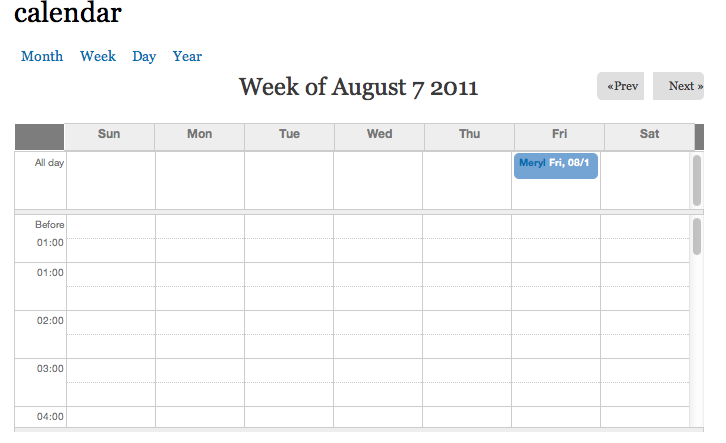
core44 commentedIm am still having this same problem running all the latest dev versions of relevant modules. I created my views from the 'add view from template' option but the week display is missing dates.
drupal 7.15
ctools 7.x-1.2+4-dev
views 7.x-3.5+14-dev
calendar 7.x-3.4+1-dev
date 7.x-2.6+1-dev
Any idea why this fixed issue is cropping up again?
Thanks
Comment #16
aboodred1 commentedFirst you need to copy calendar-week-overlap.tpl.php from calendar/theme to your custom Drupal theme and add the following lines
- add this code before html code - after line 30
$start_date = date_format($view->date_info->min_date, 'U');- after link 40 "
" replace the following code
with this code
I also attached the entire template file with this comment
Comment #17
aboodred1 commentedFirst you need to copy calendar-week-overlap.tpl.php from calendar/theme to your custom Drupal theme and add the following lines
- add this code before html code - after line 30
$start_date = date_format($view->date_info->min_date, 'U');- after link 40
<th class="calendar-agenda-hour"> </th>replace the following codewith this code
I also attached the entire template file with this comment
Comment #18
dmadruga commentedAwesome. Thanks.
Comment #19
jgsantos commentedThanks @aboodred1 !
Comment #20
Katy Jockelson commentedThank you aboodred1
Comment #21
dsoms commentedThanks @aboodred1!
Comment #22
MM10 commentedI'm having this exact issue with version D7.56 and
Calendar 7.x-3.5
Date 7.x-2.10
Views 7.x-3.18
I see one solution is to modify template files but I don't have access to these and am hoping that adding weekly date numbers is possible through the Drupal UI.
Apologies if I'm missing something obvious. My test case is a fresh install, adding a calendar view from the provided template.
Comment #23
neslee canil pinto