

Closed (cannot reproduce)
Project:
Webform
Version:
7.x-3.13
Component:
Code
Priority:
Normal
Category:
Bug report
Assigned:
Unassigned
Reporter:
Created:
30 Aug 2011 at 18:29 UTC
Updated:
7 Dec 2011 at 02:37 UTC
Jump to comment: Most recent file

Comments
Comment #1
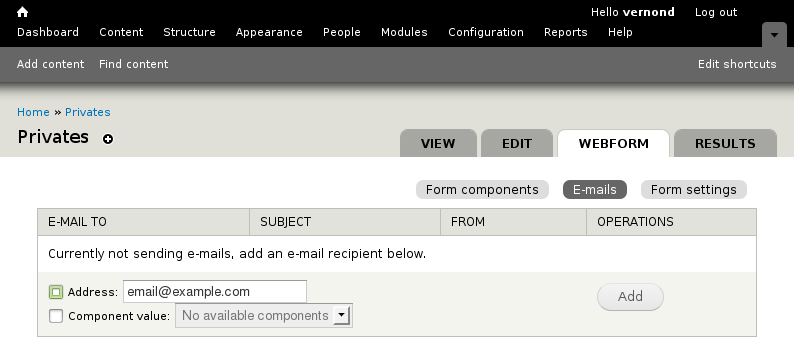
vernond commentedOnce the node is created you should have View, Edit, Webform, Results as main tabs to the right of overlay. When you click on Webform tab you should see Form components, E-mails, and Form settings sub-tabs. See attached screenshot.
Comment #2
seanrYeah, the second row of tabs is completely missing for me. I'm thinking some other module must be screwing with things. Ugh.
Comment #3
jnettikI can confirm this. I also can't even path to the page. It seems like the settings are gone.
Edit: I completely uninstalled the module and reinstalled and it seems to work after that.
Comment #4
SandraL commentedI'm seeing this issue too.
I've tried completely uninstalling/reinstalling the module, but there's no change. I read elsewhere that Ubercart can cause strange issues with Webforms, but I don't have Ubercart installed. Any other possibilities? I'm using quite a few contributed modules as this is for a complex university website.
At this point, the only thing I can do with Webform submissions is create a simple list (with no export capabilities).
Update:
I'm able to get to the additional functionality by manually navigating to:
...so it appears to be just a problem with the tabs.
Comment #5
quicksketch@SandraL: In your situations it's probably the theme you're using on your site causing the problem. Are you using the Seven theme for administration (that's the default one)? Have you made modifications to your admin theme? Most likely the tabs just aren't being printed out or are hidden with CSS.
@jnettik seems to be reporting a different issue, but I have not been able to reproduce this problem.
Comment #6
quicksketchI'm almost 100% positive these are theme issues. We've had similar reports before that always turn out to be some mangled theme problem.