I have a content type with a Role Reference CCK field, and a View which displays nodes of that type. I want to limit the nodes which a user can see, based on the users' role. So if a "manager" was viewing the page, they would only see nodes in which "manager" had been checked off, in the node's Role Reference field. So, I'm attempting to use this as a crude form of access control.
In my View, under Arguments, I've added the Role Reference field. However, I'm not sure if I need to provide a default argument under "Action to take if argument is not present". I've tried "User ID from logged in user", but it doesn't seem to be working.
Can anyone help? Does this module support views arguments in the way I'm attempting to use it?




Comments
Comment #1
Geex2011 commentedsub+1
I downloaded this module for the same goal but I am stuck like you.... it seems possible but i couldn't figure it out either
Comment #2
iantaylor01 commentedI also struggled with how to do this but eventually did it this way (my senario was a page with generally available content but also the possibility of additional member only restricted content in either file or html text format - if the user was not a member I wanted to display a message rather than them just not seeing the fields):
1) Install the development version of this module removing the logwatch line (see http://drupal.org/node/1149392#comment-4460686) - this allows you to use the token value in your view
2) Set up content type with a role reference field (mine allowed a single selection) and any fields you want to be restricted (hide these fields in the display settings)
3) If not already installed install views attach module (http://drupal.org/project/views_attach)
4) Set up a view with the hidden fields you want to displayed to certain user only, filtered on the content type (both set up in step 2) and published etc
5) Add two arguments:
5a) Add the referenced role field as your first argument, in the argument settings set "Action to take if argument is not present" to empty text and validation to PHP code and enter the following:
global $user;
$role = $argument[0];
if (array_key_exists($role, $user->roles)) {
return True;
} else { return False; }
5b) Add node nid as the second argument this time in the setting select "Provide Default Argument" and select node id from url
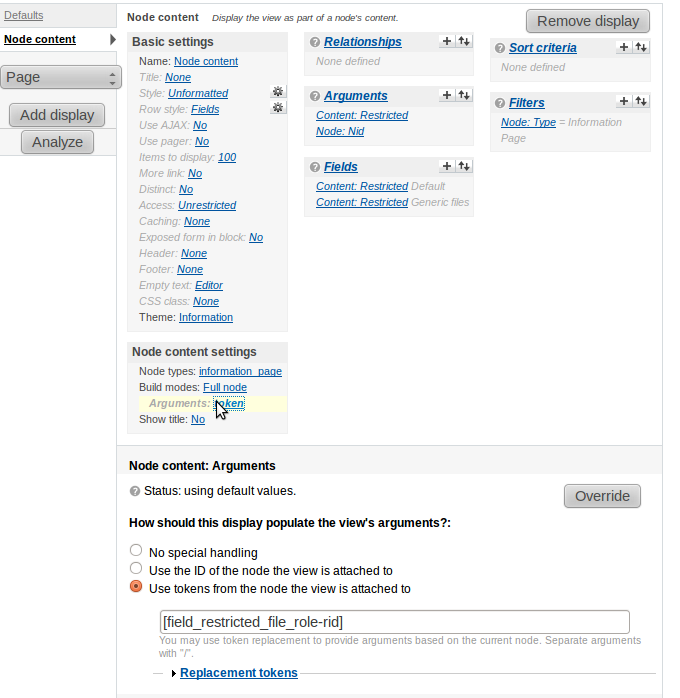
6) To your "default" view add a "node content" view display
7) In the display setting set the content types and set the argument to be the token for your role reference field (rid version) - NOTE this is where you need the development version otherwise the token will not be available.
8) set the empty text to let people know there is content available only to member/subscribers etc
9) Save the view and this should now have either your collection of fields if the user has the related role or the empty text from the view if not.
Hope this helps...
Comment #3
apmsooner commentedI tried that #2 post in D7 but couldn't get that to work. Any additional advice?
Comment #4
rerooting commentedThis works with D7
Comment #5
svajlenka commentedRather than using php in the view to handle this, I've written a default argument views plugin. It provides the role IDs of the current logged in user.
Comment #6
deekayen commentedCommitted to 7.x-1.x at 0d455f462f8fc015e54324ec0182b65a00dd5171.