

Active
Project:
Imagefield Crop
Version:
6.x-1.0
Component:
Miscellaneous
Priority:
Major
Category:
Support request
Assigned:
Unassigned
Reporter:
Created:
1 Sep 2011 at 17:21 UTC
Updated:
9 Feb 2012 at 17:40 UTC
Jump to comment: Most recent file



Comments
Comment #1
arcane commentedSorry this is for the 6.x-1.0 version of the module
Comment #2
yhager commentedCan you elaborate on what exactly is different, and on what conditions?
Comment #3
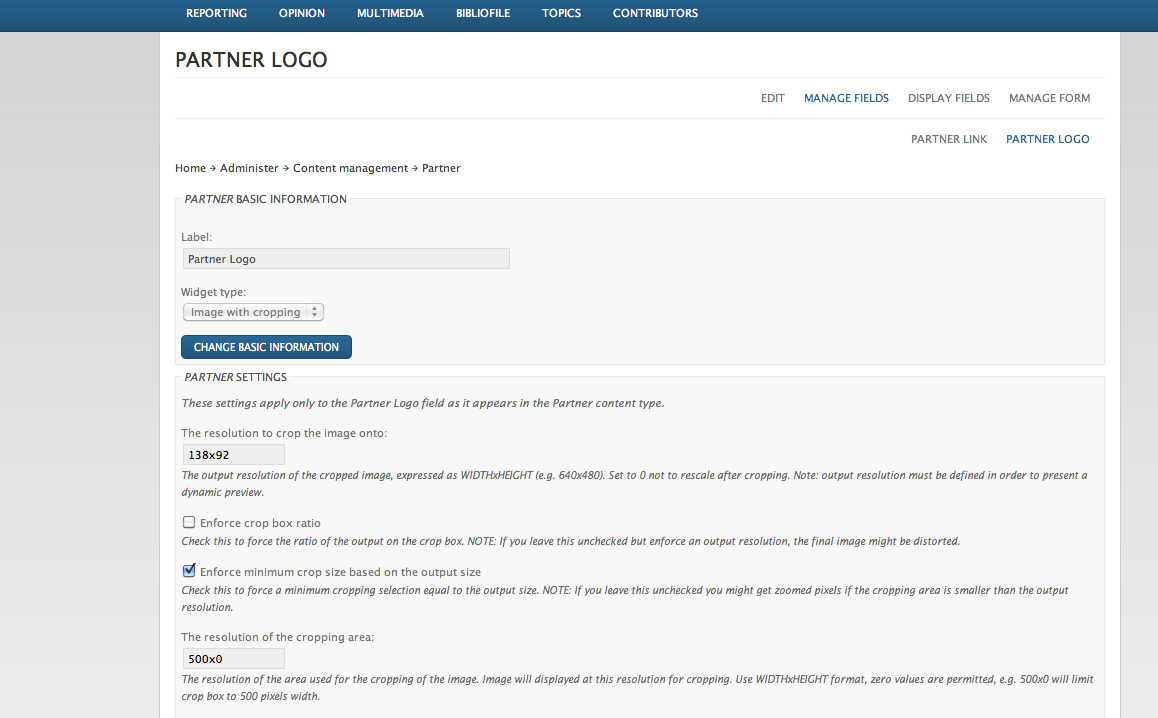
arcane commentedHi I have include screenshots of the settings and steps as well as my image file. I hope this helps illustrate what I am running into. Please let me know if you need any other information.
Comment #4
arcane commentedNotice that in the final result, the image is missing leading space on top (that shows in the crop preview)
Comment #5
arcane commentedHi any comment on if this is the intended bahaviour or if this is a bug?
Comment #6
yhager commentedIt looks like a bug, but I haven't figured it out yet.
Comment #7
ttapada commentedI have a similar situation (the difference maybe that i've patched ImageCrop from #763214: image is not resized if crop area is never untouched)
In my case, image crop preview is one and the image being displayed is different,
altough in my case image being displayed is the original image.It also seems in my case (and in the example provided by arcane as well) that the resizing is a little unexpected.
For instance, if you want do display an image with 100px by 100px, and if you have a 300px by 200px image, resize is done so that it stops as soons as either width ou height match the display you want, in the example I just gave, image would be 150x100.
It seems to me that the same happened in arcane's example: he wanted to crop to 100x100, but chose a crop area of 150x125, so he ended up with an image that is 120x100 that cannot display entirily on 100x100...
I hope I was able to explain it correctly...
Furthermore, I would like to point out that in my case, crop seems not to work at all; the image being displayed does not match the crop selection I made during node edit - it is always a resized original image..EDIT: ok, I've just determined that part of the problem was due to the fact that I have a hierarchical select on the node form and everytime and select something, the crop area is reset to the entire image - that's why the result was not what I expected. Anyway, the part of the problem concerning the resizing is still valid.