

 The 2026 Drupal Business Survey is open. Your response will help shape the future of the Drupal business ecosystem.
This is a well known problem discussed in commons.acquia.com
http://commons.acquia.com/discussion/new-stream-locale-problem
http://commons.acquia.com/blog/commons-20-released#comment-22396
http://commons.acquia.com/discussion/no-visible-status-updates-stream-ac...
http://drupal.org/node/1261914
As suggested in commons's web site by ezra-g I just want to open an issue here
I did a fresh install of commons 2.0 in this environment
- CentOS 6
- Apache 2.2.15
- PHP 5.3.2 with APC cache 3.1.3p1
- MySQL 5.1.52
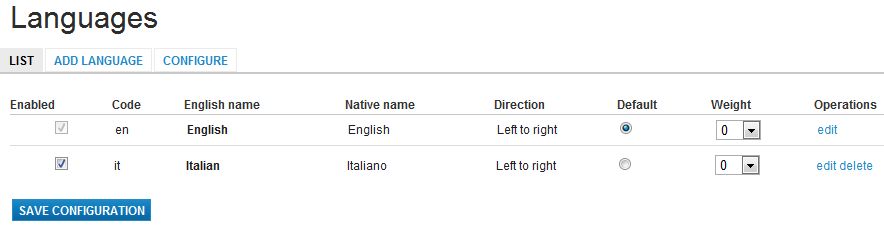
I enabled the Locale module, added the Italian language and imported the file it.po
If the default language is English the stream is displayed
If I set the default language to Italian the stream dissapear (is displayed only a line of dots for each post)
If I switch back to English as default language, the stream works again.
Same result with the different themes provided by commons
See attached images
| Comment | File | Size | Author |
|---|---|---|---|
| Stream-Italian.JPG | 37.79 KB | Andrea C | |
| Stream-English.JPG | 55.1 KB | Andrea C | |
| Languages.JPG | 29.77 KB | Andrea C |


Comments
Comment #1
ezra-g commentedThanks for opening this bug report.
You can follow the latest progress on this issue at #1261914: Activity stream tokens didn't work for non English language.
One user found a potential manual fix: http://drupal.org/node/1261914#comment-4920074
Comment #2
Andrea C commentedI tried the solution http://drupal.org/node/1261914#comment-4920074
Not sure to understand, I did execute the following SQL command:
UPDATE databasename.activity_log_templates
SET eval_input = REPLACE(eval_input, "templates|en|template", "templates|it|template")
WHERE tid <> 35 and tid <> 36;
(the WHERE clause is only because the MySQL safe mode ask for it and tid 35 and 36 where not in the table)
The I regenerate the activity log (?q=admin/settings/activity_log/regenerate) without any parameter set.
I also restarted Apache.
But nothing happens, same error
Comment #3
nikeev commentedTry regenerate activity log checking all Events to trigger and then clear all caches.
Comment #4
Andrea C commentedI change the priority to "normal" and the status to "need work" because some of the for workarounds suggested by IceCreamYou in #1261914: Activity stream tokens didn't work for non English language, solve the problem (see comment http://drupal.org/node/1261914#comment-5004730)
The solution I prefer is the first one because it seems the most 'solid'
I've tried it. It's a heavy job because you need to rewrite more or less 100 form for rules, conditions and actions, but it works very well.
It works also after a [Clear all message caches] and, for what I understood, will protect your content when you will update the module.
See description at:
http://drupal.org/node/1261914#comment-5008130 and
http://drupal.org/node/1261914#comment-5008862
The solution described by jtorrado, in
http://commons.acquia.com/discussion/new-stream-locale-problem#comment-2...
that starts from the one of AntNik described in http://drupal.org/node/1261914#comment-4920074
works also and and is faster to to be applied but be carefull:
if you go to page admin/settings/activity_log and click on [Clear all message caches] the templates will be rebuilded with the English language and the stream stops to work again.
Comment #5
BALIKADAM commentedThis solution is ABSOLUTELY WORKING. I tried this. Maybe it is long way but it worked.
SOURCE: http://commons.acquia.com/discussion/new-stream-locale-problem#comment-2...
1-Go to admin, build, modules and install the Locale module.
2- In site configuration, languages install the new language
3-Go to admin, rules, triggered rules.
4-Go to each rule, and inside them there is a section called 'DO'
5- Inside each 'DO' there is a section for each installed language, just translate the english string (most of them are just copy and paste).
6- When you are done translating, go to your database and execute the next SQL: UPDATE databasename.activity_log_templates SET eval_input = REPLACE(eval_input, "templates|en|template", "templates|es|template"); of course, change the databasename and the new language (in my case, spanish).
NOTE: YOU MUST CHANGE EVERY activity_log_templates STRING from all "templates|en|template" to templates|yourlanguagecode|template . NOT ONE.
7-Navigate to admin, site configuration, activity log.
8- Then click regenerate activity and its done.
IMPORTANT!!! if you go to page admin/settings/activity_log and click on [Clear all message caches] the templates will be rebuilded with the English language and the stream stops to work again.
Comment #6
ezra-g commentedThere is now a patch up for review in the Activity log queue. It would be great to get someone to test at http://drupal.org/node/1261914#comment-5261320
Comment #7
ezra-g commentedBased on the lack of activity here and #1261914, marking as fixed.
Comment #8
Andrea C commentedAs is #4 I customized all the triggered rules to have the stream in Italian.
Now, with Commons 2.4 may I come back to the standard?
And which is the best way to do it? Uninstalling activity log, reinstalling it again ad re-add the translation?