

 Come together with the global Drupal community in Rotterdam, 28 Sept – 1 Oct 2026. Sessions, contribution, connection, and Early Bird savings until 8 June.
Hey,
I installed the module in Drupal 7 and downloaded the elfinder 1.2 to my webspace.
After that I activated the module and opend the config page.
Now my (I think very simple) problem: Where can I open and use elfinder !?
I looked around at my website, asked google but I can't find anything.
Please help me ;)
best wishes
tobma
| Comment | File | Size | Author |
|---|---|---|---|
| #16 | elfinder_screenshots_20120321.zip | 293.1 KB | cmcnamee |
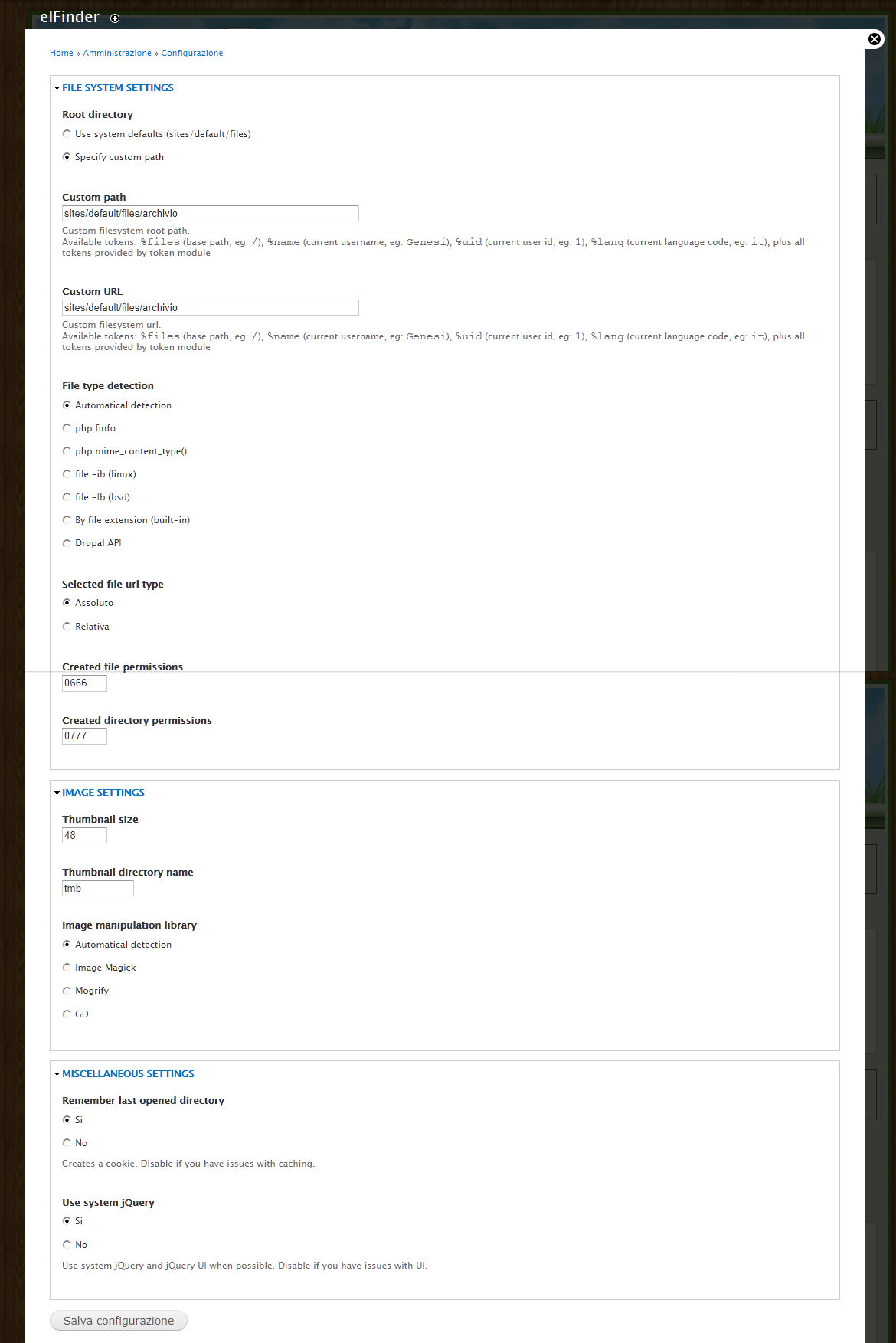
| #12 | configuration.jpg | 170.13 KB | velociraptor |
| #12 | From page.jpg | 171.29 KB | velociraptor |
| #10 | Images.zip | 279.7 KB | velociraptor |


Comments
Comment #1
tobma commentedcan anybody please tell me, where i have to open this module ?
tobma
Comment #2
grendzy commented/elfinder
Comment #3
ph0enix commentedAlso elFinder should be located under admin/content/files. For 1.2 better use latest dev version.
Comment #4
Kamal Prasad commentedhttp://yourdomain.com/?q=elfinder if you don't have clean URLs enabled.
Comment #5
velociraptor commentedAfter the update I do not work anymore elfinder, displays a completely blank page.
I also noticed that if you have suggested as an address /elfinder but in my case by mistake, can I just add elfinder without /
I also noticed that in the file "elfinder.module" updated to version 2011-Oct-18 in the 7.x-1.x-dev
Line 111 should not be:
elfinder_add_css($libpath . '/css/elfinder.drupal.css', $options);
but
elfinder_add_css($libpath . '/css/elfinder.css', $options);
it is a mistake?
Comment #6
ph0enix commentedWait for Oct 23+ dev build. There are compatibility issues.
Comment #7
ph0enix commentedComment #8
velociraptor commentedafter update of 24 is still active without displaying the progress bar nothing
Comment #9
ph0enix commentedIs there any php error messages in server log? Is there any javascript errors? Could you please provide screenshot and blank page html source?
Comment #10
velociraptor commenteddoes not give me no error, the page remains fixed
Comment #11
ph0enix commentedStrange...
1. Try to replace Custom URL to absolute (i.e. http://...)
2. Check if directory writable by webserver
3. Try to test with non-opera browser if possible.
4. Try to switch 'use system defaults'. Is contents of sites/defaults/files available in this case?
Comment #12
velociraptor commented1. where?
2. I tried changing the permissions on the folder in 0777 (they were set to 0775) but nothing.
3. I tried it with Internet Explorer but is equal
4. I tried putting in default, but nothing
I uninstalled and installed the module and the package elfinder library, but nothing changes, it remains inaccessible
attached the new images
I also noticed that the default folder. tmb point has disappeared, is now being offered tmb
Comment #13
harmlessdrudge commentedI have just tried 7.x-0.6 and 7.x-1.x-dev with Drupal 7.9 running with the admin-menu module.
For both, I get
elFinder library was not found. Please download it from http://sourceforge.net/projects/elfinder/files/ and install to sites/all/libraries/elfinder. (Currently using elFinder Not found)
when the module is activated. I installed the module using "modules, install new module" and giving the URL of the module in each case. The result was that the module was installed to sites/all/modules not sites/all/libraries as advised by this error message.
So far every other module I've used has installed without any problem using this installation method. What am I missing?
Later: Installing from a downloaded file produces the same result.
Comment #14
ph0enix commentedModule is installed into sites/all/modules - it is correct. But you should manually download client library (it can't be included into module per drupal.org's bureaucracy) from http://sourceforge.net/projects/elfinder/files/ and unpack it to sites/all/libraries/elfinder
Comment #15
ph0enix commentedharmlessdrudge,
I can't reproduce your issue, so need your help to capture it. There are needed few things:
1. Firefox browser
2. FireBug extension
Are you able to install it to get more info about this issue?
Comment #16
cmcnamee commentedThe first time I tried to enable the module, I got this error:
Warning: include_once(/php/elFinder.class.php) [function.include-once]: failed to open stream: No such file or directory in include_once()...
First, I noticed that the elFinder.class.php file does NOT exist here: sites/all/libraries/elfinder/php/elFinder.class.php
Which is where the elfinder.module is looking for it.
Instead, it exists at: sites/all/libraries/elfinder/connectors/php/elFinder.class.php
So, I modified the first line in modules/elfinder/elfinder.module and hard-coded the path (not the best solution, just a temporary fix):
include_once '/your/full/system/path/to/sites/all/libraries/connectors/php/elFinder.class.php';
//include_once dirname(elfinder_connector_path()) . DIRECTORY_SEPARATOR . 'elFinder.class.php';
Upon trying to enable the module after this change, I got this error:
elFinder library was not found. Please download it from http://sourceforge.net/projects/elfinder/files/ and install to sites/all/libraries/elfinder. (Currently using elFinder Not found)
I noticed it seems that elfinder is looking for this class in sites/all/libraries/elfinder/php/ and NOT sites/all/libraries/elfinder/connectors/php/ which is where the class actually resides. So, I copied the php directory contents and pasted it into sites/all/libraries/elfinder/php/
This resulted in the module enabling successfully. I was able to create a content type for files, and when I add content, the correct file-upload widget displays in the add-content page. However, it seems that every area that elFinder loads (including mydomain.com/elfinder is presenting a warning message of:
elFinder library directory containing features test files sites/all/libraries/elfinder/elfinder.php.html, sites/all/libraries/elfinder/connectors/php/connector.php, sites/all/libraries/elfinder/php/connector.php. Please remove these files to avoid security hole.
After removing these files, there are no more errors. However, I get a blank screen when accessing the elFinder file browser at mysite.com/elfinder and the same result on the add-content page when clicking "browse" for elfinder file.
Please see attached screenshots. Any advice would be greatly appreciated. This project is time-sensitive (as in, supposed to be finished days ago). So, hopefully this can get resolved asap. It looks like a promising module, otherwise.
Comment #17
cmcnamee commentedUpdate: for the time being, I've reverted to the 7.x-0.7 version, and it is working well.
Comment #18
mdallmeyer commentedWith 6.x-1.x-dev I could find elFinder at admin/content/files, but I wanted per user permission settings so I upgraded to 6.x-2.x-dev. Now when I go to admin/content/files nothing shows up, but I don't get a 'missing page' error.
Comment #19
ph0enix commentedIs there any javascript errors?
Comment #20
mdallmeyer commentedNo errors anywhere.
Comment #21
ph0enix commentedIs it showing on /elfinder url?
Comment #22
Kvark commentedHello, I have same issue. Downloaded and copy all from elfinder-2.0-rc to sites/all/libraries/elfinder, installed module 7.x-0.7 (filefield source as well) Drupal core 7.15 and it's still says that "elFinder library was not found." that can be wrong here?
Comment #23
Kvark commentedSolved as 2.0-rc lib should be used with 2.0 Dev module and not 0.7
Comment #24
ph0enix commentedComment #25
velociraptor commentedWhy do I suggest to delete the files:
in the library 2. for security reasons?
Or am I wrong I set permissions (644)?