

Closed (fixed)
Project:
Taxonomy Term Reference Tree Widget
Version:
7.x-1.x-dev
Component:
User interface
Priority:
Normal
Category:
Bug report
Assigned:
Unassigned
Reporter:
Created:
13 Sep 2011 at 03:35 UTC
Updated:
13 May 2019 at 16:11 UTC
Jump to comment: Most recent, Most recent file


Comments
Comment #1
1000Li commentedThank you for the patch, I've just come across the same problem in iE7. I have applied your patch and so far it works very well and doesn't break anything else. Thank you.
Comment #2
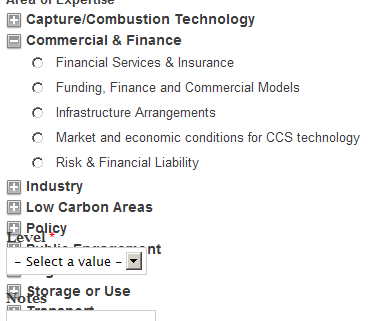
1000Li commentedP.S. Hmm i've taken a closer look at my site and in my case the patch seems to be working only with the "Leaves option" enabled. With this option disabled, the expand labels are positioned above checkboxes, not next to checkboxes. I'm getting this bug in IE.
Comment #3
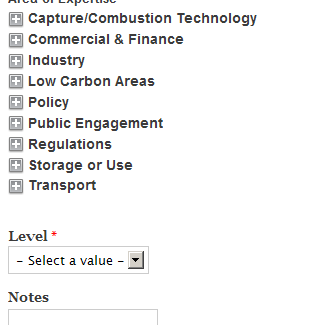
Bevan commentedCan you provide a screenshot? Or note what CSS needs to be fixed and/or how?
Comment #4
chris_hall_hu_cheng commentedThe CSS is essentially broken in various ways for IE7 and IE8 (not sure about other versions).
I managed to hack together some css that fixed IE7 (because our client was using this) but a real hack so will try to fix properly and post details.
Comment #5
spcalpo commentedI would be interested in any hacks/fixes you've put together for this issue, chris.
Comment #6
Bevan commentedThis is a screenshot of the bug this patch introduces with the "Leaves only" option off, as per comment #2.
Comment #7
paulap commentedHi!
This is a real problem. Most of all internet users use IE <= 8.
We use this module together with the profile2 module. And use tax fields on the registration page. That looks ugly...
Two major problems:
1. the tax-terms aren't not in the same line like the checkbox (or line break)
2. if we expand a tax-term to overlays with the content
Attached there is a screenshot.
Wr
paulap
Comment #8
paulap commentedIf you need help we can support. We can test it...
Comment #9
bartk commentedMan, I hate IE.
I don't remember exactly why I used an inline block for the div. My fear if I take it out at this point, even if it doesn't affect my own site, is that it might break things for someone else.
I think the best bet would be to make some conditional CSS files (one for IE7, one for IE8) that override those particular attributes only when the browser in question is being used. Trying to make the same stylesheet work on real browsers *and* IE always leads to a big mess.
Comment #10
chris_hall_hu_cheng commentedApologies for the late reply, I am probably going to have a go at a proper fix over the Christmas break will post anything useful back then.
Comment #11
drywall commentedHere's the patch I developed off the 7.x-2.x branch. Version for 1.x branch coming shortly.
Comment #12
drywall commentedAnd here's a version of that same patch for the current 7.x-1.6 release, which is actually the 7.x-1.3-dev branch in git. What a mess.
Comment #13
bartk commentedThe patch as submitted breaks the existing layout in Firefox (and presumably other browsers as well). I've added a small CSS hack to 'fake' inline blocks in IE7 and 8, and it seems to work.
Comment #14
hephaestus commentedHi,
Sorry to be the bearer of bad news, but this still seems to be an issue in IE8 on Windows XP (latest version, 8.0.6001.18702), which is unfortunately still very widely used.
Anyone have any ideas?
Comment #15
hephaestus commentedI've managed to get a test environment running for this combination. Microsoft offer a Virtual PC image of WinXP, with IE6 installed and desktop shortcuts for installing IE7 and IE8.
In testing I've found that resizing the window fixes the issue temporarily, however as soon as you cascade the open tree, it leaves the whitespace below it. If you resize the window again, the element below jumps up to fill the white space. The window only needs to resized by a single pixel.
The reference tree works correctly with IE8's browser mode set to IE7 Standards or IE8 Compatibility View modes. In both cases this sets the document mode to IE7 Standards. These settings can be changed by accessing IEs developer tools with F12, and then selecting browser mode on the far right of the toolbar.
Comment #16
hephaestus commentedComment #17
adaddinsaneI had to solve this for a client but was completely unable to duplicate it. So I created a completely overkill solution based the clearfix style (since I had no idea what was causing it I applied it to each level of the HTML), and apparently this works:
Good luck.
Comment #18
Anonymous (not verified) commentedHere's a patch against the 7.x-1.x git branch that seems to fix the issue for me.
Tested in FF (Linux), IE8 (WinXP) & IE7 (WinXP).
The latest code has a CSS hack (using an asterisk (*) prefix) that targets IE7 & below. I simply changed it to use a '\9' suffix hack to target IE8 & below (see: http://www.gravitationalfx.com/css-hacks-for-ie-targeting-only-ie8-ie7-a...).
Comment #19
Matthew Davidson commentedWorks for me.
Comment #20
vincer commentedThe patch at the top of the thread basically works, however I simply added the following as a CSS override:
One of the concerns noted in the patch is changing the inline-block display, and that this change may have unknown issues, so I just added a child selector to limit the scope of the selector to target only the wrapper .form-item and not the .form-item elements inside the tree.
Comment #21
dave reidLet's please add some inline documentation to the CSS in #19 explaining why and what versions of IE should be affected.
Comment #22
Delphine Lepers commentedSubmitting a new patch
Comment #23
Delphine Lepers commentedComment #25
AritoMelo commentedFix the previous patch #22 which the test has failed.
Comment #26
richardcanoe commentedComment #27
alex_optimThis is mistake?
Comment #28
pifagor commentedThese styles are for IE 9 only.
I've recreated the patch
Comment #29
pifagor commentedComment #31
alex_optimComment #32
alex_optimComment #33
alex_optim