Closed (fixed)
Project:
Acquia Marina
Version:
6.x-3.1
Component:
Code
Priority:
Normal
Category:
Support request
Assigned:
Unassigned
Reporter:
Created:
13 Sep 2011 at 12:30 UTC
Updated:
24 Oct 2011 at 03:58 UTC


Hi,
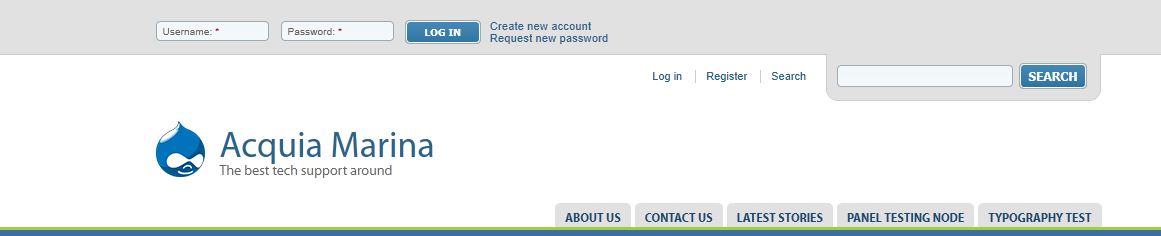
I am wondering how to activate the very cool search and registration to the template as is done in the demoo (and attached image)? I'm using D6!
Thanks in advance... ps great theme... fusion is cool!
| Comment | File | Size | Author |
|---|---|---|---|
| Capture.JPG | 31.78 KB | OnthegOinOz |

Comments
Comment #1
Deepika.chavan commentedHi,
1. To enable the search box for anonymous user please give the 'search content' permission for anon user here- 'admin/user/permissions' page.
2. Enable 'User login' block in 'header top' region.
3. Now to theme it properly, rename your 'local-sample.css' to 'local.css'.
4. Add following css code in local.css file
5. Please clear cached data here- admin/settings/performance.
HTH!!
RGrds,
Deepika Chavan.
Comment #2
esmerel commentedComment #4
OnthegOinOz commentedThanks for this... sorry for not responding sooner. I followed the guide but could not seem to get the search bar in it as it is in the snapshot? i'll keep playing around and see where I get to...
Comment #5
sheena_d commentedI'm not sure why someone suggested that you use custom CSS to implement this styling, this styling can be achieved with a few simple settings.
The search form styling is the default styling for the search form and will be present once you enable the search form, set permissions to allow users to use the search, and enable the search form on your global theme settings.
The login form is simply the normal login form block placed into the "header top" region with the "horizontal login block" skinr style applied.
If you are still unsure about how to use the theme, be sure to read through out documentation thoroughly. http://fusiondrupalthemes.com/support/documentation
Good luck!
Comment #6
OnthegOinOz commentedThanks... I'll give it a go!