Prior to Drupal 7.8, I can insert a Gmap macro string into the text box of an article or a basic page, using full or filtered HTML. No problem. The Goggle map shows up fine after saving the article.
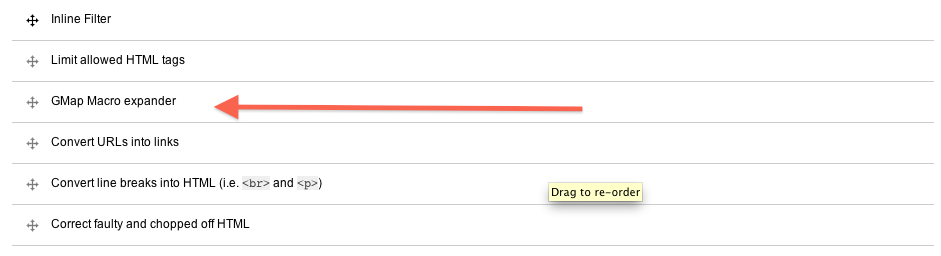
With Drupal 7.8, I can do the same, no problem. But later on, when I want to edit the article, as soon as I try to edit the text box, the Gmap macro disappears from the edit box, and is replaced with "Javascript is required to view this map". This requires me to re-insert the Gmap macro every time I edit an article. This problem persists even after removing all filters (apart from Gmap) in full or filtered HTML, or after reordering the text filters.
I have a feeling that this post of mine has been covered by other posts, though I cannot quite find an exact equivalent.
Thanks, Ben



Comments
Comment #1
snez commentedI have a Gmap in a block which I render in one of my pages. If I edit the block the map is still there...
Comment #2
bentleychan commentedOne minor correction to my original post: It is as soon as I click "Edit" for the post or article (as opposed to clicking the edit box inside the post) that the gmap macro disappears and is replaced with "Javascsript is required to view this map". This became a problem only when I upgraded from Drupal 7.7 to 7.8. So long as I don't edit the article, the Google map is still visible.
I took a closer look with the plaintext editor, and I got the following code:
Thanks, Ben
Comment #3
bentleychan commentedOops, the code I inserted in #2 got wiped out. Here is a screenshot of the code mentioned in #2. Ben
Comment #4
jhm commentedI was able to solve this by making sure the GMAP Filter was AFTER the
Limit Allowed HTML TagsFilterComment #5
bentleychan commentedThanks, jhm, for your helpfulness. I will look into your suggestion. Ben