

Needs work
Project:
Ubercart Discount Coupons
Version:
7.x-2.x-dev
Component:
Code
Priority:
Normal
Category:
Task
Assigned:
Unassigned
Reporter:
Created:
16 Sep 2011 at 21:54 UTC
Updated:
12 Mar 2014 at 17:22 UTC
Jump to comment: Most recent, Most recent file


Comments
Comment #1
wodenx commentedCan't reproduce. Do you have any other restrictions set on the coupon? Maybe if you can post a screenshot of the coupon settings page, the product settings page, and the cart to which you are applying the coupon, I can spot what's wrong. Also - what version of Ubercart are you running, and what other modules do you have installed?
Comment #2
hozt commentedI did have two products that I had setup to be excluded from the coupon. When I removed those two products coupons started to work correctly. Can I allow the coupon for a class of products and exclude specific products too?
Thanks for your help!
Comment #3
wodenx commentedNot at present. However, the existing logic for combining product restrictions is a bit tortured, and I have been meaning to revisit it.
The way it works now:
Each restriction is tested in turn, in the following order:
Product
Taxonomy
SKU
Class
If any test results in a positive (e.g. your situation - you've listed some products to exclude and a product in the cart is not in the list), the remaining tests are pre-empted. In addition, if an "exclude" rule results in a negative (e.g. you've listed products to exclude, and a product in the cart is on that list) also pre-empts further tests. Note that this is not the case for an "include" rule that results in a negative (e.g you've listed products to include, and a product doesn't appear in that list). In this case, the program moves on to the next rule.
I'm not exactly sure what the correct replacement for this is, but I'm thinking it could be much simpler: if a product fails any test, it is excluded - otherwise it is included. That would allow your use-case. However, it would NOT allow either/or situations (e.g. a product appears in a list of products OR has a particular TERM) - however, I'm not sure how valuable that case would be.
I welcome your (or anyone's) input on this subject.
Comment #4
wodenx commentedChanging to a task, since the module works as advertised.
Comment #5
wodenx commentedComment #6
jasonabc commentedgot a 500 error when posting this. Have reposted below.
Comment #7
jasonabc commentedHi Chris - posting here per your recommendations. I am not sure I agree this module works as designed (above). I have a very simple condition and it is not working.
To briefly surmise - I have a 25% code set up. I have set this to apply to one single taxonomy term on my store ("Galaxy"). There is one product in this category I do not want the code to apply to so I have entered this product into the "Applicable Products" section and set it to exempt any products listed.
It works fine - except if I also add a product to my cart from any other category, the code applies itself to that product as well. I can't see how this can be "by design".
I have attached a grab of the entire code add/edit screen.
Be grateful for any ideas/advice.
Comment #8
wodenx commentedI agree that it shouldn't work this way - but this is how it was originally designed, and I'm worried about changing this behavior since existing sites might depend on it.
As described in #3 - conditions are evaluated in a specific order, and positive matches can pre-empt later conditions. In your case, the product with a disallowed term is considered a match because it doesn't appear in the list of excluded products, so the taxonomy condition is never evaluated.
I definitely plan to change this behavior in D7 - and am hoping for input as to what the correct logic should be. I suppose it might be possible to provide new logic for D6 as an option (e.g. a "use legacy logic" checkbox on the coupon settings form which would default to checked - but at one point @longwave had expressed concern over the complexity such a setting would add, so I'm torn about it.
Comment #9
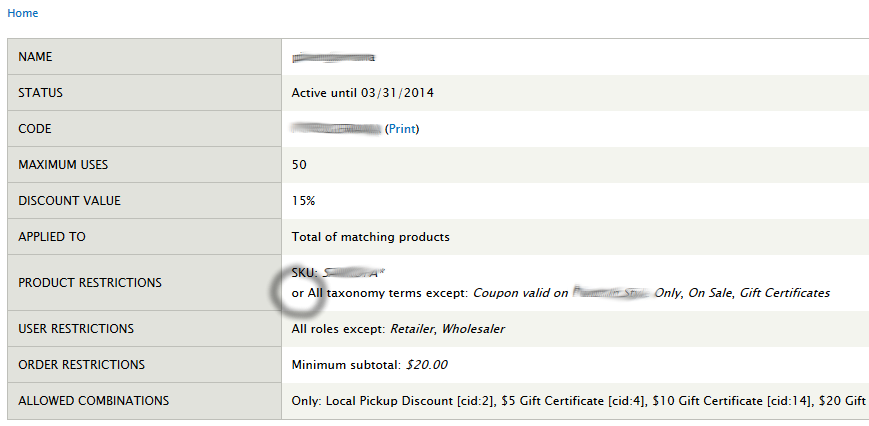
tparc commentedIt would be nice to give the administrator the possibility of AND'ing product restrictions instead of the default OR. This would allow the restrictions to be more restrictive, such as when you'd like to narrow down applicable items by a particular product class and SKU. I don't think that there is a way to do this currently.
Please look into this if you can! I'm not sure if it would be very difficult to implement.
https://drupal.org/node/2196457
Comment #10
tparc commented