Using Patterns with Facebook Page Plugin
Facebook Page Plugin provides an optional submodule named fb_likebox_patterns since version 7.x-1.4 (including branch 7.x-2.x), allowing

You are browsing documentation for an older version of Drupal, which is not supported any longer, and the information may not be correct. See current documentation for Contributed modules
Facebook Page Plugin is a simple module that provides a configurable block with the latest updates from Facebook for any given Facebook Page. It is based on the Facebook Page Plugin provided by Facebook.
The widget settings are configurable directly in the block and they are available for users with 'administer blocks' permission.
Facebook announced the old Facebook Likebox social plugin will be deprecated after the 23th of June 2015. New branches were developed for this new plugin: 7.x-2x and 6.x-2.x respectively. The naming of the module "fb_likebox" in the code will remain since this is the name of the project at Drupal.org itself.
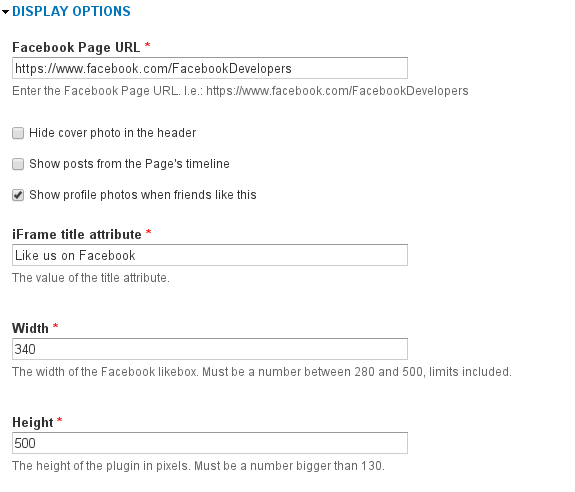
The plugin will by default adapt to the width of its parent container on page load. If the width of the parent element is bigger than the Page pluin's width it will maintain the value defined in data-width. (min. 180px / max. 500px).
For more information visit the Facebook developers documentation
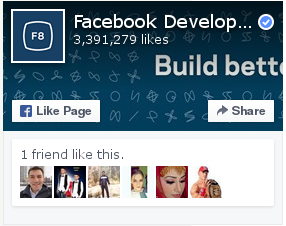
Show profile photos when friends like this: Yes
Width: 340
Height: 500

Hide cover photo in the header: Yes
Width: 300
Height: 500
Facebook Page Plugin provides an optional submodule named fb_likebox_patterns since version 7.x-1.4 (including branch 7.x-2.x), allowing

Drupal is a registered trademark of Dries Buytaert.
