

Closed (fixed)
Project:
Search API ranges
Version:
7.x-1.x-dev
Component:
Miscellaneous
Priority:
Normal
Category:
Feature request
Assigned:
Unassigned
Reporter:
Created:
21 Sep 2011 at 17:33 UTC
Updated:
21 Sep 2012 at 13:45 UTC
Jump to comment: Most recent, Most recent file

Comments
Comment #1
Anonymous (not verified) commentedWe recently moved to Facet API, @see #1213360: Move to Facet API. Now the slider is just a widget for the ranges. It's easier to add another widget for your feature, easier than a new module.
Comment #2
Anonymous (not verified) commentedChanged title for this feature request.
Comment #3
amitaibuOk, I'll have to learn the code. Unless you have plans to do that :)
Comment #4
Anonymous (not verified) commentedI can make a start, and then you can give suggestions.
Comment #5
amitaibuSounds good
Comment #6
jordiserra commentedI am very interested in that module/widget, do you know when it will be ready?? THANKS!
Comment #7
mrfelton commentedGoing to put some time into this this week - has anyone already started work on porting Amitaibu's module to facet api? If so, can you make a patch for what you have so far?
Comment #8
Anonymous (not verified) commentedHi, if you want to work on this, easiest is to check out search_api_ranges module /plugins/facetapi/widget_links.inc
You can copy
class SearchApiRangesWidgetUISliderand start from there. It should be relatively easy to do. All it needs is some grouping logic, either based on absolute min/max queries, or relative to the active filters (in which case you can re-use the_buildUISliderFormlogic to get your min/max values).You would add your widget in
search_api_ranges_facetapi_widgets()and reference your own class.Comment #9
mrfelton commentedStarted work on this this morning. Making good progress. Code is up in https://github.com/systemseed/search_api_ranges . Patch attached with my current progress. Unfortunately, because I'm working with Commerce price fields, I'm a little bit hindered by #1350528: Add support for Commerce module price fields. So I need that patch applied before I can get any thing at all, but as I mentioned in that other issue, all searches return no results - no no real way to test this code yet. But, what I have so far is:
- A new class SearchApiRangesWidgetLinks which extends FacetapiWidgetLinks
- An implementation of the Basic range mode a bit like in Amitaibu's module (it generates ranges for you - you just specify the step).
- This works to the point of generating and displaying the range links, with what looks like the correct query paramaters (no way to test yet).
What I'm having trouble with is:
- Calculating the count value for each option (could probably do this by running a count query for each range option, but feel inefficient)
- Doing anything with the Search API API - I an completely unfamiliar with these apis, and the documentation is pretty sparse.
Open to comments and suggestions..!
Comment #10
Anonymous (not verified) commentedGreat, will have a look at it myself soon.
- Calculating the count value:
To make this possible, would require you to index a prices as belonging to a certain group. So we'd need to set the grouping in advanced, then index each item and say "item with price 10,99 belongs to group 0-25". This makes the grouping less dynamic, but you'd have counts.
Comment #11
mrfelton commentedIf you are going to look, use the code from git as there have been changes since the patch, and I can't be bothered regenerating the patch needlessly. After applying a fix for the issue described in #1344076: URL encoding issue in fields using relationships (I have only fixed in on this widget - I haven't touched the code for the slider widget), as well as adding code to detect if a facet is active or not, the filtering is working pretty well. It generates the ranges as per the configuration of the the widget, you can click on a range, the results are appropriately filtered, and the facet is marked as active. You can then click on the facet again to remove it, as with the standard text links widget.
There is something funky going on with the AND/OR modes though.
When in OR mode, after selecting one facet, the resultset is narrowed down - which causes the min/max valued to be recalculated, which means that the generated ranges only cover the items in the selected facedt - resulting in only one range displaying, which doesn't necessarily match the originally selected range!
In AND mode, it works better. You can add one facet, and then remove it. You can then add a different one, and then remove it. However, really, in AND mode, once you have selected one facet, all other options should be removed - since an item can not belong to more than one group.
To implement this properly, I think that as you say - we actually need to have the ranges predefined and properly indexed. Not sure how to go about doing that though. You said "So we'd need to set the grouping in advanced, then index each item"... Could you elaborate on that?
Comment #12
Anonymous (not verified) commented>> You said "So we'd need to set the grouping in advanced, then index each item"... Could you elaborate on that?
I mean, a user should pre-define the groups. For example "group by 10, 100 or 1000". If you choose 100, you get groups like 0-100, 100-200, 200-300 etc. Then you index values and say, "123,1" belongs to "100-200". If you want to change the grouping afterwards to 0-50, 50-100 then you have to re-index. But it gives you the benefits of being "real facets" with counts.
For example,
group: 0-100; index_value: 0; displayed as "$0 - $100"
group: 1-200; index_value: 1; displayed as "$100 - $200"
To do this during indexing, you need to implement a dynamic hook_entity_property_info_alter()
That function search_api_ranges_grouping_meta_get_properties() would do this
..well I don't know if this is the right approach, it's worth a try, see what happens. I could dive into this more in early January. Might need this for my own project anyway.
Comment #13
BeaPower commentedwhat is the status of this?
Comment #14
Anonymous (not verified) commentedI never got around to it. If anyone can post a patch for this, I will be happy to apply it.
Comment #15
mgriebe commented+1 follow. Love to have this widget!
Comment #16
Island Usurper commentedHey, a widget class for range facets!
I've made them look according to my own preferences, but they work like you'd expect.
Comment #17
Anonymous (not verified) commentedThank you so much. It works and looks good. I committed your patch as-is to dev-x.
http://drupalcode.org/project/search_api_ranges.git/commit/0b35e5a
Some suggestions for future improvement:
- keep showing active links
- automatic grouping basec on min/max values (e.g. show 10 links between min/max)
Anyway, it's good to go.
Comment #18
vegardjo commentedVery timely, thanks for working on this :)
However I have a support request: The simple range works beautifully, but I can't get the advanced range to work. What is the syntax for this? It says to refer to the readme, but it doesn't contain any info.
I have tried:
1500-1600
1601-1700
1500 - 1600
1601 - 1700
1500-1600, 1601-1700
1500 - 1600, 1601 - 1700
But no luck, all these gives me one link in the facet block that is 0-0
Comment #19
vegardjo commentedHi, after testing this for a few days I feel I have to reopen:
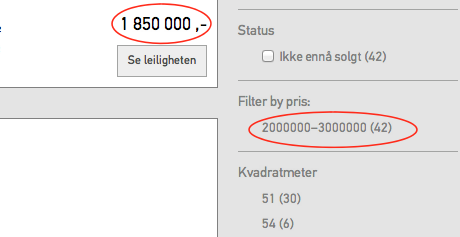
Simple range kind of works, but I just realized it doesn't have correct values. Have a look at the attached screenshot where it says all items are within the 2000000 - 3000000 range. To the right you se one value (which is that field) that is below that range..
Also, can not get advanced range to show at all. It says 0-0 whatever I put in, Which syntax are we supposed to use?
Comment #20
Anonymous (not verified) commentedHi I opened new issues, because this thread was already committed to dev.x
See:
#1785428: Cannot get advanced range to work
#1785430: Simple range text links not showing correct values
Comment #21
vegardjo commentedThanks, we made a patch that makes advanced ranges work here: #1785428: Cannot get advanced range to work