

Closed (works as designed)
Project:
Video
Version:
7.x-2.2-beta3
Component:
Video Core
Priority:
Normal
Category:
Bug report
Assigned:
Unassigned
Reporter:
Created:
28 Sep 2011 at 14:07 UTC
Updated:
13 Feb 2012 at 13:44 UTC
Jump to comment: Most recent file


Comments
Comment #1
hypertext200did you install Ffmpeg?
Comment #2
pumpkinkid commentedYes I did... I also get the following under the bootstrap error:
This seems to be more an issue with the string keeping the setting itself...
Comment #3
hypertext200What is the version of FFmpeg you installed?. May be there are some incompatibility of versions I installed and tested on 0.6.1
Comment #4
pumpkinkid commentedThis is what I get when I run ffmpeg version:
Comment #5
hypertext200I believe this could be a version issue. I will install newer version of Ffmpeg and see how it works.
Comment #6
pumpkinkid commentedThank you, let me know how it goes or if I can provide you some more feedback.
Comment #7
hypertext200Patch attached.
We are producing a series of screen-casts for all the video module users so please donate $10 or more to our donation campaign to make it happen.
Comment #8
hypertext200Mark #1289326: Undefined index: dans PHPVideoToolkit->getFFmpegInfo() as duplicate
Comment #9
hypertext200Closed as duplicate #1292348: Multiple errors... #1227766: PHPVideoToolkit Error Output for file was not found.
Comment #10
pumpkinkid commentedWell that patch did fix the issue with the bootstrap, but now I have these errors:
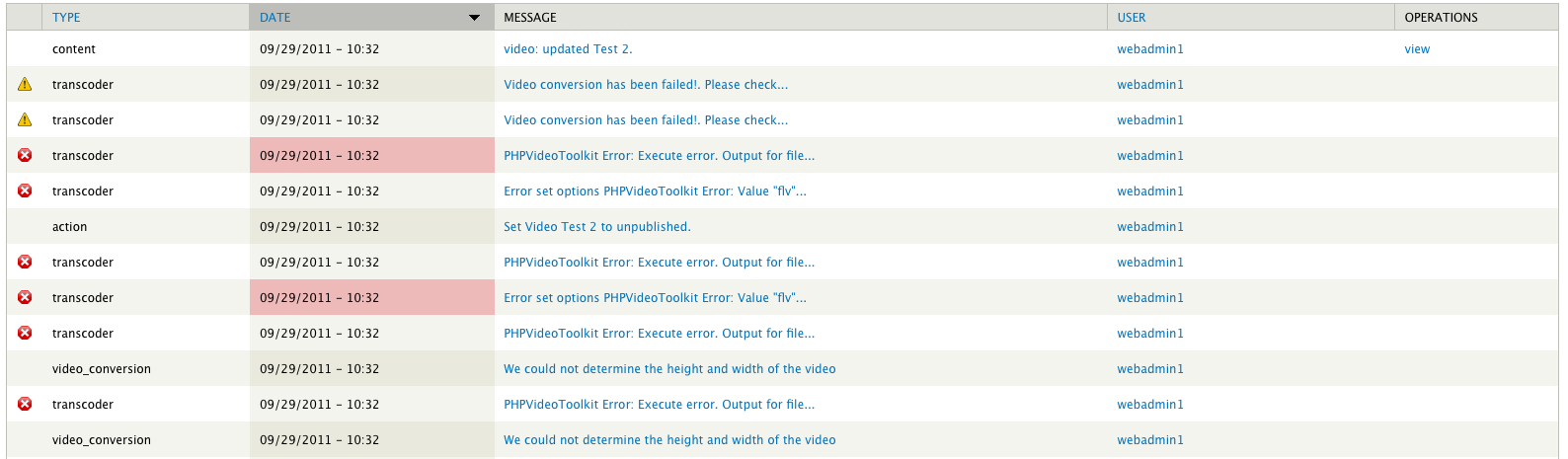
Comment #11
hypertext200You have to configure video presets.
Comment #12
pumpkinkid commentedThe preset is already configured... it is saying:
Error set options PHPVideoToolkit Error: Value "libx264" set from $toolkit->setVideoCodec, can not be used to encode the output as the version of FFmpeg that you are using does not have the capability to encode video with this codec.I have tested ffmpeg and know it works as I am using it on a Drupal 6 site on the same system...
Comment #13
hypertext200This is just only the way it should configure. Work as designed.
Comment #14
jh3 commentedI'm receiving an error similar to the issue you closed as a duplicate (http://drupal.org/node/1227766): PHPVideoToolkit Error: Execute error. Output for file "/path/to/my/video.wmv" was not found. Please check server write permissions and/or available codecs compiled with FFmpeg. You can check the encode decode availability by inspecting the output array from PHPVideoToolkit::getFFmpegInfo().
I have Video convert on node submit enabled. I also have the module set to generate three thumbnails.
The preset I have configured is using FLV format as the video output extension and Flash Video (FLV) / Sorenson Spark / Sorenson H.263 as the video codec.
Videos seem to upload fine. Sometimes there are only two thumbnails shown when there should be three. I think it actually generates all three, though, because I see them on the server.
When I go to save the node I get the error. I am pretty sure it is not a permission issue because Drupal is creating directories inside of converted/.
Here is the version information from ffmpeg:
I appreciate any help you may give.
Comment #15
davidam commentedThis bug continues in 7.x-2.4 and 7.x-2.x-dev with debian stable and ffmpeg 0.7.11, but not with ffmpeg 0.5.6-3 (there are another problems with this version).
Comment #16
roman-drupal commentedI too can confirm the same problem as ejh3 (#14) with version 7.x.2.4, however my shared hosted server is running ffmpeg 0.6.1. I’ve checked my video presets which are all configured fine and as ejh3 mentioned the video uploads fine with thumbnails generated yet the transcoder still fails on save.
In my case however, within the logs and error message I did notice something wrong and the stipulated path.
The error message reads:
PHPVideoToolkit Error: Execute error. Output for file "/home/domains/example.com/www_root/sites/default/files/private/videos/video_01_0_1.mp4" was not found. Please check server write permissions and/or available codecs compiled with FFmpeg. You can check the encode decode availability by inspecting the output array from PHPVideoToolkit::getFFmpegInfo().
Now, the prefix section of this absolute path (/home/domains/…) is actually incorrect, and I have verified this with the hosting company. The correct path is “/var/www/domains/example.com/www_root/…”
Could this possibly be the issue, hence “Output for file was not found”?
How does this path get generated or derived?
Thanking all of you in advanced for your help.
Comment #17
poorva commentedMe also confirming the same issue with ffmpeg-php version 0.6.0 at my server.
Error message in watchdog appears:
Error set options PHPVideoToolkit Error: Value "ffv1" set from $toolkit->setVideoCodec, can not be used to encode the output as the version of FFmpeg that you are using does not have the capability to encode video with this codec.
Please help if anybody has solution as I have spent 2=3 days to resolve it.
Thanks in advance.