I've tried both the 3.0 stable and the 3.0 dev.
Expected behavior: Checking "force render" on left and middle preface region will make them behave as if they contained the invisible debugging block - that is, fill the columns - so that when there's a block in the right preface region, it will actually be at the right/
Actual behavior: Left and middle preface divs are present in page source but contain no element or content. These regions collapse and the right preface block floats all the way to the left, so it looks like it's actually in the left preface region.
As soon as there's some actual content (element, printable character, whatever) in the region, it works. So I'm working around this problem by using region--preface_*.tpl.php to put a non-breaking space into the region if there's not any other content.
I'm setting this to "User Interface" and "Support Request" in case this all stems from some mis-understanding on *my* part about how the "force render" feature is supposed to work.


Comments
Comment #1
patrick.thurmond@gmail.comI am running into this problem as well. It won't render the content region even though it is set to force rendering.
Comment #2
beanluc commentedThen, let me post my work-around.
Simplest thing would be to add, in your subtheme's templates directory, this version of region.tpl.php. Re-name the attachment.
If the region exists (which is what "Force Render" actually does) but is empty (which is why you need "Force Render" at all), then, a non-breaking space will be printed into the region so that it's not empty and becomes visible.
Comment #3
hoff331 commentedJust to clarify, we would rename this file to "region.tpl_regionnamegoeshere.php" or "regionnamegoeshere.tpl_.php"?
Thanks is advance.
Comment #4
beanluc commentedIf you just use region.tpl.php, it will work for any and all regions which are force-rendered. It won't affect regions which are not force-rendered. So I recommend just using the one file, instead of any region-specific one.
Comment #5
mediameriquat commentedThe region.tpl.php published in #2 solved my problem.
I want to stress, however, that the force-rendering was ok *when logged in*. The region would collapse only for anonymous users.
Comment #6
beanluc commentedParadiso, "administer theme" permission-bearing users see the development region placeholder blocks. That's what makes the region visible when the right user is logged in. It's not just any old authenticated user.
Comment #7
knalstaaf commentedAfter using the provided region.tpl.php I still seem to be struggling with this issue: the forced rendering of a region works for the admin, but not for anonymous users.
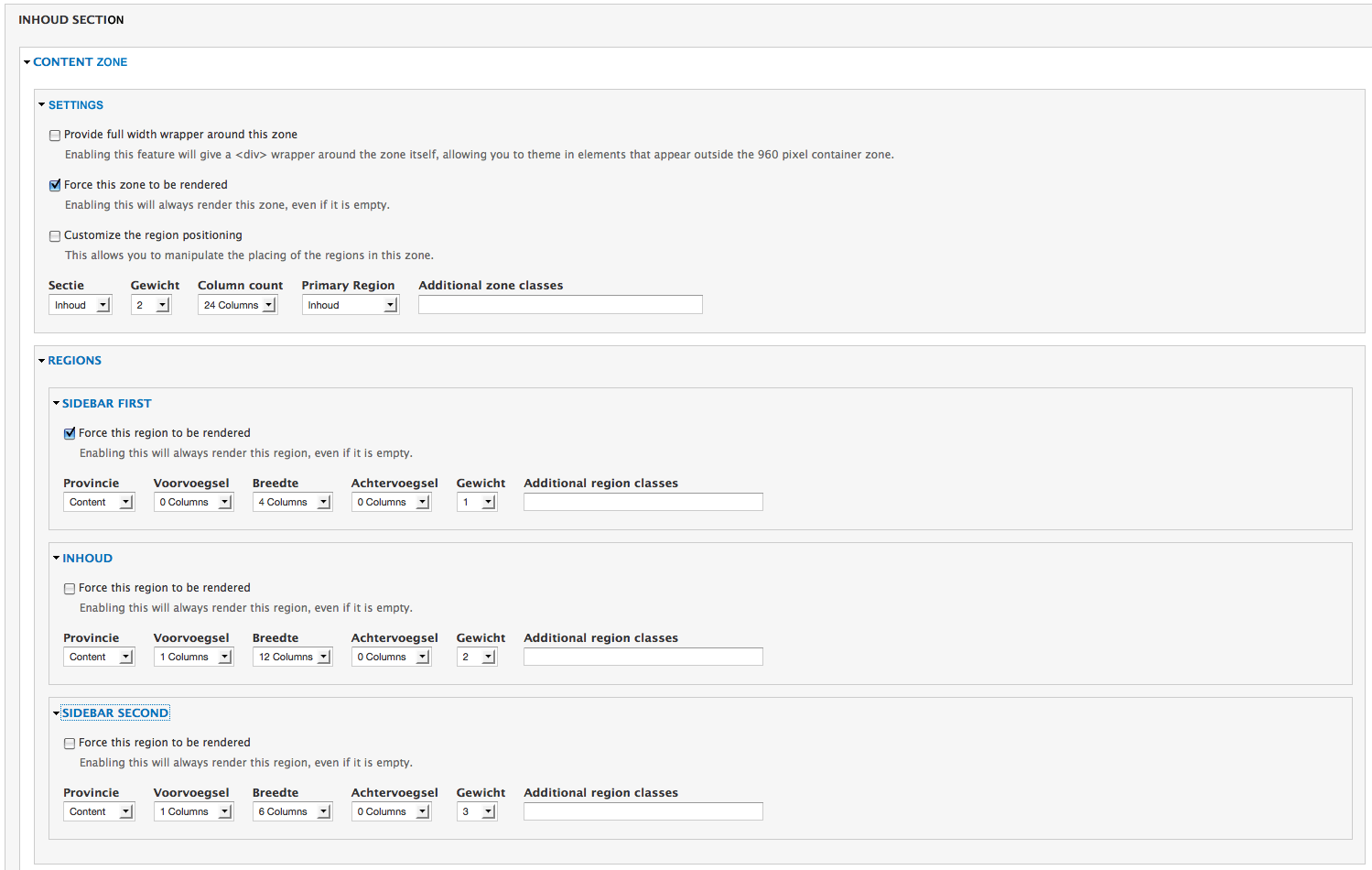
The Sidebar First in my theme contains a submenu (rendered by the menu block module), but some main menu items don't have a submenu, so that region becomes empty. In my layout configuration both the Content zone and the Sidebar First region are forced to be rendered (see attachment).
This works for the admin, but once I'm logged out the regions that should be forced to render do collapse after all. Is this a bug?
Comment #8
knalstaaf commentedFound a workaround for this problem: set this css-attribute for the region that should be forced to render:
min-height: 1px.Once this is done, there's no longer need for the region.tpl.php file provided above.
Still, I consider this as some kind of minor bug though.
Comment #9
beanluc commentedThe problem exists for any user, logged-in or not. Provided work-arounds do not change the nature of the problem. Changing title back.
Comment #10
sweetchuckI think the "Force this zone to be rendered" and the "Force this region to be rendered" options works well, but some improvements is advised.
The attached patch add new classes and template suggestions to the empty zones and regions.
With this classes you can write a well aimed CSS selector, as recommended in this issue #1218436: Dynamically set height in Omega UI when forcing region to be rendered..
Or you can use different *.tpl.php file for those elements.
Comment #11
Dcode commentedAlso any user role that has either the "Enable the debugging (placeholder) blocks for the selected roles " or "Enable the grid overlay for the selected roles" option selected for it on the debugging page in appearances will see a force rendering of zones and regions. User roles without debugging options will not. Not sure it this fact was referenced by post #6.
Comment #12
rory_o commentedI ran into this but had a nicer workaround than modifying the template file. Just create an empty block or box and place in the region you want to always render. Since empty divs take 0 space, this works out fine and won't break layout until this issue gets resolved.
Comment #13
Hendrik53 commentedThe region.tpl.php published in #2 solved my problem since there was nothing to be rendered in the div container of User Bar First (view source in browser window) and I wanteted the search to be less prominent in the second user bar, or in the menu zone at the most right, but that is the next I will have to find out).
(I've just started using Drupal and this Omega theme and this was my first 'bug' !)
Comment #14
baroo commentedHi I am having the same problem. My first page has no breadcrumb which I have ascertained lies within the preface - zone. Consequently the content of the home page runs flush with the menu. I thought by forcing the preface zone (and its region) to be rendered would force the same space to appear in the home page as well as the others but it doesn't seem to work. I have taken the advice of #8 and given it a fixed height - however it would be good if this could be fixed ... my site: ctis.bruceclark.eu
thanks
Bruce
Comment #15
fubhy commentedPlease make these classes use only one dash. Other than that the patch is fine.
Comment #16
sweetchuckThanks for response.
If we declare the 'empty' word as reserved word, then the double dash is not necessary. (Of course the 'empty' is a stupid name for a zone or region)
My suggestion is:
from
drupal_html_class("zone-{$vars['zone']}--empty");to
drupal_html_class("zone-{$vars['zone']}-empty");What you think?
Comment #17
HeathN commentedIs this issue still happening? I am not able to force a region to show.
Comment #18
beanluc commentedHeathN:
No fix has been committted to the module, but, there are at least two work-arounds described above.
The one in #8 above is probably the quickest, easiest and most elegant.
Comment #19
dotman commented#8 isn't working for me. Anyone else having that problem?
Comment #20
brianlp commentedThis is still not working. My workaround is to create a "dummy" block, place it in the not-rendering reagion and give it the custom css class:
.block-dummy {visibility: hidden;}(I can't create empty blocks)Comment #21
chrisL commented#8 works for me. Thanks.
Maybe it would be a good idea to add a class to regions that are empty but should be rendered,...
Comment #22
beanluc commentedLuckily, there is such a class.
It's
.region.That doesn't cover the "is empty" part of your statement, but it certainly covers the "should be rendered" part.
The
min-height: 1px;rule should be fine (harmless) for any regions, generally. If you should happen to have a specific (non-empty) region which requires a different min-height, you can write an overriding rule for.region-regionname.Enjoy!
Comment #23
cellar door commentedWhat about including the one liner: .region {min-height: 1px;} into the base CSS for omega. Shouldn't cause any breaks since any customization done in the subtheme files would override it.
Thoughts?
Comment #25
sweetchuckComment #27
sweetchuckComment #28
beanluc commentedWhat's to review? The patch failed testing. The automatic status is set that way for a reason. Changing it to "Needs review" does nothing to expedite the issue.
Comment #29
bunthorne commentedThis issue has been alive for 10 months with only workarounds provided. Is there a solution that will be committed so that we don't have to rely on a workaround?
Comment #30
muranod commentedI have userbar1 configured with logintoboggin and userbar 2 to its right, configured to hold the search. I just noticed that on the homepage (delta), userbar1 was collapsing to the left. I guessed I must have changed something.
I opened the Appearances / settings for the regular pages then the Delta / settings page next to it to compare. The only difference was that "Force equal heights" was unchecked for Delta, which is the page where the block was collapsing.
I checked this (now having all four boxes checked under USER ZONE / CONFIGURATION) and then after loggin, the search box stayed in its place.
Don't know if this solves anyone's problem, but am posting in case it helps someone.
Dan
Comment #31
Anonymous (not verified) commented#8 Fixed me tks.
Comment #32
bunthorne commentedStill just workarounds. Can anyone provide an actual patch, or else an explanation that it cannot/will not be fixed? Thanks.
Comment #33
bunthorne commentedThanks to a session at CapitalCamp in DC today, I just learned that this may not be a bug after all. I had regions set as Primary Region, which causes them to expand across a non-primary region if it happens to be empty. When I changed my Primary regions to -None-, the forced regions reappeared.
So in fact, the "force render" option seems to be a conflicting function to the "Primary Region" option. Perhaps the module owners can decide which should option take precedence and resolve the issue accordingly.
Comment #34
tnanek commentedThe work-around in #8 just resolved this for me, and #33 didn't seem to be effective for me.
Though I didn't test the dev version, just 3.1.
Comment #35
joshwestes commentedI managed to get around this problem (since the force render did not seem to work) by just adding the missing columns through the prefix options in the region's setup. This may not work for every situation but it worked for mine.
Example : I was using the content to the User bar second region(defualt for omega) but nothing to user bar first. User bar first is set default to 8 columns and user bar second to four. By adding a prefix it consumed the whole zone.
This obviously wont work if you add content to the user bar first region.
Comment #36
torgospizzaThe min-height workaround works for me. This appears to be a standards-compliance bug (a div with no content and no padding or other attributes will be collapsed). It's easy enough to add one line of CSS as described in #8.
The way it is now I don't think there's really any way to "fix" this in Omega, since the problem is in fact a "div content" and browser-related issue. In reality the div is rendered - there's just nothing in it, which is the actual problem.
Comment #37
steinmb commented