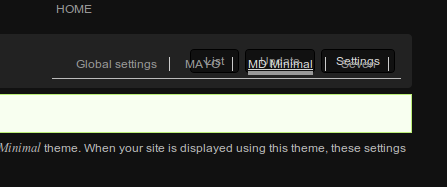
When using this theme on a page with both primary and secondary tabs, the tabs overlap each other making it very hard/impossible to use them properly:

I like the fact that the tabs are displayed to the right of the title section, but the problem occurs because they're placed there using position: absolute;.

I recommend instead creating a div around both the title and the tabs elements and use floats to align them. This will have the added benefit of allowing the div (with the rounded-corner background) to expand vertically if there are secondary tabs present.

CommentFileSizeAuthor
#2 fix_tabs_display-1295422-2.patch3.06 KBAnonymous (not verified)
#1 md_minimal-tabs-fixed.png9.77 KBAnonymous (not verified)
#1 fix_tabs_display-1295422-1.patch3.01 KBAnonymous (not verified)
md_minimal-tabs.png9.44 KBAnonymous (not verified)

Comments

Anonymous’s picture

Status: Active » Needs review
StatusFileSize
new3.01 KB
new9.77 KB

The attached patch fixes this issue using the solution described above.

Anonymous’s picture

StatusFileSize
new3.06 KB

For some reason the #title-tabs div was still being displayed even when there was no title or tabs. This updated patch fixes the issue.