Hi,
I decided to go with a completely different approach for the module. What was bothering me was that the module would work fine with images, but what if I wanted to link e.g. a Youtube video image to a youtube embedded video ?
So I completely rewrote the module so it uses the file_entity API and uses files display modes to decide what to show in the field and what to show on colorbox. So you can decide to use the "Small" view mode for the field and the "Large" view mode for colorbox, using your defined file types formatters. It also takes care of gallery settings.
This makes the whole thing much more powerful and flexible.
A patch is attached, as well as a full module zip.


Comments
Comment #1
jide commentedJust added some access verifications.
Comment #2
murzThanks, I'll try to test this in several days and report here if find some problems.
Comment #3
gaele commentedHi jide,
I tried the patch from #1. It didn't work.
Settings (on tab "Field display"):
- View mode "Small" set as Image thumbnail.
- View mode "Large" set as colorbox media small to original; I left the other setting (Image large).
- Added an image in the wysiwyg editor, using "Large".
Result: a fixed, large image.
Also: it seems by default this module creates a circular dependency. In view mode Preview using colorbox media the field view mode is Preview as well.
Comment #4
jide commented@gaele : Since there was no documentation, it was unclear how to use the module. I added a README file explaining how to install and configure the module. However, I did not test this with inline images inserted using WYSIWYG.
Here is an updated patch and zip.
Comment #5
gaele commentedThank you for the update. I'm using the media module.
From the README:
At "Manage display" there's nothing to configure. "Manage file display" however contains the option shown in the attached screenshot, including the circular dependency I mentioned.
I didn't try with it an image field. However Media + Wysiwyg still doesn't work.
Comment #6
jide commentedYou should do the opposite : Use the "Colorbox file" display mode for your content type, and in File types, configure the chosen view modes with e.g. "Image".

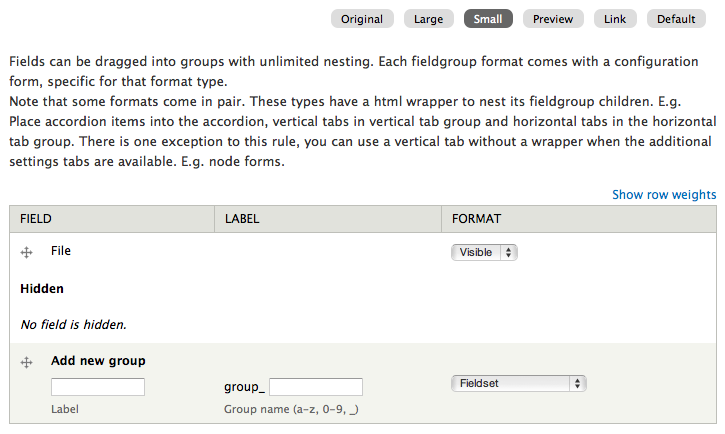
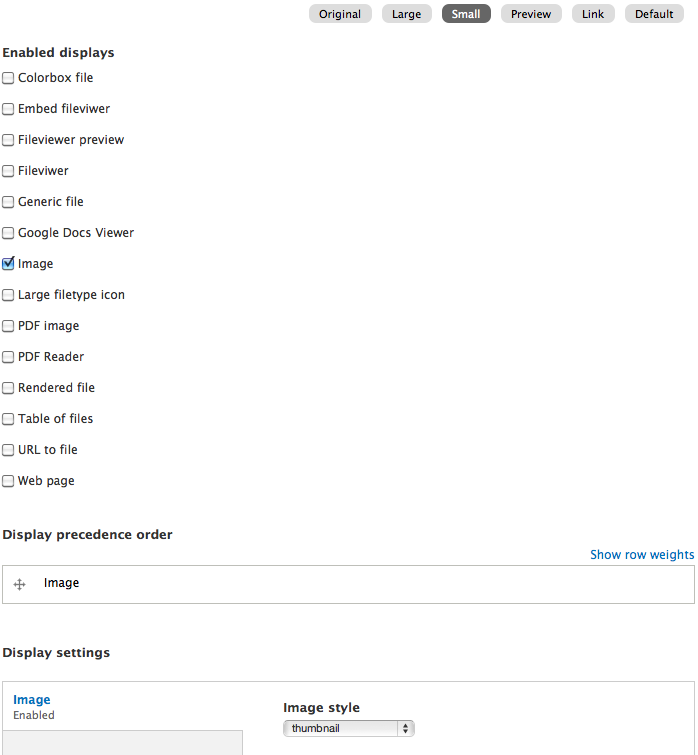
With screenshots :
In your content type, choose "Colorbox file", and choose "Small" and "Large" view modes :
In File types, in "Manage display" ensure "Small" is displayed :
Finally, in "Manage file display", configure the view modes, e.g. we use "Image", and set "thumbnail" for the "Small" view mode, and "large" for the "Large" view mode :
Comment #7
jide commentedStatus.
Comment #8
camdarley commentedHi,
I did exactly as you said, the thumbnails are showing well, but i have no image in my colorbox... all i have is an access denied error.
The log report this:
Type access denied
Date Wednesday, October 19, 2011 - 14:31
User admin
Location http://mysite.net/colorbox_file/414/media_large/und
Referrer http://mysite.net/article/my-article
Message colorbox_file/414/media_large/und
Severity warning
Hostname 127.0.0.1
Any idea?
Thanks for your work by the way!
Comment #9
jide commentedHmmm... odd. Did you try with user 1 ?
Otherwise ensure :
Comment #10
camdarley commented- cache emptied
- logged as admin
Warning keep displays...
I can see the image at http://mysite.net/media/414/view, without access warning.
I keep investigate on this issue, but you're right, that's odd.
Comment #11
camdarley commentedOk, i found it.
Comenting
'access callback' => 'file_entity_access',in colorbox_file.module solve the issue.It must be because i use media 7.x-1, i didn't see the dependencies.
Anyway, i have another issue, not critical, but as image style is not generated, the colorbox is empty. I had to load http://mysite.net/colorbox_file/414/media_large/und to generate media_large version of the image, then it worked well.
That's sound logical but it could be confusing for regular user.
Comment #12
jide commentedOh, yes, the module requires the 2.x version of file_entity, which is a dependency of the media 2.x module. Maybe it could be version agnostic.
About the image generation problem, that is most probably an issue with the image_style module, you should not have to visit the url first to generate the image of course. Using a simple image style formatter, do the image show correctly on the first time it is displayed ?
Comment #13
camdarley commentedMy apologies, i used a simple image style formatter and its working well. Sorry for wasting your time ;)
Comment #14
neurojavi commentedHello:
Thanks for this module!
I've managed to make it work but with the following issue, similar to #12:
The first time I click on an image belonging to a gallery, a empty white box appears, then I press esc key and click again in the same image and the image appears in the colorbox. I have to do this for each image in the gallery.
If I use a simple formater it works (or if I use the url with /styles/....)
And other question:
Would it be toot much difficulto to make the module show media entities and no file entities?
I have added some fields to my media bundles (like author, licence, etc.). I have created some view modes that show this fields and others that not. It would be very useful to be able to show this view modes in a colorbox a not only the file ones... This would make this module much more powerful.
PD: I'm using media 2.x-unstable2
Thanks.-
Javi.-
Comment #15
neurojavi commentedHello again:
The problem related to getting empty white boxes is wore than what I thought. It seems to show white boxes randomly (I cannot imagine why sometimes it show the picture and sometimes not). You can see an example here: http://buscando.waslala.org/galeria/una-semana-en-delhi
It's a production site about my 2 years travel and educational project arround the world. Please any help will be very valuable to me since is difficult form me resolve this problem while traveling...
Thank you!
Comment #16
gaele commented@neurojavi: This is the same problem as #11/#12. The first time you click the image is not generated yet.
Comment #17
camdarley commented@gaele: I don't think so, #11/#12 is a permission problem, and in this case the image is replaced by "access forbidden:..."
@neurojavi: it seems that your image is loading well, but your colorbox have a 0px width... have you checked your colorbox settings?
Comment #18
camdarley commentedAlso, have you downloaded the latest version of colorbox?
Comment #19
jide commentedSee the README :
Comment #20
neurojavi commentedOh! #19 was the solution! I remeber I read this some days ago but didn't notice taht was the reason :-(
I get the same white little square the first time a picture is loaded but thats another issue and is not critical.
Another question: Any plans to be able to use this module with wysiwyg and to make a public release of the module?
Thanks again!
Comment #21
neurojavi commentedHello again:
I want to open a debate about the future of this module.
What is kmadel's opinion about this? has he any intention of make this rewrited version of the module the oficial one?
I thinks that we have to decide about this in order to make the module go further...
I want to open issues for some new features or bugs so this issue doesn't get overloaded but its not posible since this is a patch inside a sandbox project.
My opinion: I like this version and will be happy if it is the official one. It works fine for me and seems more user friendly. It would be perfect if it allows using it in WYSIWYG editors and if it allows to display full media entities and not only file entities. This will allow to show pictures or videos with descriptions and license information in a colorbox (if you add this fields to your media entities, of course). In fact this are the two feature request I'm willing to open...
Thanks.-
Comment #22
kmadel commentedI just applied this patch locally a couple of days ago and everything appears to be work well against the latest dev release of the the Media module. I also took a crack at making the caption that shows up in the Colorbox overlay be based on a configurable field on a File type entity - so you could use a different field depending on the type of file entity - Image, Video, Audio, etc.
I still have some testing to do and need to run everything through the coder module. Then I will push it into the repository. At that point, I will wait to get some feedback on the changes, and if things are stable enough I will promote this to be a full project and create an official release.
Also, I would like to point out that I am working against Media 7.x-2.x-dev and don't plan on supporting the -1.x version of Media.
Comment #23
neurojavi commentedOk! This sound great... I'll test it as soon as available!
How are you planning to do this? Will we have to select a caption field for any type of files in colorbox formatter settings? It would mean one selectbox for audio, one for video, etc. Wouldn't it?
It seems a little comlicated UI and code...
I was thinking about another approach:
Change colorbox_file to render in the colorbox the file entity using the view mode selected in field configuration. I mean display the main file (image) and its fields according to the selected view mode. Currently it seems that only displays the file associated with the file entity and not its fields.
With this approach I can create and configure a "Colorbox test" view mode and show a large image with description and license fields for image media, the audio player, album name and license fields for audio files, etc.
The caption text could be managed and selected in view mode configuration (perhaps this task belongs to another module, like media or DS?)
This are only some thoughts. I'm sorry if I've said anything too much stupid! :-)
Comment #24
kmadel commentedThe 'caption' to use as the Colorbox caption would be a setting that is available on all text fields of a given file type. Remember, the updated code already supports the use of Field entity display modes to display the media item on the page and in then possibly a different one or the same display mode (if you want?) to show the media item in the colorbox overlay. So any fields that you add and select to show will be displayed in the colorbox overlay. However, the colorbox module uses the title attribute of the image being displayed as the 'caption', so my approach is to allow you to choose a text field on one of you file field types via the manage fields configurate for File types.
Then, for the colorbox file formatter settings, you will just specify if you want to use this field approach, the approach that was in the re-written code (basically uses the label of your media field for the node type, or have no caption be displayed.
Comment #25
jide commentedIt would be great to see the this committed as a real module.
Concerning the file displayed with its fields, since the function used is
file_view($file, $view_mode, $langcode)It should display file fields I think (did not try this though, but seems obvious).
I'm not sure I follow you here, what do you mean ? Media module displays file entities, right ?
@kmedal: What do you think about committing this as is first, and then make changes ?
I put status back to "needs review" and change "assigned to" in the meanwhile (could be RTBC according to your reviews though).
Comment #26
neurojavi commented@kmadel
OK! It seems a good approach for the UI to select the caption text. One question related with this:
Do you know if there is some way to make that the field selected as caption for colorbox view mode gets used as title and/or alt tag in File view mode? Could this be implemented as part of this module?
@jide
Yes, you're right! I was a little confused. And it is true, I can see fields configured in my view modes in the colorbox overlay. I had a problem but it seems to be related to Display Suite (it seems to not work with file entity view modes).
Thanks.-
Comment #27
kmadel commented@neurojavi I have thought about the image alt/title attributes quite a bit. For the Colorbox module, the title attribute is actually what is being leveraged to to uses File entity field as a Colorbox caption. There is an interesting discussion about the title/alt attributes as an issue on the Media modoue: http://drupal.org/node/1343022.
Now, the Colorbox File module is really trying to be a formatter for any other situation than when you want to display a Media Field entity in a Colorbox. As you can see if you read through the post above - what if you want to have the title/alt text be specific that the Media item is being displayed with - @jide's approach handles this somewhat, but the same field label would be used across all items of a multi-valued media field. What if you have a multi-valued Media field on your content type and would like to have a node specific title attribute for each that is different? I would rather have another module take care of this sort of scenario, and then with the Colorbox File you would be able to configure the formatter settings to use the title or alt text - that would actually be being set based on some field widget setting or something node specific like that.
Comment #28
jide commentedJust noticed I left a typo on line 53 :
'file_view_mode' => 'smalll',should be :
'file_view_mode' => 'small',;)
Comment #29
Toktik commentedThis definitely should be commited and converted to real project.
Comment #30
kmadel commentedI am close to being ready to commit the changes that include some new caption handling support, and after a short review by the few that our using it, I will promote it to a full project.
Comment #31
marco_cruz commentedI'm using the version from your last submission, and I'm getting this error
and can't figure it out...
Comment #32
kmadel commentedThis fix has been pushed into the repository - to include a fix for #28. Once this is tested a bit, I will create a full project and a dev release.
Comment #33
neurojavi commentedI've tried last git version and this is my review:
- A minor problem: When you are configuring a media field with colorbox_file formatter and you change to File type text field it gets saved when you press update and save (in the summary it appear "File type text field" but when you edit formatters setting the combo box is allways in "Title text".
- A major problem: I've created a new field for a image field type (field_test) and when I check the checkbox to make this field the source to colorbox caption and press save, I get a white screen and this setting is not being saved (it says that settings have been saved if I load another page, bur colobox caption setting is unchecked again). I also get a white (empty) page when I try to view a node that uses this file type.
- A comment: This only works for text fields, not long text ones, Am I right? Could it be useful if we can use lng text too? Or this makes no sense becouse of the supposed length.
Thanks!
Note: I'm using last dev 2.x media version
Comment #34
kmadel commentedWill update code with fixes
Comment #35
kmadel commentedIssues from #33 have been fixed. Also a big change is that this module was renamed to Media Colorbox. The primary reason for this module in the first place was to make it easy to use Colorbox with Media module based field, so it seemed like Media Colorbox made more sense than Colorbox File.
Comment #36
andes1 commentedHi kmadel,
I have used Media Colorbox latest released (7.x-1.0-beta2) module along with Colorbox and Media module. This works fine for images, but not when file type is Media asset. I did all settings inside configuration-> File Types -> Image Manage Display. The exactly same as describe in previous posts. Still this not working. Is it required to add any patch or something to work with it ??
Comment #37
kmadel commented@andes1, you may want to create a new issue for this. Also, what is the actual file type(s) that you are working with - PDF, video of some sort, MS Office files? You will have to manage the display for whatever File type the Media asset falls under.
Comment #38
kmadel commentedPlease test with rc1.
Comment #39
frixos12 commentedSame issue with me.
I am using video file along with the latest dev versions of all the required modules.
What file display should i use for the colorbox view mode (Configuration » Media » File types » Manage file display)
Comment #41
samsterlin commentedJust added some access verifications.