

 Come together with the global Drupal community in Rotterdam, 28 Sept – 1 Oct 2026. Sessions, contribution, connection, and Early Bird savings until 8 June.
Hi there,
I installed your module, but it always returns "In stock", even if the stock value is zero.
To check whether the correct value is determined, I added this:
watchdog(WATCHDOG_NOTICE, print_r($return, TRUE));
at the end of uc_out_of_stock_query()
In the logs, I find:
Array ( [uc-product-add-to-cart-form-218-1] => )
Any ideas?
Thanks,
Stefan
| Comment | File | Size | Author |
|---|---|---|---|
| #21 | dress_stock.PNG | 14.34 KB | ratinakage |
| #21 | db.PNG | 4.31 KB | ratinakage |
| #13 | 1301548-13-only-radio-and-select.patch | 2.98 KB | hanoii |
| #6 | shot1.png | 93.63 KB | Schneck |
| #6 | shot2.png | 51.76 KB | Schneck |






Comments
Comment #1
hanoiido you have stock enabled for that model, and if you use attributes, do you have any selected by default? if the stock cannot specifically be retrieved it will display in stock. Do you ahve a link to the site and can you place screenshots of your adjustment and stock tab of the product.
Comment #2
Schneck commentedStock is enabled, and default attributes are selected. You find an example at http://comali.de/artikel/brosche-bambi but your module has not been enabled. The screenshots show my development server. The first shows that the stock level is zero. The second one show some attributes, and that there is a default attribute. The third shows an excerpt of the product details page, where "In Stock" is shown.
Comment #3
hanoiiAny chance you can enable the module online so I can take a look into what's being sent to the server?
Thanks,
a.=
Comment #4
Schneck commentedUnfortunately not, but I have a local application clone. You could tell me what to do to gather the information you need, I'll send it to you then.
Comment #5
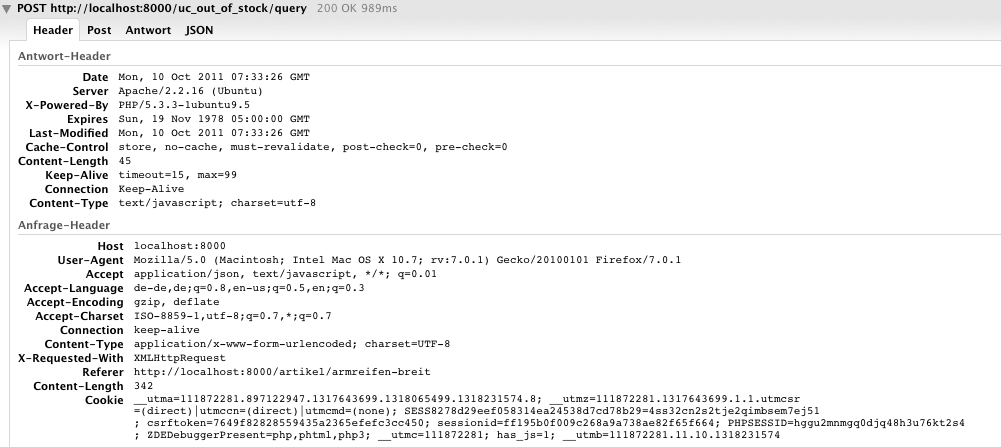
hanoiiWell, I was planning to debug the script from your side. Can you put your local copy live somehow? Anyway.. I am not sure. Apparently, from what you describe, there issue might be on several places. My first suspicion is that there's something wrong in the JS. What happens when you actually change the attribute? Does it display out of stock? Say you change it and then change it back to the default, what happens? Try to capture with firebug or chrome everything what's being sent to the uc_out_of_stock/query path, both when the script is first load and afterwards.
Comment #6
Schneck commentedI made some firebug screenshots, does this help in any way? When I have some free time, I will set it up online, but it could take some time.
Comment #7
hanoiiWill check them out, but trying to debug a live site might be very helpful. One thing I do need to know if is this behavior remains the same when you change attributes. Does the throbber starts? Does it still shows as In Stock?
Thanks,
a.=
Comment #8
Schneck commentedYes, it remains the same. The throbber always starts, and it always returns "In stock", even if I change the stock level to zero or increase it.
Comment #9
wd4t commentedI experienced the same issue with version 6.16, leading me to install the latest dev version.
From what I can determine the root of the problem appears to be recovery of stock information associated with attribute options.
If you go here http://staging.cashmereandcotton.co.uk you'll find a site that's ready to go live save for this issue. From the main menu roll over the option Cardigans and click on the expanded option of Boyfriend Cardigan. The stock level for the option Aubergine and Large is zero, yet it returns in stock and adds the item to the cart.
If the SKU number for Aubergine Large is entered as the SKU number as part of the main product information then it's shown as out of stock. This suggests that a check for stock for an SKU relating to the selected options is not happening or is failing.
I'm happy to provide login to the site for settings to be checked.
Comment #10
Schneck commentedI tried out your site, but it seems to work there. Could you tell me what changes you made to get it running?
Comment #11
wd4t commentedI'm afraid it isn't working correctly.
The SKU number shown on the main product detail page is W9FSJ100-TO-L. This relates to the Taupe Large option. This happens to have zero stock. If you select the Black Medium it returns out of stock, when in fact there are 12 in stock.
Irrespective of what option is selected out of stock is returned every time. This appears to be because the check being done is only against the SKU as listed on the main product page. The check doesn't appear to be done against the SKU for the option selected.
The behaviour is consistent because if you look at this product http://staging.cashmereandcotton.co.uk/warmers/skinny-striped-scarf-aw11... you'll see the SKU is AW11SS100. This SKU is not enabled. This product has all options set to zero stock. This suggests the default behaviour of returning in stock is happening because the main SKU is not being found and the individual option SKU's are not being checked.
I hope this additional information helps you to see what the problem is?
Comment #12
hanoiiHi @wd4t, I would appreciate to have login details with enough permissions, just sent them via private message. Thanks, will be reviewing this maybe today.
Same goes for @Schneck, I know it's a bit of a pain, but if you can temporary put a sandbox of the site with the problem somewhere and provide me login details, that'd be great, just as a temporary place.
Comment #13
hanoiiAttached is a patch for you to try.
@wd4t
First of all, thanks for the access, it was very helpful, not to mention the cpanel access, which also helped a lot, thanks for the trust. Also be aware that I have installed a module, and added some attributes to do some tests, but you said it was fine to mess with it, that's why I did it. It helped me find a couple of bugs which this patch attempts to fix. The patch is against the dev version, you do have the 1.6 installed on the stage server. Although your files are patched there, I suggest you installing dev and then applying this patch and try things.
@Schneck try this patch as well and comment back.
@wd4t and @Schneck
* uc_stock_notify
There is some comments I should mention, first the use of uc_stock_notify, there's already an issue #862778: Integration with uc_stock_notify for using that module with this one #862778: Integration with uc_stock_notify and I don't really use it so I haven't followed it much there's certainly some kind of issues with both modules. So if you are going to report issues with this module, I really suggest you disable that module first, check everything and then re-enable it and see what happens and maybe explain it on the stock notify issue. One thing I noticed in your case though, @wd4t, is that if the default attributes or the main sku is active and out of stock, stock notify replaces the add to cart button with the notify one. So then, even though my module gets the stock information properly now (with the patch) it can't add the 'add to cart' form because there was never there. What the module does is hide or show the add to cart form, but if stock notify modified the form, I am unable to either hide or show the form and display the out of stock message.
* main sku
be carefull of what you set your main sku (the one on the product). If it's the same as one of the combination of attributes, and either no attribute or not all of the attributes are selected, the stock info will default to that one. I suggest using a different SKU for the main product than of all of the SKU with the attribute and options combination.
Because checkboxes don't really add sku info, they shouldn't be included in any stock control (both client and server). That's also included on the patch and will soon udpate the project page for that.
Comment #14
wd4t commentedI've now got the module working on staging and live sites. A big thanks for sorting this!
I didn't get the module working in quite the way you advised. I applied the patch to the dev version and it was still giving me inconsistent results. I disabled the stock_notify module and this led to consistent behaviour on the staging version using version 1.6. I then moved the whole patched module across to live and this has produced the behaviour I was expecting.
I'm going to install the dev version on the staging site, apply the patch and then test. This will be towards the end of this week. But for the time being I can confirm that version 1.6, as you patched it, is working.
Comment #15
hanoiiIt might be important for you to test the dev version as I am planning on releasing a new version soon with the "In stock" functionality, that adds how many items are in stock next to the add to cart button.
I will now commit this patch, so check for the date of the dev version. If it was generated today or tomorrow, then it will already include this patch.
Comment #16
hanoiiAny feedback? @Schneck?
Comment #17
skwtayler commentedSilly question, but where do you apply the patch?
Also is it possible to remove the feature from the catalogue view pages and only display in the product view?
Comment #18
ratinakage commentedHi all,
I am experiencing the same issue exactly. Has the patch been applied to the latest release (6.x-1.7)?
Thanks...
Comment #19
hanoii@ratinakage the patch was applied, can you describe your problem, attach the screenshots of the pages I requested above as well as provide, if possible a link to the site where this is occurring so I can take a look?
Comment #20
Schneck commentedPerfect! Thanks a lot, it's working now.
Comment #21
ratinakage commentedHi,
Here is an example where this module is not working. It shows in stock but as soon as you select the attributes, it shows as out of stock:
http://eclosettest.co.za.dedi6.cpt3.host-h.net/house-fashion/clothing/fl...
Here is the two records in uc_product_stock:
Does this help?
Comment #22
hanoii@ratinakage according to what you show, the behavior is correct.
At first it shows in stock, because as no attribute is selected, it defaults to looking for the main SKU, which in your case, is not active, so, it doesn't do any stock validation on it.
Comment #23
Will Igetit commentedwell I have a similar issue which occured only when i added a jquery widget on the page
taking of the links get my throbber and out of stock back works.. I have no error on my page that is kind of disturbing.
Comment #24
hanoiijquery-ui 1.8 not sure if it's supported on D6 even with the latest jquery_update module. I suggest you stick with jquery_ui module with it's 1.6 or 1.7 which should not conflict, anyway, if you are experiencing a conflict with jquery.ui either open another issue here or better on the jquery_ui project.
Comment #25
Will Igetit commentedok i think even if i did not replicate your issue, we have the same problem being that we have two concurrent version of jquery running.
and the solution for the time being that i found is there :http://drupal.org/node/1058168
Comment #26
hanoiiI am not really following you and this is really out of this topic. Let's continue this on a new issue if necessary otherwise let's keep this issue into what was reported first, which is nothing to do with jquery.
Comment #27
hanoiiI think this was a non issue after all.