
 The 2026 Drupal Business Survey is open. Your response will help shape the future of the Drupal business ecosystem.
On this page
- Use Cases
- Active Directory + Groups Example
- Drupal basics
- Goto admin/config/people/ldap/servers
- Goto admin/config/people/ldap/user
- Goto admin/config/people/authorization/profile/
- Derive Authorizations from User DN
- How "Derive from user DN" Works:
- What an LDAP looks like that can use the "Derive from user DN" approach.
- Derive Authorizations from User Attribute
- How "Derive by Attribute" Works:
- Which LDAPs should use the "Derive by Attribute" approach?
- What nested groups mean in "Derive by Attribute" approach.
- Step by Step walkthrough
- Configuration and Sample Data (for further understanding)
- Step through for example above
- Derive Authorizations from LDAP Group Entry
- How "Derive from Entry" Works:
- Which LDAPs should use the "Derive from Entry" approach?
- What nested groups mean in "Derive from Entry" approach.
- Step by Step walkthrough
- Configuration and Sample Data (for further understanding)
- Visual Breakown of Configuration
LDAP Authorization use cases
This is documentation for Drupal 7, which is no longer supported. Learn more and find resources for Drupal 7 sites
LDAP Authorization is simply an API for "authorization consumers" such as Drupal roles or Organic Groups groups. Drupal roles is most commonly used. You must enable LDAP Authorization and one or more "authorization consumer" modules.
Each "authorization consumer" will have a single configuration entry at: admin/config/people/ldap/authorization that will need to be created, configured and enabled for authorization to work.
After configuring an "authorization consumer", use the "test" link to see the authorizations a given test user would be granted.
Use Cases
Use cases are many and varied so the user interface that accommodates them can be complex. Add your own examples below! Be sure to summarize the goal of your authorization configuration and what type of LDAP you are using.
Detailed explanations of the three LDAP group mapping strategies are on child pages
Active Directory + Groups Example
Goal: Have users log in to your Drupal website based on their credentials from ActiveDirectory, ensure that their 'group' in ActiveDirectory puts them in the correct Drupal 'role'.
Note! This is performed against 7.x-2.x branch, there is a known bug and requires a small patch.
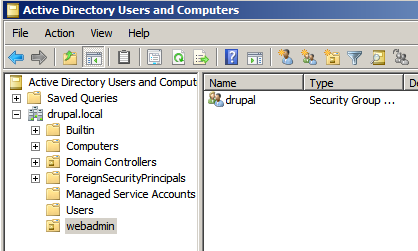
In this example we created groups in ActiveDirectory based on this tutorial and added users to those role(s), the base DN for the AD/LDAP Server is "dc=drupal,dc=local". I now have a OrganisationalUnit (ou) called "webadmin" and a Group called "drupal"
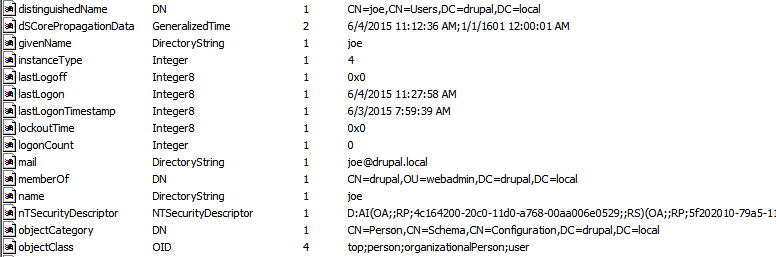
Using the 'Active Directory Explorer' application my new user 'joe' looks like the following (once he has been assigned to the new group)
Drupal basics
- Ensure your ActiveDirectory server is accessible and running correctly
- Be sure your PHP is running php_ldap
- Enable ldap_user, ldap_authentication, ldap_authorization, authorization_drupal_roles, ldap_servers, ldap_sso
Goto admin/config/people/ldap/servers
- Configure a new server, select Active Directory and set the obvious values
Important parts here
- Select Bind with Users Credentials
- Base DNs for LDAP users, groups, and other entries. in our case is "CN=Users, DC=drupal, DC=local"
- AuthName attribute is "cn"
- AccountName attribute is "cn"
- Email attribute is "mail"
- Expression for user DN. Required when "Bind with Users Credentials" method selected. is "cn=%username,%basedn"
- Name of Group Object Class is "group"
- A user LDAP attribute such as memberOf exists that contains a list of their groups. is CHECKED
- Attribute in User Entry Containing Groups is "memberof"
- LDAP Group Entry Attribute Holding User's DN, CN, etc. is "distinguishedname"
- User attribute held in "LDAP Group Entry Attribute Holding..." is "dn"
- Groups are derived from user's LDAP entry DN. is CHECKED
- Attribute of the User's LDAP Entry DN which contains the group is OU
Goto admin/config/people/ldap/user
- Be sure to select your server at LDAP Servers Providing Provisioning Data *
- Create or Synch to Drupal user on successful authentication with LDAP credentials. is CHECKED
- Select your server at LDAP Servers to Provision LDAP Entries on
Goto admin/config/people/authorization/profile/
This is where we do the actual mapping between LDAP/AD 'Groups' and Drupal 'Roles'
- Add a new authorization mechanism
- Select your LDAP server
- Enable this configuration is CHECKED
- Only apply the following LDAP to drupal role configuration to users authenticated via LDAP. is up to you, in our case it is CHECKED
Now for the fun part..
Mapping of LDAP to drupal role (one per line)
I have a Drupal Role called 'editor', and I want anyone in the LDAP group 'drupal' of the organisational unit webadmin to be assigned to this group when they authenticate, my example config is just "CN=drupal,OU=webadmin,DC=drupal,DC=local|editor"
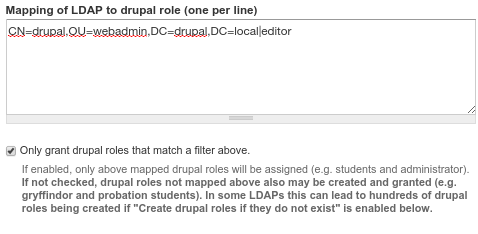
Taddaa, now the user logs in with the role automatically assigned

Derive Authorizations from User DN
How "Derive from user DN" Works:
- Query for user's ldap entry. e.g.
cn=verykool, ou=sysadmins, ou=it,dc=ad,dc=myuniversity,dc=edu - whichever attribute (e.g. ou) listed in "Attribute of the DN which contains the role name", will have its value added to the list of authorizations. E.g. "sysadmins" and "it"
- "Derive from user DN" does not support nested groups. Nested has no meaning in this approach
What an LDAP looks like that can use the "Derive from user DN" approach.
This can be useful in any LDAP and is typically used with one of the other 2 approaches at the same time. While options II.B. and II.C. are designed for two different LDAP group models, "Derive from user DN" simply leverages user DN attributes such as "ou" which may map to authorizations.
Some other examples besides the "ou" attribute would be useful here.
Derive Authorizations from User Attribute
How "Derive by Attribute" Works:
- Query for user's ldap entry.
- for each attribute listed in "Attribute names", add entries to list of authorizations
- if nested is selected keep finding parent groups recursively
Which LDAPs should use the "Derive by Attribute" approach?
Microsoft's Active Directory has this structure. The user's attribute "memberOf" will have a list of all the groups the user is a member of.
What nested groups mean in "Derive by Attribute" approach.
In this approach, nested groups means taking all the groups in memberOf and adding the groups they belong to, recursively. That is if jdoe belongs to the bakers group and the bakers group is member of the "food workers" group, jdoe's authorizations will include bakers and "food workers"
Step by Step walkthrough
Configuration and Sample Data (for further understanding)
User verykool has an ldap entry of:
    'dn' => 'cn=verykool,ou=it,dc=ad,dc=myuniveristy,dc=edu',
    'mail' => array( 0 => 'verykool@myuniversity.edu', 'count' => 1),
    'sAMAccountName' => array( 0 => 'verykool', 'count' => 1),
    'password' => array( 0 => 'goodpwd', 'count' => 1),
    'memberOf' => array(
      0 => 'cn=sysadmins,ou=it,dc=ad,dc=myuniveristy,dc=edu',
      1 => 'CN=NETadmins,ou=it,dc=ad,dc=myuniveristy,dc=edu',
      2 => 'cn=phone operators,ou=it,dc=ad,dc=myuniveristy,dc=edu',
      'count' => 3,
      ),
- option II.B. Derive from attributes is checked and "memberOf" is in the "Attribute names" text area.
- group class is set to "group" in the ldap server configuration.
Step through for example above
- LDAP Authorization finds the user entry and checks if any "memberOf" attributes exist.
- It loops through all of the memberOf attributes and adds each to the authorizations/groups list. e.g. 'cn=sysadmins,ou=it,dc=ad,dc=myuniveristy,dc=edu', 'CN=NETadmins,ou=it,dc=ad,dc=myuniveristy,dc=edu', 'cn=phone operators,ou=it,dc=ad,dc=myuniveristy,dc=edu',
- If nested groups is checked, a search is performed for all groups that have these groups as members (their parents)
(&
  (objectClass=group)
  (|
   (memberOf=cn=sysadmins,ou=it,dc=ad,dc=myuniveristy,dc=edu)
   (memberOf=CN=NETadmins,ou=it,dc=ad,dc=myuniveristy,dc=edu)
   (memberOf=cn=phone operators,ou=it,dc=ad,dc=myuniveristy,dc=edu)
  )
)
and the memberOf attributes from the resulting groups are added to the authorizations. This continues on recursively until no results are found or a limit of 10 nests is reached. Because of the number of queries involved, it is best to use 1 high level basedn instead of several lower ones.
- if "convert full dn to value of first attribute is checked", the entire array of dns is converted to first attribute. e.g.
cn=sysadmins,ou=it,dc=ad,dc=myuniveristy,dc=edubecomessysadmins. This option is problematic when many groups are involved and name collisions may occur.
Unit tests in the files at /ldap/ldap_authorization/tests/DeriveFromAttr are also illustrative of this method.
See also http://drupal.org/node/118112 for Drupal 6 LDAP Integration mapping explanations
Derive Authorizations from LDAP Group Entry
How "Derive from Entry" Works:
- Group entries under consideration are listed in the IIC. authorization configuration under "LDAP DNs containing...".
- each of these groups that has the user DN in question as a member is added to authorizations
- if nested is selected keep finding child groups recursively. If user is a member of a child group, the ancestor in "LDAP DNs containing..." is added to authorizations.
Which LDAPs should use the "Derive from Entry" approach?
This scenario is most applicable to UNIX LDAP environments. In this scenario, the LDAP groups are stored as objects with their members represented by a mulitvalued attribute. That attribute's name might be: members, memberUid, uniquemember, etc. That attribute's value might be the DN or CN of another group or user. LDAPs that use the memberOf overlay, should use option IIB.
What nested groups mean in "Derive from Entry" approach.
If user is a member of a child group, the ancestor in "LDAP DNs containing..." is added to authorizations. That is if jdoe belongs to the bakers group and the bakers group is member of the "food workers" group, jdoe's authorization will be "food workers" (if "food workers" is listed in "LDAP DNs containing..."
Step by Step walkthrough
Configuration and Sample Data (for further understanding)
The following group entries exist in LDAP
    'dn' => 'cn=developers,cn=groups,dc=ad,dc=myuniversity,dc=edu',
    'objectclass' => array( 0 => 'groupofuniquenames', 'count' => 1),
    'uniquemember' => array(
      0 => 'uid=joeprogrammer,ou=it,dc=ad,dc=myuniversity,dc=edu',
    ),

    'dn' => 'cn=it,cn=groups,dc=ad,dc=myuniversity,dc=edu',
    'objectclass' => array( 0 => 'groupofuniquenames', 'count' => 1),
    'uniquemember' => array(
      0 => 'cn=developers,cn=groups,dc=ad,dc=myuniversity,dc=edu',
      1 => 'cn=sysadmins,cn=groups,dc=ad,dc=myuniversity,dc=edu',
      2 => 'uid=joeprojectmanager,ou=it,dc=ad,dc=myuniversity,dc=edu',
    ),
- option II.C. is checked
1. LDAP DNs containing:
cn=it,cn=groups,dc=ad,dc=myuniversity,dc=edu
cn=developers,cn=groups,dc=ad,dc=myuniversity,dc=edu
2. "dn" or attribute holding previous list: dn
3. Attribute holding: uniquemember
4. "dn" or User LDAP Entry attribute held in 3.: dn
Visual Breakown of Configuration
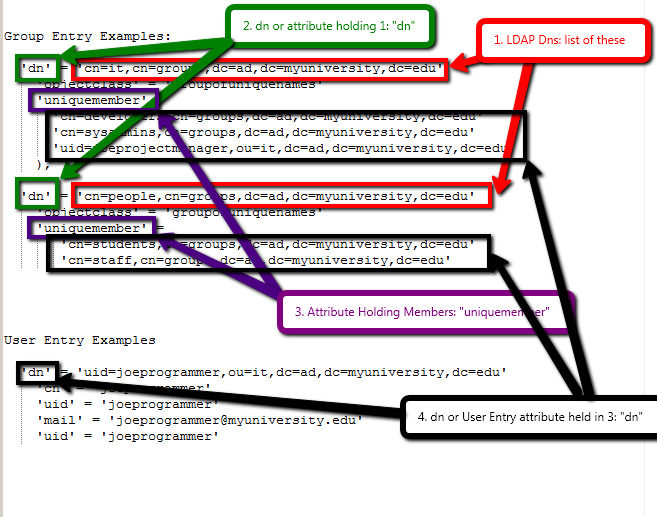
Unit tests in the files at /ldap/ldap_authorization/tests/DeriveFromEntry are also illustrative of this method.
See also http://drupal.org/node/118112 for Drupal 6 LDAP Integration mapping explanations
Help improve this page
You can:
- Log in, click Edit, and edit this page
- Log in, click Discuss, update the Page status value, and suggest an improvement
- Log in and create a Documentation issue with your suggestion
