

Reviewed & tested by the community
Project:
Field extra widgets
Version:
7.x-1.x-dev
Component:
User interface
Priority:
Critical
Category:
Bug report
Assigned:
Unassigned
Reporter:
Created:
10 Oct 2011 at 18:34 UTC
Updated:
10 Mar 2018 at 12:01 UTC
Jump to comment: Most recent, Most recent file

Comments
Comment #1
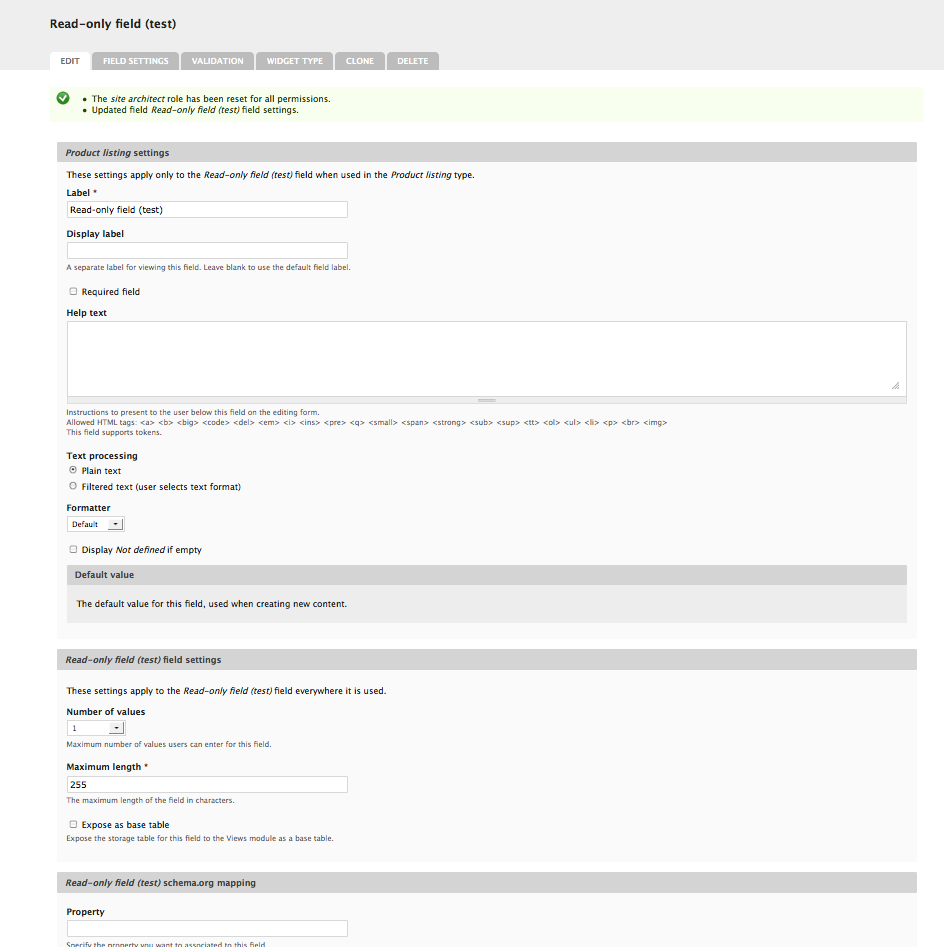
damien tournoud commentedYou should be able to go ahead and configure the formatter to use in the "Edit" section of the Field UI.
Not sure why the fallback default doesn't work for you.
Comment #2
jaxpax commentedSame here, Read-only doesn't show anything
Comment #3
amateescu commentedHere's the patch that I used to get rid of the fatal error mentioned in the OP as I encountered it when creating a field with the Hidden widget as well.
Note that it doesn't fix the read-only field not being displayed..
Comment #4
plonk commentedMarked #1312788: Fatal error: Unsupported operand types in field_extrawidgets.module on line 119 as duplicate of this issue. Confirmed that @amateescu's patch in #3 resolved that issue
Comment #5
nevergonePatch tested and works well.
Comment #6
amateescu commentedSure, the patch works, but only for the fatal error.
I can't remember if I tried, but does it also fix the read-only field being hidden?
Comment #7
deryck.henson commentedThis patch was unsuccessful in fixing the original problem (viewing the read-only field). Given that this is essentially half the reason this project exists, I feel the priority should be raised.
Comment #8
urlaub commentedWas anyone able to fix the original issue?
I installed the module to publish a read-only field in the edit form, but I have to confrim the bug, it's not working.
First I was using the module computed field and had the same issue, maybe someone can find a possible solution here: http://drupal.org/node/214197
Comment #9
damien tournoud commentedMerged #3 in 7.x-1.x.
Comment #10
rbennata commentedsame problem for me - readonly is just hidden. For me, this is the use for this module.
Comment #11
joel_osc commentedFYI, my read-only field is also not displaying, but I figure it is because my field is part of a Field Collection which means this line of code will return an empty array instead of rendering the field because the entity type is field collection but the form_state only contains a reference to the node entity which has the field collection.
Makes sense to me that field collections would need to be explicitly supported, too bad it is not because this is a great module!
Comment #12
davidwhthomas commentedSame here,
I have a field using the "Ready only" widget.
The value is set programmatically, and visible in the db field table, but the field does not display on the entity edit form.
Looks like it needs work.
Edit: field shows on entity view, just not on edit form.
Comment #13
Anonymous (not verified) commentedThe project notes state "Read-only: this widget shows the content of the field on the edit form".
This assertion is not true.
The module is not usable in its present state for this stated purpose.
Comment #14
Firemyst commentedI've been messing with this module for a day and saw, like everyone else, that the read-only option makes the entire value disappear. I made the following patch to fix the display for the read-only option.
Basically, it has to do with the visibility settings ('display_empty') removing the entire element if set not to show. This is the default behavior, so it looks like it's disappearing. By changing where the condition is shown, and adding a default #markup with the value first, I was able to solve this problem.
If this works for you, let me know. I consider it a WIP.
Comment #15
kasalla commentedThanks for the patch.
Now it shows the value even it is empty (display_empty = 1).
But using a simple textfield, I cannot enter the read-only text anywhere.
Comment #16
Firemyst commentedAh, to be honest, I hadn't thought of how to enter the data. Right now, I'm using it for showing data created by code in the database, where I wouldn't want an editor to mess with, like a shortened URL, for example.
Getting it to show as a valid text field in the Add content vs. Edit could be as easy as checking the node id, or the args. I can look into how do that when I have some free time, if no one else wants to give it a shot.
Comment #17
pdcrane commentedStill not resolved in -dev.
What's needed to push this patch through?
Comment #18
afoster commentedI applied patch in #14 to today's dev version and got this error. (2 errors per empty, read-only, visible fields).
Notice: Undefined index: value in field_extrawidgets_field_widget_form() (line 215 of /_work/PGA_pga.org/_website/sites/all/modules/contrib/field_extrawidgets/field_extrawidgets.module).
Notice: Undefined index: und in field_extrawidgets_field_widget_form() (line 215 of /_work/PGA_pga.org/_website/sites/all/modules/contrib/field_extrawidgets/field_extrawidgets.module).
Added is a revised version of #14 patch - I Added a check to if there is a value set, and if not applying an empty string.
Comment #19
Angry Dan commentedI'm having trouble with field collection items. As far as I can tell, rather than reading
$form_state[$entity_type]you just need to read$form['#object']instead.See attached patch.
Comment #20
Angry Dan commentedSorry, for what was undoubtedly my worst contribution of the day!
$element['#entity']is what I meant.Comment #21
Angry Dan commentedComment #22
miroslavbanov commentedFor me, I have the same problem on the taxonomy_term form. The term is at key
$form_state['term']and it is searched at$form_state['taxonomy_term'].Patch #20 fixes it nicely.
Comment #23
miroslavbanov commentedOops, I didn't realize until now, but this broke the field administration. New patch attached.
Comment #24
klonos#23 works for me in the latest dev. Thanx.
Comment #25
mirondi commentedComment #26
miroslavbanov commented@mirondi, at least say something. Why the silent treatment?