

 The 2026 Drupal Business Survey is open. Your response will help shape the future of the Drupal business ecosystem.
| Comment | File | Size | Author |
|---|---|---|---|
| #16 | ecard-s06-other_settings-2013-02-06_2132.png | 67.05 KB | yesct |
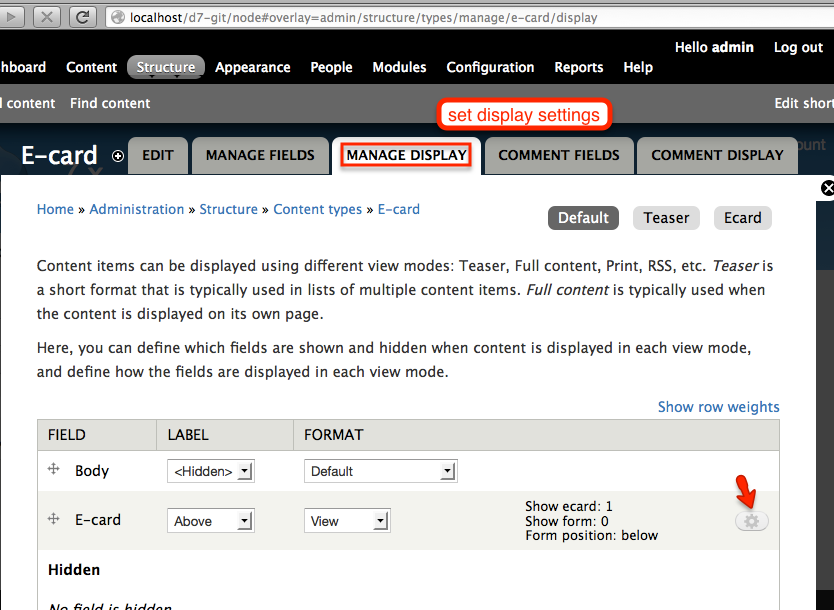
| #16 | ecard-s07-display_settings-2013-02-06_2135.png | 139.37 KB | yesct |
| #16 | ecard-s08-display_settings_defaults-2013-02-06_2137.png | 97.62 KB | yesct |
| #16 | ecard-s09-permissions-2013-02-06_2142.png | 117.23 KB | yesct |
| #16 | ecard-s10-permissions_for_content_type-2013-02-06_2147.png | 87.6 KB | yesct |





Comments
Comment #1
kars-t commentedHi
this is one of my todos for the module. Please stay tuned because this is rather time consuming :)
Comment #2
kars-t commentedQuick tipps:
Comment #3
shadowdknight commentedThanks for prompt reply.
It works for now :).
Comment #4
Guizlena Alvarado commentedI have problems displaying fields in my content type because there is a label and name, but I cannot display the field. I have set permissions but I don´t know what is wrong, please help me, I really need to finish my project on January. Thanks.
Comment #5
kars-t commented@Guizlena Alvarado
This is not enough information to help you :-/
Comment #6
Guizlena Alvarado commentedHi Kars-T:
Is there a tutorial to show e-cards using views? I am trying to show in my homepage a taxonomy term using a display block, but really I don´t know how to do it... I added a view of type Ecard, is that correct? Thanks.
Comment #7
kars-t commentedHi
please leave this for D7. For D6 there will be no further development and documentation. Only bug fixes.
Comment #8
iluvbluesky commentedHello,
I have been watching this module's status for a while now. I was hoping there might be some additional in-depth documentation offered about how to use this module. I am a new Drupal user, have my site up and have installed the module, created a node, given a field to the e-card form, and that's all I know to do! How do I get the ecard node viewable, then clickable and the form to show for a user to fill out? Can anyone direct me? I would appreciate any help at all, even a redirect to similar documentation that might apply. Kars-T I read your quick tips but don't understand what "adjust the field settings" means, and do not understand the steps following this. Also, if you can get a general outline of "how to", I'd like to volunteer to write the documentation for you or I am willing to help you do this in whatever way might help you the most. I will test this module and offer feedback when I can get it installed and working on my site. Thank you very much for reading this!
Comment #9
kars-t commentedHi iluvbluesky
thanks for your offer. I hope I find some time the next days to provide the information.
Comment #10
iluvbluesky commentedKars-T: Thank you for your reply! My offer stands indefinitely. If I knew more about Drupal and Modules, I would help you develop the module or do whatever you needed. I will hope and wait for whatever additional help documentation you can supply for this ecard module! Thank you again for all of the time you have put into this module and for your dedication to helping all of us who will use ecard as a result. It's so nice to know that there are people out there like you! :)
Comment #11
RKopacz commentedI am testing this module, which is a Godsend for my client. I am not sure this is a bug or a support request.
I want to know how to theme the page that the recipient gets. I did not see any tpl files in the module folder.
Specifically, I would like to take the expandable field set off the recipient's postcard. I have unchecked the message field check boxes in the admin page, but that seems to take the field set off the sender's form, but not the recipient's ecard page.
Any suggestions on that? Is the field set on the received card unintentional? I am sure I can modify via preprocess but wished to check first if there is a way that may be available but is not immediately apparent.
Thanks in advance.
EDIT, sorry this was directed at ver 6.10, misconfigured the meta data on this.
Comment #12
Preston McMurry commentedI am stuck the same as iluvbluesky. No idea what to do next. No idea, even, if this solution will be appropriate for what has been requested of me. First step first: Need to get this working to make that determination. Getting very frustrated ...
Comment #13
Preston McMurry commentedEnding up creating my own ecard module, using webform to create the form, and adding an "ecard image" content type to control what images are displayed for selection (using a pre-built option list).
Comment #14
kars-t commentedUnassigning task and will ask YesCT
Comment #15
yesct commentedYep. I'll look at this.
Comment #16
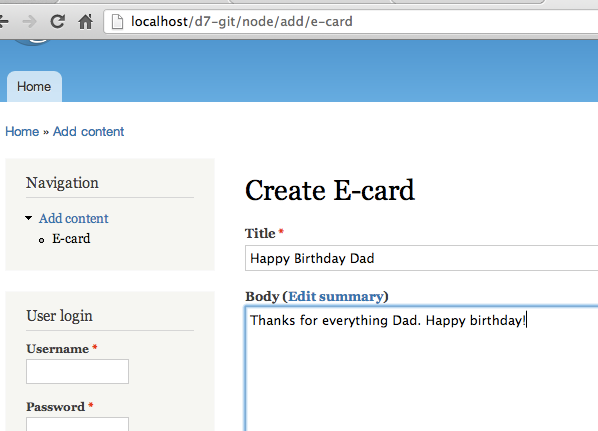
yesct commentedfirst of a few posts to come.
This one is a first pass at a minimal setup:
like:
Comment #17
kars-t commentedGreat thanks!
Now I have to bug you to do an README.md (Mark Down) please.
And remake this as a blog post for comm-press.de because than we can link this as documentation :)
Comment #18
yesct commentedyep.
I want to do some more detail with how to use an image with overlay text, and use roles to set up some user who create cards, and other who send them.
Is there any other workflow people can suggest get documented?
Comment #19
kars-t commentedWell I added tons of features Stella did write patches for. But currently I have to again review everything if I did something wrong in the patching process. So currently lets focus on base usage.
Comment #20
Anonymous (not verified) commentedJust wanted to thank YesCT for being THE person who created documentation for this module, which I might add (because of the screen shots) is better than for most.
While working with Views today, I noticed that the eCard module creates two Views pages. One lists eCards SENT. The other, eCards SCHEDULED.
I'd be unclear as to how eCard information (entered by the person sending the card) is ultimately removed from your database. Does it expire, must you delete it somehow?
If anyone knows, please post.
Comment #21
iluvbluesky commentedHi Kars-T, it's been a while. I'm sorry I could not stay with the project and develop the documentation. I had some unexpected health problems. Thank you to YesCT for the awesome screen shots and documentation--what a great job! As always, thank you Kars-T for keeping ecards alive.
Comment #22
imorris commentedWe have two questions:
Comment #23
GirlInTech commentedHi,
The instructions/screenshots by YesCT are great. I've followed all the steps, but don't have the field type (shown in #6) of Ecard form? I'd really appreciate your help on this.
Thanks
Comment #24
GirlInTech commentedHi,
Re the above message- problem solved. The module was an incomplete upload (net connection is intermittent where I am). Now I've re-uploaded the module, then cleared the cache, all is working.
Comment #25
GirlInTech commentedPS- instructions on how to overlay the text over the image would be very helpful! Thanks
Comment #26
yesct commented