

Closed (works as designed)
Project:
Omega
Version:
7.x-3.0-rc2
Component:
Code
Priority:
Major
Category:
Feature request
Assigned:
Unassigned
Reporter:
Created:
14 Oct 2011 at 19:41 UTC
Updated:
7 Feb 2013 at 18:51 UTC
Jump to comment: Most recent file


Comments
Comment #1
fubhy commentedYou are problaby in debugging mode. In debugging mode the system renders all regions (even if they are empty). Turn it off to see your primary region expand to the space of the empty regions.
Comment #2
nicolas@webstanz.be commentedHi,
What do you mean by "debugging mode"?
The "debugging block" and "grid" options? I unchecked these options and the problem is still present.
I've an other site with this theme and there is no problem. I don't understand.
Do you have a solution?
Thanks
Comment #4
rwilson0429 commentedI had the same issue as hoff331.
I unchecked everything in debug as #1 suggested, flushed cached, and my content area did expanded dynamically.
Comment #5
knalstaaf commentedI followed the mentionned procedure as well + cleared the cache, ran cron and even logged out: no change.
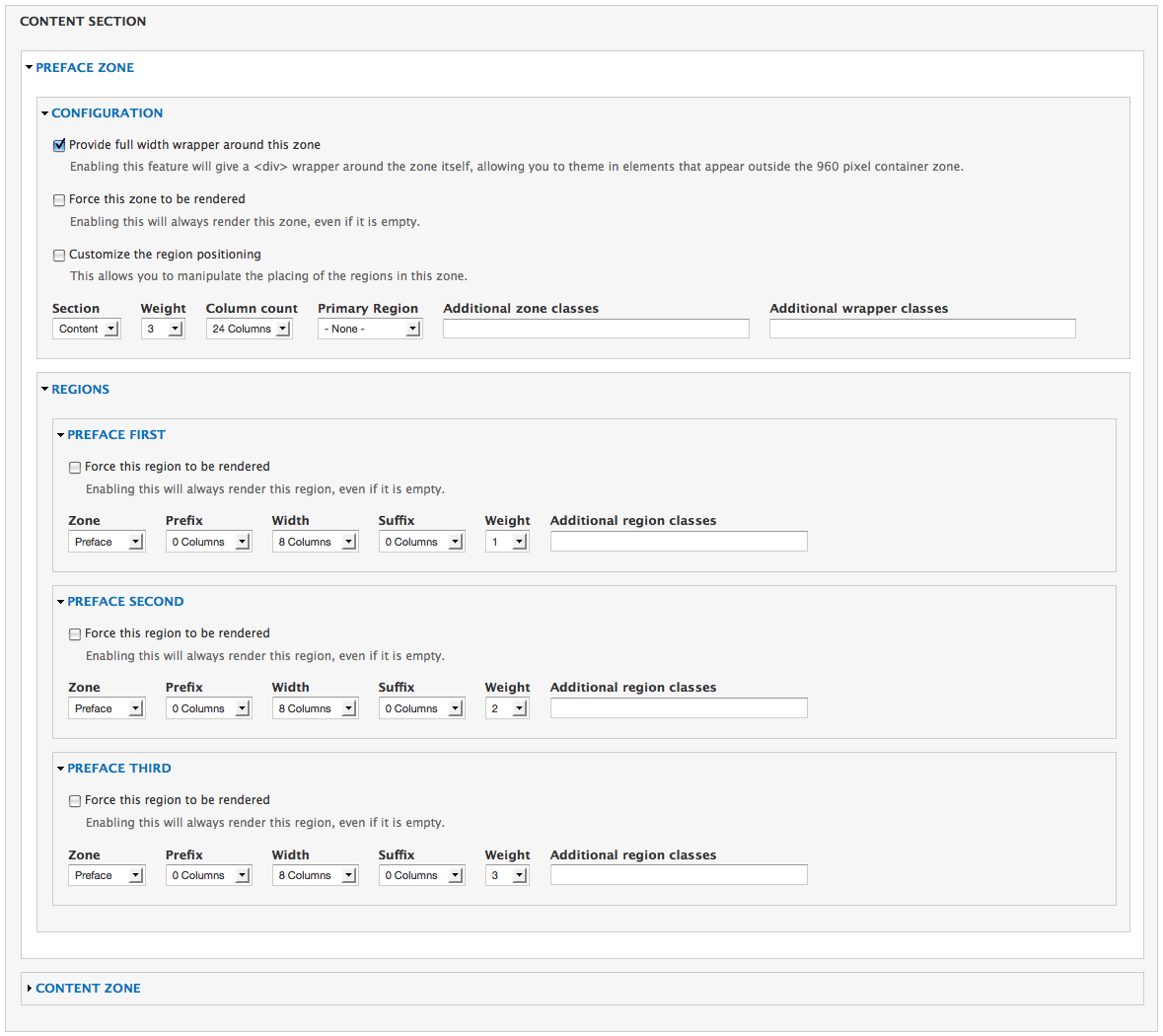
I'm using a preface zone that's divided in 3 regions (preface first, second, third). Each has a width of 8 cols spread over 24 cols (see attachment).
Comment #6
samwillc commented@knalstaaf, I notice in your configuration that it's a 24 column zone with 3 regions each at 8 columns. What you haven't done is set one of the regions as 'primary' in the zone configuration.
If primary is not set, your regions will appear as in your image 'Result: 2 columns not stretched'. They will be the width of whatever number of columns you have specified, and no more. If you set the primary region to be the region which contains 'OUR BATTERIES', that region would stretch to fill the void.
Whichever region is set to primary within a zone will stretch when the other regions have no content.
Hope this helps.
Sam.
Comment #7
samwillc commentedAlso, if you use the context module, you can make a context conditions=node type, and set the reactions=menu, choose products for the parent menu item (description=Control menu active class using context). This would keep the 'products' tab highlighted when you venture further into your site, for example, on a sub page like this:
http://preview.batterysupplies.be/en/products/e-bike-batteries
It's in products, but no highlight. Just an afterthought.
Sam.
Comment #8
knalstaaf commentedThanks, Sam, you helped a lot further than you probably would expect.
It was indeed so that my primary region wasn't assigned. When setting that straight, the issue would still remain, but that was because my View display wouldn't render the empty block as empty. I solved that by adding an extra filter criterion: "
Content: headerblock 2:target_id (not empty)" on the view of the second block (and removing it from the Master display in Views).The read more-link was directing to the wrong page. I mistakingly used the wrong field display. It had to be a custom link, not the read more-link. But I've been looking for a way to get active trails working with Views, for instance when a list of links is being displayed, each with a link to its proper content.
Basicly your "afterthought" solved a question I was dealing with for a long time.
Thanks a lot, very much appreciated!
Comment #9
samwillc commentedNo probs.
I had the same problem when trying to keep 'Blog' main menu (blog page=view) highlighted when viewing an actual post (post page=blog content type). I do this via context also.
Sam.
Comment #10
pierrelord commentedJust fyi - you may also want to make sure to uncheck
'Show all regions'
Show all regions including those that are empty. Enable if you are administering your site using the inline editor.
in your 'context settings' at /admin/structure/context/settings
This causes regions to be rendered as in 'debugging mode'
Comment #11
3djeff commentedThanks pierrelord! That context module setting was indeed causing the problem for me.
Unchecking the 'Show all regions' fixed the issue on my site where when logged in, my sidebars would show up even though they were empty. When logged out, they would not display and the content would correctly display
across the entire page, as I want it too.
Comment #12
polishyourimage commentedNOTE: Even if debugging is toggled off (red DO NOT ENTER icon top right of page, vs. green check) Omega renders empty regions. Debugging has to be turned off entirely for empty regions to not be rendered. Maybe it'd be better if toggling off debugging removed the empty regions?
Comment #13
samwillc commentedI hardly ever use the theme with debugging on. It's clear in my head what regions are where from the way I've designed the page layout. Debugging caused me headaches right at the beginning too!
Sam.