
Sample TAC configuration: Topic editor
Last updated on
30 April 2025
Scenario
- The website is a news site with news posted in several topics.
- The published news content is available for all site users to read.
- There are several topic editors who should be able to edit existing articles in their topics.
Taxonomy configuration
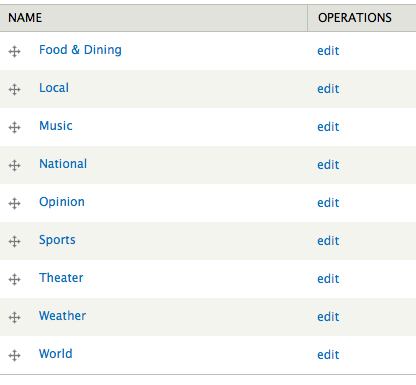
Create a "Topic" vocabulary at admin/structure/taxonomy. Add terms for each news topic.
Role configuration
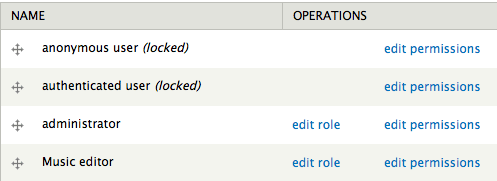
Create a role for each topic. In this example, we will configure access for the Music editor. (You would repeat this for the other topics.)
Content type configuration
Add a "Topic" term reference field to the core article content type, using the "Topic" vocabulary.

TAC configuration
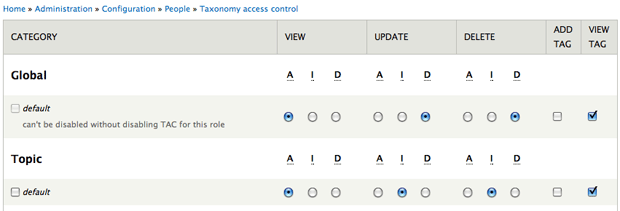
Anonymous user role
For the "Topic" vocabulary default, set:
- View: Allow
- Update: Ignore
- Delete: Ignore
- Create: Unchecked
- List: Checked
Authenticated user role
Same configuration as the anonymous user role.
Music editor role
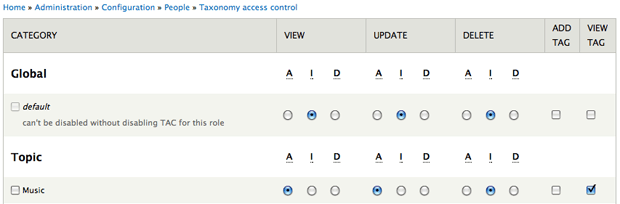
For the "Topic" vocabulary default, set:
- View: Allow
- Update: Allow
- Delete: Ignore
- Create: Unchecked
- List: Checked
Help improve this page
Page status: Not set
You can:
You can:
- Log in, click Edit, and edit this page
- Log in, click Discuss, update the Page status value, and suggest an improvement
- Log in and create a Documentation issue with your suggestion
