

 Come together with the global Drupal community in Rotterdam, 28 Sept – 1 Oct 2026. Sessions, contribution, connection, and Early Bird savings until 8 June.
I have set up ffmpeg correctly and have set up transcoder settings correctly through the trancoder settings module. I have a content type called General Video and I add a node and upload the video to the node for transcoding. After i save the node, the node body is deleted completely, the video is also deleted and I am left with the success message that my video will be published soon and has been transcoded successfully.
Upon clicking into the node the body is gone as well as the video I just uploaded. Through ftp I can see that thumbnails were created and also that the video did upload and that there is a transcoded file in the converted folder! What on earth is the problem here. Watch dog shows me the error that it cannot find the converted file.....its right there Drupal!
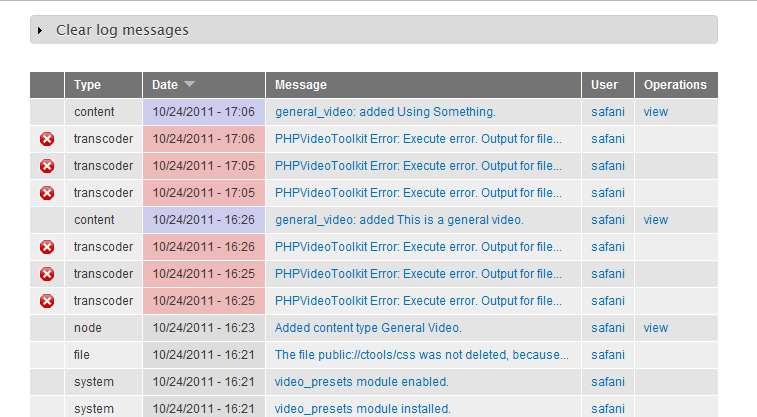
PHPVideoToolkit Error: Execute error. Output for file "/xxxxxx/sites/default/files/videos/original/fp_backpack.flv" was not found. No images were generated.

Comments
Comment #1
safani commentedComment #2
clbeam commentedSame problem here almost. I am using ffmpeg and my test node is uploading the file ok. It creates the thumbs OK. It shows the Dimension of the original file. It placed the original uploaded file in the correct /videos/original location. It then converted the file from Test.mp4 to test.flv and placed it in the /videos/converted/456 folder. I also watched my cpu status at 30% which is normal during conversion. Then drupal video states error your conversion failed:
Error set options PHPVideoToolkit Error: Value "flv" set from $toolkit->setVideoCodec, can not be used to encode the output as the version of FFmpeg that you are using does not have the capability to encode video with this codec.
My ffmpeg is converting any file I throw at it on my CLIPBUCKET website on the same server. I also use WinFF and it converts fine also. I also have a ASP.net website where I call ffmpeg with shell commands and input my own presets and it kicks butt.
My ffmpeg is running fine on 3 or 4 other sites on the same server. Virtual Ubuntuserver 11.04.
I have ran FFmpeg -codecs and encode and decode are showing for the different type videos I am trying to use with drupal.
This is a drupal problem or the lack of good configuration setup information to make the video mod work.
It seems that the mod is converting and placing the files where it is suppose to, but drupal don't seem to know what drupal is doing.
Support seems to be very limited on every issue I have had. The newer the version of drupal you are using the less you can get help. I'm using drupal 7.8 and find manry mods are not available. I have posted several posts, but never gotten any replies.
Comment #3
clbeam commentedJust for the heck of it, I recompiled ffmpeg with every codec possible. Used svn-34279 version to build.
Same error, the video uploaded, the video converted and is stored in the converted folder, but drupal still says my ffmpeg is not capable of converting using the codec selected.
Comment #4
Jorrit commentedThe capabilities of ffmpeg are cached by PHPVideoToolkit in a file in your temporary directory. I forget if it is the Drupal temporary directory or your OS temporary directory. The file has ffmpeg in it. Try deleting this cache file.
Comment #5
serkan_isin commentedI have the same problem but in my case, when i first use the module, it has done everything correct. but then, when i try 2nd time, it failed and still have that same error;
Error set options PHPVideoToolkit Error: Value "flv" set from $toolkit->setVideoCodec, can not be used to encode the output as the version of FFmpeg that you are using does not have the capability to encode video with this codec.Any body help?
Comment #6
ganchimeg commentedsame problem help pls
Comment #7
ejsteven commentedI had the same problem as everyone and found a solution for myself. The problem was because I used aac audio and, for my version of FFMPEG at least, required an extra "-strict experimental" parameter otherwise encoding wouldn't start. Once this extra parameter was added to the command produced by phpvideotoolkit (included in the module) it worked.
Comment #8
ganchimeg commentedwhat your version of FFMPEG was? My FFMPEG version is 0.7.2. How about this version?
Comment #9
Webbeh@ejsteven: I'm trying to implement this to see if it works for me - where is the "-strict experimental" placed?
Comment #10
Jorrit commentedThe "No images were generated." error should be fixed in 7.x-2.x.