
 The 2026 Drupal Business Survey is open. Your response will help shape the future of the Drupal business ecosystem.
Panels 3: Pane Visibility Rules (Evaluating $contexts Variable)
You are browsing documentation for an older version of Drupal, which is not supported any longer, and the information may not be correct. See current documentation for Contributed modules
Panel panes can be configured to appear when PHP code evaluates TRUE.
For example, a pane displaying the field(s) for a node may only make sense when that field actually has values.
Using the $contexts variable available to content pane visibility settings, one can evaluate such a condition in PHP.
- Add a new rule
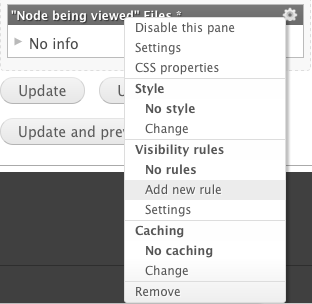
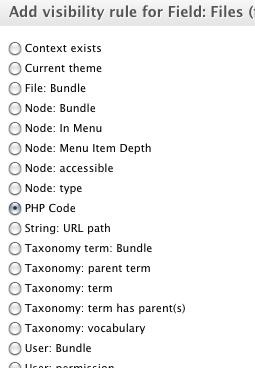
- Inspect the $contexts variable
While the PHP code must ultimately return a boolean value, temporarily output the contents of our $contexts variable using drupal_set_message():
drupal_set_message('Contexts:<br /><pre>'.print_r($contexts,1).'</pre>');
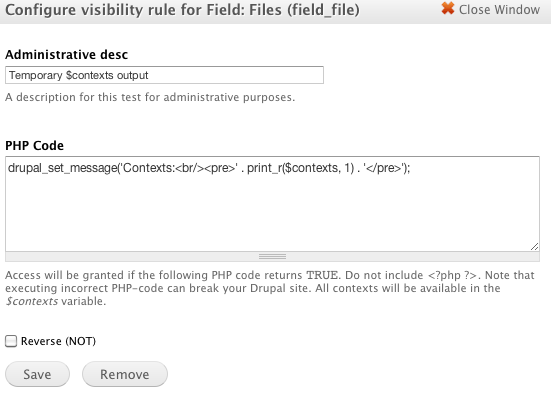
Visit your Panels page and you will see the output of the entire $contexts variable -- a variety of nested objects and arrays pertaining to the page.
- Evaluate your condition(s)
After finding the $contexts properties or element(s), return a boolean value (optionally using the negation (NOT) option instead of a PHP operator):
return empty($contexts['argument_entity_id:node_1']->data->field_file);
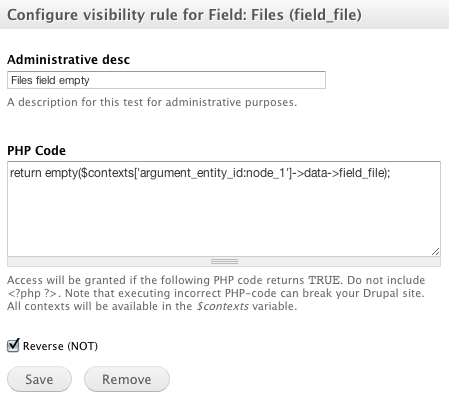
In this example, the panel pane will only appear when the specified condition is met--when the array defining the node's file_field property (array) is not empty.
Help improve this page
You can:
- Log in, click Edit, and edit this page
- Log in, click Discuss, update the Page status value, and suggest an improvement
- Log in and create a Documentation issue with your suggestion
