It looks like that imagecache is redundant in D7 now. So have you had any thoughts about adding a sharpen filter?

The core imagecache one never seemed to product great results for me, but looking back to a old drupal 5 action that I wrote performed much better (or maybe time simply made this appear better)

http://drupal.org/node/259268 for the Drupal 5 action & the sharpen code http://vikjavev.no/computing/ump.php

CommentFileSizeAuthor
#3 sharpen-example.jpg56.29 KBslippast

Comments

alan d.’s picture

Let me know if you are interested! I loved this implementation of the filter compared with the native ImageCache version of D6. Not sure what is around for D7 yet.

slippast’s picture

Just thought I'd throw in a comment. I'd love to see a unsharp mask come (back) to image cache - it should be a core option in my opinion. Perhaps it needs to become it's own module? From the looks of it most of the heavy lifting has been done.

slippast’s picture

StatusFileSize
new56.29 KB

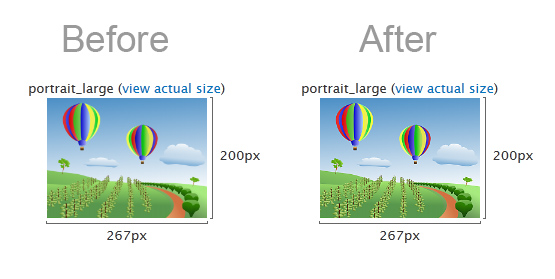
Okay, I should've looked a little closer before my last post. Here's a quick and dirty solution. I took the excellent code from the http://vikjavev.no/computing/ump.php site, slightly modified it, created a 'Custom Action' (custom php code) and voila. I attached a before/after image as an example.

The upside? Unsharp Mask! The downside? You have to enter the three unsharp mask values manually in the PHP code (the defaults are usually fine). Anyway, here's the code - remember to remove the PHP tags when pasting it into the Custom Action area:

////////////////////////////////////////////////////////////////////////////////////////////////  
////                  Unsharp Mask for PHP - version 2.1.1  
////    Unsharp mask algorithm by Torstein Hønsi 2003-07.  
////             thoensi_at_netcom_dot_no.  
///////////////////////////////////////////////////////////////////////////////////////////////   

	$img = $image->resource;
	$amount = '80'; // (Typically: 50 - 200 | Limits: .016 - 500 | Default: 80)
	$radius = '.5'; //	(Typically: 0.5 - 1 | Range: 0 - 50 | Default: .5)
	$threshold = '3'; // (Typically: 0 - 5 | Range: 0 - 255 | Default: 3)

    // Attempt to calibrate the parameters to Photoshop: 
    if ($amount > 500)    $amount = 500; 
    $amount = $amount * 0.016; 
    if ($radius > 50)    $radius = 50; 
    $radius = $radius * 2; 
    if ($threshold > 255)    $threshold = 255; 
     
    $radius = abs(round($radius));     // Only integers make sense. 
    if ($radius == 0) { 
        return $img; imagedestroy($img); break;        } 
    $w = imagesx($img); $h = imagesy($img); 
    $imgCanvas = imagecreatetruecolor($w, $h); 
    $imgBlur = imagecreatetruecolor($w, $h); 

    //////////////////////////////////////////////////  
    // Gaussian blur matrix:               
    //    1    2    1         
    //    2    4    2         
    //    1    2    1 
    ////////////////////////////////////////////////// 

    if (function_exists('imageconvolution')) { // PHP >= 5.1  
            $matrix = array(  
            array( 1, 2, 1 ),  
            array( 2, 4, 2 ),  
            array( 1, 2, 1 )  
        );  
        imagecopy ($imgBlur, $img, 0, 0, 0, 0, $w, $h); 
        imageconvolution($imgBlur, $matrix, 16, 0);  
    }  
    else {  

    // Move copies of the image around one pixel at the time and merge them with weight 
    // according to the matrix. The same matrix is simply repeated for higher radii. 
        for ($i = 0; $i < $radius; $i++)    { 
            imagecopy ($imgBlur, $img, 0, 0, 1, 0, $w - 1, $h); // left 
            imagecopymerge ($imgBlur, $img, 1, 0, 0, 0, $w, $h, 50); // right 
            imagecopymerge ($imgBlur, $img, 0, 0, 0, 0, $w, $h, 50); // center 
            imagecopy ($imgCanvas, $imgBlur, 0, 0, 0, 0, $w, $h); 

            imagecopymerge ($imgBlur, $imgCanvas, 0, 0, 0, 1, $w, $h - 1, 33.33333 ); // up 
            imagecopymerge ($imgBlur, $imgCanvas, 0, 1, 0, 0, $w, $h, 25); // down 
        } 
    } 

    if($threshold>0){ 
        // Calculate the difference between the blurred pixels and the original 
        // and set the pixels 
        for ($x = 0; $x < $w-1; $x++)    { // each row
            for ($y = 0; $y < $h; $y++)    { // each pixel 
                     
                $rgbOrig = ImageColorAt($img, $x, $y); 
                $rOrig = (($rgbOrig >> 16) & 0xFF); 
                $gOrig = (($rgbOrig >> 8) & 0xFF); 
                $bOrig = ($rgbOrig & 0xFF); 
                 
                $rgbBlur = ImageColorAt($imgBlur, $x, $y); 
                 
                $rBlur = (($rgbBlur >> 16) & 0xFF); 
                $gBlur = (($rgbBlur >> 8) & 0xFF); 
                $bBlur = ($rgbBlur & 0xFF); 
                 
                // When the masked pixels differ less from the original 
                // than the threshold specifies, they are set to their original value. 
                $rNew = (abs($rOrig - $rBlur) >= $threshold)  
                    ? max(0, min(255, ($amount * ($rOrig - $rBlur)) + $rOrig))  
                    : $rOrig; 
                $gNew = (abs($gOrig - $gBlur) >= $threshold)  
                    ? max(0, min(255, ($amount * ($gOrig - $gBlur)) + $gOrig))  
                    : $gOrig; 
                $bNew = (abs($bOrig - $bBlur) >= $threshold)  
                    ? max(0, min(255, ($amount * ($bOrig - $bBlur)) + $bOrig))  
                    : $bOrig; 

                if (($rOrig != $rNew) || ($gOrig != $gNew) || ($bOrig != $bNew)) { 
                        $pixCol = ImageColorAllocate($img, $rNew, $gNew, $bNew); 
                        ImageSetPixel($img, $x, $y, $pixCol); 
                    } 
            } 
        } 
    }
    else{ 
        for ($x = 0; $x < $w; $x++)    { // each row 
            for ($y = 0; $y < $h; $y++)    { // each pixel 
                $rgbOrig = ImageColorAt($img, $x, $y); 
                $rOrig = (($rgbOrig >> 16) & 0xFF); 
                $gOrig = (($rgbOrig >> 8) & 0xFF); 
                $bOrig = ($rgbOrig & 0xFF); 
                 
                $rgbBlur = ImageColorAt($imgBlur, $x, $y); 
                 
                $rBlur = (($rgbBlur >> 16) & 0xFF); 
                $gBlur = (($rgbBlur >> 8) & 0xFF); 
                $bBlur = ($rgbBlur & 0xFF); 
                 
                $rNew = ($amount * ($rOrig - $rBlur)) + $rOrig; 
                    if($rNew>255){$rNew=255;} 
                    elseif($rNew<0){$rNew=0;} 
                $gNew = ($amount * ($gOrig - $gBlur)) + $gOrig; 
                    if($gNew>255){$gNew=255;} 
                    elseif($gNew<0){$gNew=0;} 
                $bNew = ($amount * ($bOrig - $bBlur)) + $bOrig; 
                    if($bNew>255){$bNew=255;} 
                    elseif($bNew<0){$bNew=0;} 
                $rgbNew = ($rNew << 16) + ($gNew <<8) + $bNew; 
                    ImageSetPixel($img, $x, $y, $rgbNew); 
            } 
        } 
    } 
    imagedestroy($imgCanvas); 
    imagedestroy($imgBlur);

    return $img;

Props go to Torstein Hønsi of course. This is all his code. Also thanks to the folks who brought us Imagecache and Imagecache Effects. Thank you!

alan d.’s picture

I've signed his guestbook to see if he will release with a GPL compatible license.

http://vikjavev.no/gjestebok/

alan d.’s picture

Update: I've contacted the author of the filter twice now and no affirmative or negative response yet. I'll try to remember to ring him directly in a couple of weeks to see if I can get an answer one way or the other if I do not hear back by then.

mxt’s picture

There's a module to do sharpening: http://drupal.org/project/filtersie

See also: http://drupal.org/node/1056318

alan d.’s picture

Status: Active » Closed (works as designed)

Marking closed then :)