I am trying to create a custom Rules Component to be used with Ubercart.
I have created my custom component European Shipping.
I then added the order entity to be available so I could use
order:delivery-address:country to verify the countries.
The unfortunate thing is that the select drop down for value does NOT allow for multiple selections. This means that I need to create a separate condition check for every single European Country where I allow shipping, as well as throwing an OR conditions in between each condition.
I am at about the 9th condition (country) and now every single time I try to add a new country condition I get the white screen of death.
Checking Apache Error Logs it's saying:
PHP Fatal error: Allowed memory size of 1073741824 bytes exhausted in /var/www/html/root/sites/all/modules/entity/includes/entity.wrapper.inc ........
I've already set my php.ini to memory limit to 1 GB and this doesn't even seem enough. Ideas?
Can we make the value for the data selector drop down allow for multiple selections?!?!
Thanks



Comments
Comment #1
Woggers commentedOk this is insane. I just bumped my PHP.INI memory limit up to 2048M and it still crashed out on the same bytes exhausted error.
Comment #2
itangalo commentedSeems strange that the PHP memory limit is crashed. There might be some really nasty recursion going on that drains your memory, but 2 GB memory limit should really be enough. Probably something else makes Rules whack out.
However, if you're handy with PHP you could change the select list into a multiple-select list writing a hook_form_alter. Another approach is to write another condition plugin – check out these resources for help on how to do that:
* Rules online docs for creating conditions: http://drupal.org/node/878928
* Screencast on creating conditions: http://nodeone.se/node/937
* Example code to use: http://drupal.org/project/rules_example
Comment #3
Woggers commentedIt could be something whack in the Entity module too. This rule of course has almost 20 conditions (10 countries to do a 1-to-1 data comparison, with 10 OR conditions.)
Once I get up to 11 conditions added everything starts lagging and the memory limit gets crazy. Right now I'm trying to do it through PHP execution.
If I write a hook to turn the select into a multiple-select, what would the effect be? Somehow I think the backend module part of Rules wouldn't be configured to deal with a multiple select box and multiple values ?! Would it know how to build it's query off multiple values? I mean it's simple to write a hook form alter to make it a multiple select box, but is the rest of the Rules core built to be able to deal with the multiple values? Know what I mean?
Comment #4
itangalo commentedHm, good point. I don't know either what the internals of the data comparison is.
Another possibility is to create a list of all the text strings (countries) you want to compare against, and then use the condition "list contains item". That would require adding another component, since you normally can't run actions before conditions. I recommend executing this as a rule set, where (1) a first rule creates the list of countries, and (2) a second rule checks if a given country is in that list.
The rule set solution is surprisingly complex to do. There should be a way of adding condition components that also contains actions - so you could just use it as a condition (and not a rule set). I'll have to look into that.
If you don't want to mess with extra rule sets and stuff you should really consider coding a custom condition. If you're used to coding it will be really quick, and if not it is an excellent way to start. Check out the screencast mentioned above if you want to see an example.
Good luck!
Comment #5
itangalo commentedFYI: Just posted a feature request that, once fulfilled, would make this task easier – see #1323198: Condition component *with actions*.
Comment #6
fagoI've just commit an improvement some days ago, which allows you to do a "is one of" data comparison - thus you can select multiple countries in a single condition.
I've no idea though, why adding many conditions should result in such memory usage. Must be a recursion somewhere. Is it reproduceable? If so please change to bug-report. Does it happen with any condition type?
Comment #7
itangalo commentedComment #8
Woggers commentedI am fairly certain that the issue that we're discussing now is related to this issue with the Entity module:
http://drupal.org/node/1203018
Everything seems to add up. I haven't tried to the token tweaks module they recommend but I will try the newly built dev with Fago's improvement.
A multiple select list should with a "is one of" data comparison should fix everything.
Thanks Fago.
Comment #9
Woggers commentedFago,
Re: #6 - it isn't in the current Oct 24th release is it? Have to wait till the next dev release gets built? :/
Comment #10
itangalo commented@Straddle: You can also check out the latest stuff using git – check the "version control" tab for some details.
Comment #12
mgiffordWe've reproduced memory problems on our end that seem to be tied to the number of Rules, so I'm opening up this issue again.
Using Devel we could see the memory jump as we added more conditions. There is likely some recursion somewhere, but not sure where.
@Fago how many conditions have you tested this with in the past? Should 20 rules be fine without allocating 1G of PHP memory?
We're using 7.x-2.0 from October, so perhaps we should be using dev or the git repo to test this.
Comment #13
acrazyanimal commentedMore details on this (work with mgifford): We also have several layers of rule components. We have a need to nest these in order to access certain data and apply conditional conditions and actions, etc. It seems the heaviest memory usage occurs when deleting a condition. Refreshing the caches seems to use about the same. The page load after deleting a single condition in a rules set's rule resulted in the use of 350MB+ of memory. A normal page load on the site is around 76MB, Viewing the rules ui components page is roughly 160MB. I'm assuming the excessive memory use when deleting a condition and refreshing caches is a result of an iterative process the rules module employs to check the integrity of objects and fields? Can this process be improved for better efficiency?
The site we are working on is using the commerce module, entity api and rules to implement a drupal native CRM. Thus, many rules are required. I'm guessing any drupal 7 site that has a big ecommerce component will soon be coming across this same problem.
Note: Also, I deleted a condition before deleting its dependent conditions and that resulted in WSOD with no php errors or logs despite having set the max php memory limit to 1GB. Then reverting the database and testing again, but deleting conditions in the proper order of dependence was fine. Still ~350MB, but not anywhere close to over the limit of 1GB.
Comment #14
mrfelton commentedThis sounds very similar to the problem I just reported in #1383522: Huge performance impact when using lots of 'entity has field' checks.. For me the problem stems from rules_condition_entity_has_field_assertions(), and my suspicion is because its calling entity_get_all_property_info() every time.
Comment #15
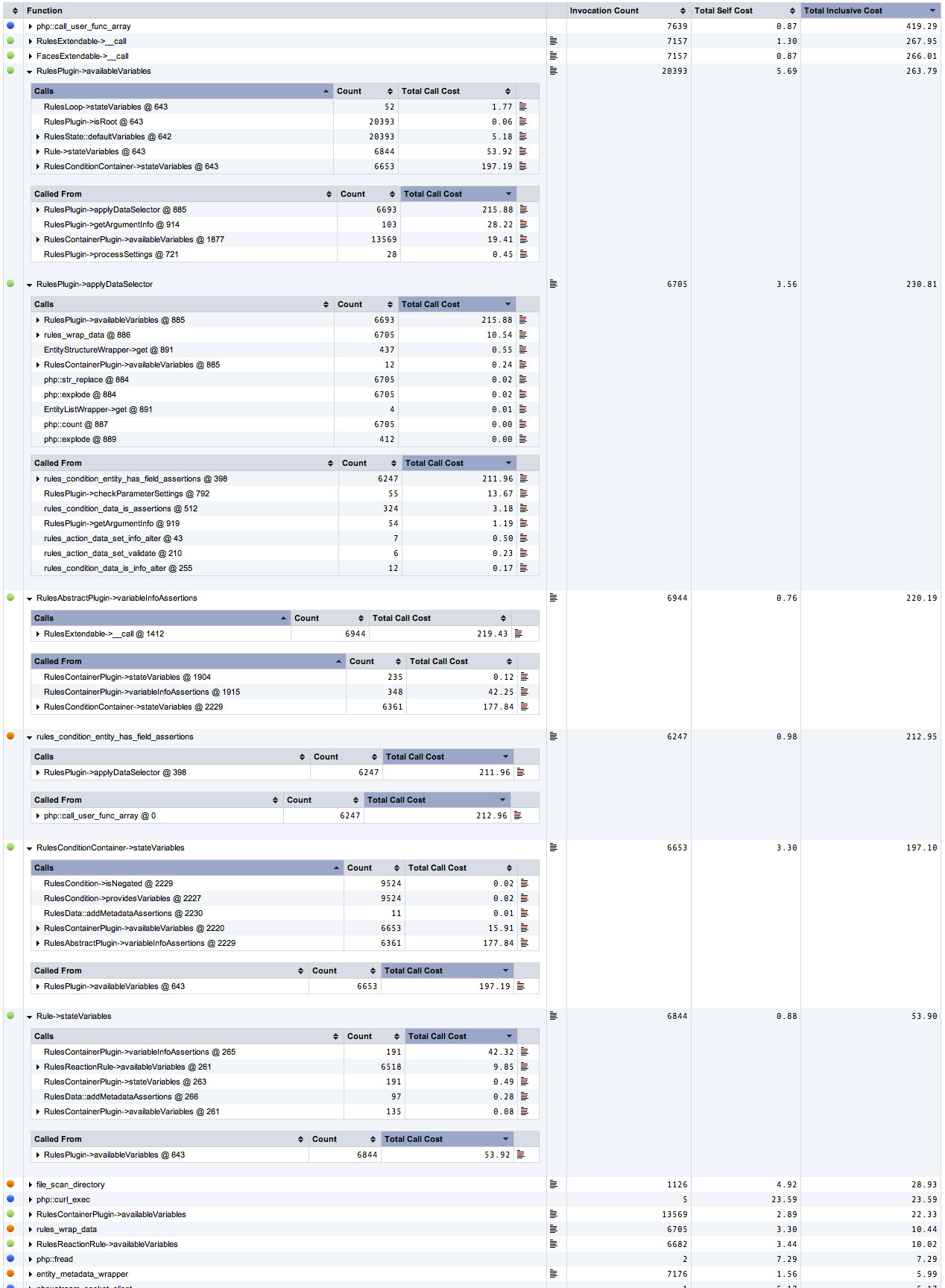
mrfelton commentedSee attached screenshot which I think highlights the problem. Also, bare in mind that this is how it looks AFTER commenting the function like sl:
Even after this, it still shows up as one of the most called and heavy functions. This debug file was 70MB. If I revert the function (undoing my commenting out), then the debug file grows to 800MB and PHP maximum execution time of 120 seconds gets exceeded.
Comment #16
mrfelton commentedHere is a better screenshot that shows more clearly where all of the time (and hence probably memory too) is being spent. All of these Rules related functions are the most expensive in the site. It seems it spends a lot of times trying to get the available variables over and over again.
Comment #17
dasjomaybe it helps if you post your rules export code
Comment #18
mrfelton commentedSure, here is an example of one of the Rules that incurred massive slowdown and memory usage.
Comment #19
AndrzejG commentedI have 11 Rules actions. Half of them are rather simple. Problem of memory exhausted began when there were only 6 or 7. Fatal error first have been appearing in the screen with Rules list. I found a way to bypass it - open Rules list from parent URL, workflow.
However, the more Rules actions I created, more often Fatal Error has been appearing.
The messages concerned entity.wrapper.inc, sometimes PHP segmentation, sometimes various parts of Rules module (most often Rules plugins), one or two times zend...mm... something (I don't remember).
From discussions related to tokens I learned that node reference + entity tokens modules together create HUGE token trees responsible for such kind of problems.
Now my site is completely down. So, I deleted References module from file system, as well as not-used Rules plugins. Now I have fatal error messages concerned mainly Rules.
On flush cache, the message is:
Fatal error: Allowed memory size of 134217728 bytes exhausted (tried to allocate 86 bytes) in /sites/all/modules/rules/includes/rules.plugins.inc on line 431
On the main page of my site, and on ..../workflow/rules it is:
Fatal error: Allowed memory size of 134217728 bytes exhausted (tried to allocate 24 bytes) in /sites/all/modules/rules/includes/rules.plugins.inc on line 429
On /admin/config/workflow/rules/reaction/manage/my_rules_action it is:
Fatal error: Allowed memory size of 134217728 bytes exhausted (tried to allocate 91 bytes) in /sites/all/modules/entity/includes/entity.property.inc on line 90
Of course a number of bytes in the parentheses varies.
Big stress for me, as I can't access my 6-months work.
Comment #20
acrazyanimal commented@Andrzej : Can you increase your php memory limit? At the moment it looks like it is set for 128MB. If you can raise that limit it will most likely give you the opportunity to access your site and make some rules changes to diminish the load.
Comment #21
AndrzejG commented@acrazyanimal
I thought about such a way, however, I'm not a coder and using hosting server, accessible through FTP. Host's consultants told me that in many cases I can upload custom script with a "system" command. If it makes sense, please instruct me in details how to do that.
Please note also, that I wrote #19 to focus everybody attention on the fact, that memory limit occurs in the page displaying a LIST of Rules actions. So, there must be something wrong in the backyards of this page - seems it contains much more than links and descriptions.
BTW DaveReid or somebody from token/entity guys noticed similar issue in the Help system. AFAIR, help page of tokens module carries all the tokens' tree... stupid.
Comment #22
mrfelton commented> Please note also, that I wrote #19 to focus everybody attention on the fact, that memory limit occurs in the page displaying a LIST of Rules actions
Yes, the problem happens when rules tries to verify/validate the rules. This happens in a number of places, including the admin pages.
Comment #23
dasjoAndrzejG, see Increase PHP memory limit documentation page to fix #19
Comment #24
AndrzejG commented@dasjo - Thank You very much. Editing settings.php works! Sorry I didn't find this section of documentation earlier.
Comment #25
itangalo commented(Issue status should relate to how important the issue is for the project, not for individual users.)
Comment #26
acrazyanimal commentedI would think that this issue should be critical for the project considering it can result in grinding the development of a site a halt. Its not relevant to a particular few users, its every site that uses rules which is increasingly likely to be all d7 sites. Rules are amazing and a necessary evolution in Drupal. This issue needs to be solved!
I don't know the inner workings of rules too well yet, but I'm learning as I read through the code. My guess is that there needs to be a step to clear static caches after a rule has been validated and before moving onto the next. Or possibly a combo of the former and adding a static cache to track which rules/sets/conditions/whatever has already been validated so that a rule calling (for example) a set that has already been validated doesn't need to go through that step of building the validation tree again.
Does anyone have any intentions of working on this issue?
Comment #27
dasjoComment #28
itangalo commented@acrazyanimal:
Ok, you have a point there. Upping this to "major" (though I feel unconfortable rasing the priority, since I'm not the Rules maintainer, nor qualified to work on this issue)
The reason I downed the priority was that I have never seen this problem myself, even when working with quite a lot of rules. But now I realize that I have not used the "entity has property" more than maybe three times in one rule, and this condition might be the culprit.
Thanks for making the point clear, and for the kind reply even to a rather sloppy comment. :-)
Comment #29
acrazyanimal commentedThese issues also seem to be very similar or duplicates of this issue:
#1259650: White screen of death when adding Conditions
#1383522: Huge performance impact when using lots of 'entity has field' checks.
#1305204: Removing a variable that provides a list to a loop crashes
Comment #30
mrfelton commentedCross posting #1383522: Huge performance impact when using lots of 'entity has field' checks. where a possible workaround is described (do a bundle check to load multiple fields in one go).
Comment #31
acrazyanimal commentedI've found that the bundle check still adds to the memory strain. However, the method of using a "data comparison" against the bundle type rather then multiple "entity has field" conditions will help many people alleviate the memory strain if they don't require many rules involving entities.
I'm thinking that another area which might help reduce the memory use would be to come up with a way for entity developers to allow properties/fields to be set directly in the "create entity" action. I have been working with the ECK module and unlike the user entity, there are no fields available to be set in the create action. So instead I have to use multiple "set a data value" actions, each of which I'm sure are causing the rules to do an integrity check.
I think several things could happen here to reduce the memory issue:
(this is all hypothetical because I don't actually understand what is going on in terms of integrity checking, so excuse my naivete if I'm completely off base)
1. When rules is doing the integrity check on an entity of a particular type for such an action, like 'set a data value', it could temporarily cache that integrity check so that the next 'set a data value' action could reference it and would only have to check the integrity of the parameter/field being set and not everything that comes before it. Not sure if this is done already. Potentially releasing that cache once everything in that rule has been checked.
2. As a good example for my next point: using the "create entity" for a user object, all the required fields are there for you to fill in. It would be good if all other non required fields were available as well. Also, it would be good to have this implemented as a "framework" for potentially all entities. This way you wouldn't have to have multiple "set a data value" actions adding to the memory strain.
3. If there is a way to add a generic "modify entity" action then that would also be very useful in terms of reducing multiple integrity checks. This action would allow you to change multiple parameters/fields for an already existing entity in a single action. I guess the condition to check an entity's bundle type would be required in order for a particular entity to be available to this new modify action.
Comment #32
das-peter commentedFyi, I'm working on a patch for related stuff here: #1319912: rebuilding the cache is slow due to integrityChecks
Comment #33
fagoIntegrity checks depend on the configuration of the item, so we cannot cache it across items.
2. As a good example for my next point: using the "create entity" for a user object, all the required fields are there for you to fill in. It would be good if all other non required fields were available as well. Also, it would be good to have this implemented as a "framework" for potentially all entities. This way you wouldn't have to have multiple "set a data value" actions adding to the memory strain.Yep, that would be a good improvement. Also, it might be a good idea to do it independently from entity_create, like a multi-set field action where you select the entity and the properties in a first step and get forms for all properties then?
Exactly. Feel free to go ahead and open an issue for it.
Comment #34
acrazyanimal commented@fago: Right on, thanks for the reply. I've opened an issue for the "modify entity" action. #1421368: Action: "Modify an entity"
I have also opened a support request regarding how a custom entity can be defined such that rules will pick up on required fields in the "create entity" action. #1421426: How to make rules aware of a custom entity's required properties/fields for use in "create entity"
@das-peter: Great stuff. I'll try and help with testing when you figure its ready.
Comment #35
4kant commented@ Woggers: did you get your "European Shipping" to run? With fagos "is one of" solution?
Comment #36
das-peter commentedSome very important performance fixes were pushed lately - the last one was this #1319912: rebuilding the cache is slow due to integrityChecks
In the best case these fixes solve this issue too.
Comment #37
fagoYep, I think the recent improvements of #1433210: Store result of RulesPlugin::availableVariables() and #1319912: rebuilding the cache is slow due to integrityChecks should already help a lot here. So I'm going to mark this issue to be fixed. If problems still arise, make sure you are running the latest dev version and please re-open.
Furthermore, we've follow-up issues that should be a help too and generally ease things:
#1472752: Add an "entity is of bundle" condition
#1421368: Action: "Modify an entity"