

Closed (fixed)
Project:
Node clone
Version:
7.x-1.x-dev
Component:
User interface
Priority:
Normal
Category:
Task
Assigned:
Unassigned
Reporter:
Created:
1 Nov 2011 at 20:01 UTC
Updated:
4 Nov 2016 at 01:14 UTC
Jump to comment: Most recent, Most recent file


Comments
Comment #1
damienmckennaComment #2
robloachI definitely agree with you. This patch...
I'm not sure about having an extra button in the Node Edit form. Don't want to clog up the UI too much... Never used FastToggle before, what does it do?
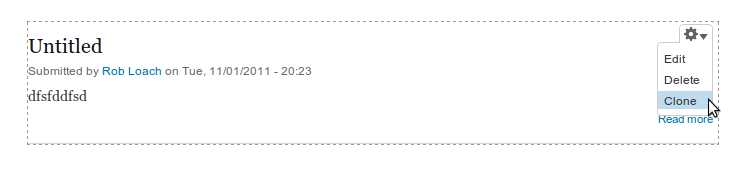
Comment #3
damienmckennaThat is stellar stuff, excellent work with very little code :)
FastToggle adds extra links to the $links array with AJAX driven links for the normal node toggles - Promote, Sticky, Published, and also supports comments; it's a nice little module for several use cases, but I don't remember off-hand whether it actually had an API to wrap the AJAX interface around your own toggles.
Still, +1 for this patch!
Comment #4
chrisschaub commented+1 For this patch also. Anybody coming from a 6.x version will expect a clone "tab". Also, depending on your theme, without this patch it appears that the module is not working. Not all themes support action links at this point.
Comment #5
charlie-s commentedI saw comments elsewhere that clone shouldn't be a tab, but the only reason I found was that "D7 UX guidelines suggest it should be an action link". I can't find where this is the case, if someone could post a link that would be appreciated.
At the end of the day a client will wonder why all of the things he does to pages (edit, track, grant) are in the tabs and 1 special option, "clone this node", appears below them, all by itself.
Comment #6
jonathanmd commentedI'd also like to see the UI updated proposed.
Comment #7
ShannonMcG commentedI'd love to see this UI fix as well. Cheers
Comment #8
pwolanin commentedcloning is an action, so I think it should stay an action link in my opinion.
making it also a contextual item is ok.
Comment #9
chowdah commentedHi pwolanin,
This is a great module! It's very useful and has saved me a ton of time in terms of creating new content, but I'm wondering why you are so resistant to creating a 'Clone' tab. It's been brought up a number of time in the issue queue and you have stated your reasons for not wanting to do it (Cloning is an action), but if users are asking for it, why not give them the option of having it as a tab? You could offer the option and explain that using the option is not compliant in your opinion.
Isn't the very heart of Drupal customizing the interface to your liking? I be interested in knowing how many people have already made this patch...
Thanks so much for your contribution to Drupal, I can't imagine the collective man hours you have saved for Drupal users world wide!
Comment #10
wonder95 commentedI tend to agree with pwolanin. What would be the purpose of having a separate clone tab? The module just either a) clones a node, saves it, and displays the edit form (i.e. the Edit tab) for the saved node or b) creates a new node before saving it and presents the node edit form. The only reason another tab is needed is if another form/page with content different from any of the other tabs is used. Since the existing Edit tab is just re-used, why would another tab be needed?
Comment #11
robloachEditing is also an action though... Grrrr, D7UX.
Comment #12
netsensei commentedWe're using D7 as a framework to build an application on top of it. So, it contains quite some business logic to model a several non-Drupal typical flows. One of the first things we disabled were contextual links and rely on the local task tabs. So, when I installed node clone, it took me 20 minutes to realize that something was a bit off when I didn't get an extra "clone" tab although I expected one to pop up.
I agree: while the datamodel of the object we're operating on is the same, conceptually editing and cloning are two different actions. Then again, I don't see any real reason why one would treat actiontype links any different on the local tasks menu or the action tasks menu.
Comment #13
attiks commented@wonder95 tab looks cleaner IMHO than just a link floating around.
@Rob Loach, patch in #2 works great, thanks.
@pwolanin: can we make this a setting? 'Show as tab', 'Show as link', if that's acceptable I'm willing to write patch.
Comment #14
Lowell commented+1 to option vs module hack
Comment #15
freakalis commentedI also would like to have this as an option in the module. Until that is fixed you can use this tiny module http://drupal.org/project/node_clone_tab
Comment #16
fejn commentedJust a thought: Maybe somebody could take Rob's work in #2, and make an extra 'Update option' entry in the admin/content(Find content) page dropdown list for 'Clone node'. If you check one of the existing pages, & select 'Clone node', it could kick you out to Rob's interface. this would make things clean, & would make it quite easy to use(especially, as you often go there if you want to add content anyway). I haven't really thought about how to handle it if somebody checked several pages at once: Possibly they could be presented to the user one after the other, somewhat the way Views presents a series of fields to you to make settings on when you make multiple additions.
Comment #17
kingandy#1571964: Clone content Tab is a duplicate of this task, favouring the 'Add a new tab beside "Edit"' option.
Re #4, "Not all themes support action links at this point" - as I mentioned over there, the Delta Blocks module can be used to add the Action Links in a block.
Personally I'm in favour of the Tab, though this may be largely due to a fear of change. I can see that it makes sense as an Action Link.
Comment #18
attiks commentedI think there're multiple use cases and the patch in #2 handles them well:
1/ Node view (full page)
Show it as an action link or as a tab
2/ Node edit (or on another tab)
Show it as a tab since action link isn't accessible
3/ Rendered nodes in a list/view
Show it in the contextual links
Maybe add a setting to the module so site admins can select which one they want to be visible?
Comment #19
dkre commented+1 to this.
I never use action links. It's not something which I use in the final site so I turn them off when I first start on a new design/development. For this reason I don't think a module should ever use menus/links other than the administration overlay/menu.
Personally I think at the very least it should be displayed in 'Operations' on the content page. Fairly logical to me.
If there aren't there really should be UI standards to develop with, there are so many modules with random implementations.
Comment #20
kingandyThere is a UI Standards section in the d.o docs. It's somewhat sketchy and bullet-pointed but there may be some info in here to give us a direction...
A local action is appropriate when "User wants easy access to an action related to the data or content of the page." It specifically mentions "Add" links (so, when you're looking at a list of entities - content, products, etc - and want to add a new one; it doesn't relate to a single content item, and doesn't make a lot of sense as a tab as it's a volatile, one-off "action").
A tab (helpfully referred to as "Local Task" in development terms) is useful when you have "Too much information or too many kinds of information to fit on a single page" or "A settings page which does not fit in the configuration section but has a related page with listed data."
I think by those definitions "Clone" would be an action. "Edit" is considered a "settings" or "configuration" page, so it gets its own tab, but "Clone" does not affect the parent item at all. It goes somewhere else and makes a new thing, just like an "Add" link would.
Comment #21
attiks commented#20: that's the theory, but I think it has to be practical as well. For some sites we have nodes we 5+ tabs (besides view and edit) mainly to add extra functionality, in those cases it sure is handy to have a tab for 'Clone'.
Comment #22
johnvimproved title.
Comment #23
johnv@JeffNutting, #16 (regarding a clone link/action on the admin/content page): perhaps your suggestion is better off in #1161924: No "Clone" link in operations column of Content page, or in a separate issue.
Comment #24
fejn commented@johnv: I just put it in this thread because given the type of discussions here, it seemed most relevant here. If you think it would be better off as a separate issue, go ahead & move it - I'd prefer not to clutter up the 'blogosphere' with new issues, just because I happened to 'notice something' -- unless this is the way people expect it to work.
I didn't really think my suggestion (#16) was relevant to the discussion in #1161924.
Thanks for the feedback, though.
Jeff
Comment #25
kingandyGenerally it's best to keep each task/issue separate, so they can be neatly closed when they're done - otherwise you get issues that look like they're still causing problems when in fact some or most of it has actually been resolved, or protracted discussions about related topics with the same result.
Suggestions for improving a module come under the heading of "feature requests". Integration with the admin/content listing seems like an useful feature, and would be worth creating a separate issue for so people can give it the attention it deserves.
(On a related note - comments on issues don't get titles of their own, be careful not to type your intended comment title into the "Issue title" box!)
Comment #26
pwolanin commentedre: #20 - yes, I agree which is why I made the change.
Comment #26.0
pwolanin commentedFurther suggestions
Comment #27
damienmckennaI've refocused the issue around just adding the "clone" action to the contextual menu.
In regards to the points raised in #20, I don't see why it can be said that "clone" is not a valid item for a contextual link when Drupal gives you both "edit" and "delete", the latter of which only shows via the edit page and is not a local tab.
Comment #28
damienmckennaComment #29
damienmckennaThis patch take's Rob's patch from #2 above but reverts the menu item "type" back to the current MENU_LOCAL_ACTION.
Comment #30
pwolanin commentedno patch?
Comment #31
damienmckenna#facepalm.
Comment #32
johnvJust my 'two cents' upon the MENU_LOCAL_ACTION / MENU_LOCAL_TASK discussion.
I now have DamienMckenna's patch in for some weeks. At first, moving the 'Clone' to a tab instead of an Action link gives a cleaner UX.
However, all other tabs are about viewing/acting upon 'this piece of content', even the EDIT tab..
When you click 'Clone', you do not act upon 'this piece of content', but you 'add new content (copying from som old content)'.
Just like the print module adds a 'send this page' link (aka inline-link instead of action-link).
So, even tought this 'action link' might seem out of sync (ad normal user never ever see the admin/content page, where this also appears ) I am now in favour of the as-is situation.
Let's see it as an encouragement to create more action links!
Comment #33
attiks commented@johnv the problem is that use cases differ, see #21
So my idea is to add all of them and add a setting so each site owner can choose what to show where, problem solved.
Comment #34
bartezz commentedI applied changes from #2 and it works like a charm. Ultimately this should be a module setting.
When upgrading from D6 to D7 some clients complained they couldn't find the clone tab anymore. For consistency I think one should be able to make a choice where to have this action sit.
Cheers
Comment #35
pwolanin commentedPlus a hack to leave the longer title text for local action, but not contextual links.
Comment #36
pwolanin commentedcommitted.
Comment #37
damienmckennaThanks for the help, everyone!
Comment #38
nairb commentedHow are you supposed to clone a node without a tab if you are viewing the node? The contextual menu only appears for blocks, and I shouldn't have to go to /admin/content to find the page.
Comment #39
kingandyThe "Clone" action is provided as an "Action link" if you're viewing the node. I'd suggest reading this issue thoroughly, there's a lot of discussion about which types of menu item / api integration to leverage (and why).
Comment #40
nairb commentedHeh thanks for the help. Guess it's time to update my theme, I wasn't aware of that variable.
Comment #41
nfriend commentedOkay I read everything here (only after spending a bunch of time looking for the tab after an install).
I really liked it on the tab area - only users with editing access typically have need for this feature and the small distraction an extra tab brings seems harmless. And it's an awesome option! When it's make sense its as important as edit some might say!
Half the time it seems action links don't work and they certainly are not obvious. I guess it's theme to theme but that is not an issue with a tab.
Want to mention here also Views has an option to include the Clone Link which works great!
My thanks to all contributors.
Neil
Comment #42
bartezz commentedhttp://drupal.org/project/node_clone_tab
Comment #44
Anonymous (not verified) commentedPlease, review my patch to add an option on the settings for choosing between a local action (default) or a local task.
I hope it can be commited upstream. Thanks and cheers! Great module!
Comment #45
feddovdm commentedI used also this: module http://drupal.org/project/node_clone_tab
Works just fine!
Comment #46
Anonymous (not verified) commentedYeah, but i prefer a simple option in one module, than having 2 different modules for such a simple thing! Cheers.
Comment #47
netsensei commented#44: Your patch won't work. Each time you change the setting, you'll have to clear your menu cache to register the new type. Besides, there's a good reason why it's set as a constant, not a dynamic value. Because the type of menu item is, well, constant. Unless you implement an explicit hook_menu_alter. Which is inherently a part of the API while your patch pretty much mimics the same behaviour.
I agree with the arguments in the discussion above. The clone link should be a contextual link, not a local task. If you really want/need the link available as a tab: use hook_menu_alter in your own custom module.
Comment #48
Anonymous (not verified) commented@netsensei: Do you actually looked at the patch code? menu_rebuild() is used (not clear ALL the cache) after changing the setting. It works perfectly (i'm using that code actually).
Site admins dont change that setting everyday! It is a choosing for a configuration setting, so i dont think having to call menu_rebuild() for that change is so problematic.
In my case, i'm using http://drupal.org/sandbox/onkeltem/1730244 for actually render tabs as contextual links, cause the UI looks better and us more usable (tabs looks out of place for site admins with my current theming)
So, that is the reason for having to change that setting in my case.
@pwolanin: Can u looks at my patch? Thanks!
Comment #49
pwolanin commentedsee #20 and #26. I think what's in the module is correct for D7+ UI standards.
Comment #50
Anonymous (not verified) commentedOSS rocks... I can have my own lovely node_clone fork! Cheers.
Comment #50.0
Anonymous (not verified) commentedRefocusing the issue.
Comment #52
asb commentedCurrently, the UI for this module in the recommended version 7.x-1.0-rc2 looks like it is shown in the attached screenshot. Is this intentional?
Just in case someone - like me - just wants a clean UI: There is a module to fix this: https://www.drupal.org/project/node_clone_tab
I can not telll how the current dev release looks because the package is broken:
I'd appreciate any update on this issue.
Thank you!
Comment #53
ladybug_3777 commentedWow, that was quite the read! After all the years it looks like the argument to move it to the tabs (or at least provide an option to do so) didn't happen. Personally, I would prefer the option to exist in this module, rather than to add another module. However, if this has been discussed for 3 years I doubt my 2 cents will count for much.
I think comment #9 sums up my feelings on it. Love this module, just wish I had the option inside the module itself to move the button to suit my needs. I can say that all my clients that have seen the location of the clone link have been surprised and confused about it's location. I can't tell you how many times I've been asked about it. It's now become standard practice for us to at the very least style it to look like the tabs and now it looks like we are leaning towards the Node Clone Tab module functionality as part of our standard install too.
Comment #54
Anonymous (not verified) commentedI created a modification to Disqus that was in the same scope of this change and the decision went the other way.
That said, node_clone_tab should be part of node_clone as an administrative setting, the argument here is just silly. Look at node_convert as a guide, they use tabs and having both installed on a site is just confusing if you don't use node_clone_tab.
Comment #55
_grizly commentedI know this is "closed", but just for anyone else who wants this to function as a tab, regardless, and can't be bothered installing another module, here's how to modify this one:
Either apply the patch, or edit the clone.module file, round line 51. Set the title, remove the title callback and arguments, change the type to MENU_LOCAL_TASK. Done.
Comment #56
roball commented@pwolanin, could you please let us know why you are not willing to integrate the functionality of the Node clone tab module into yours?
Comment #57
kholloway commentedIn addition to comment #55 if you already have a custom module in place on your site I would just add the hook from the Node clone tab module and avoid the extra module installation:
If you want to avoid code the Node clone tab module works just fine. I'd avoid hacking the module manually as updates in the future become more involved ;)
NOTE:
The Node clone tab module alters a link that doesn't contain the %clone_token at the end which didn't work for me. I had to update the link item array name to what I included in my module above. With that said the Node clone tab module might not work as an option for you. The code above does though :)
Comment #58
pwolanin commentedThe commit in 2014 added a contextual link. I don't think it should be a tab, but yes, you may need to style the local actions to be more obvious.
A tab should be an alternate view of the same data (not creating something new), so I think this is following the "normal" D7 UX pattern.