Hi.
I have a site where the WYSIWYG editor works flawlessly with CKeditor 3.6.2.7275 on most content types, but on my event content type, CKeditor doesn't appear due to a JS error: Uncaught [CKEDITOR.editor.replace] The element with id or name "" was not found (error fully listed below).
The only two differences between this content type and others is events have many more text areas and it includes an integrated workflow form.
I can try an earlier version of CKeditor if someone thinks that may be the culprit.
Thanks in advanced,
Dan
Full error:
Uncaught [CKEDITOR.editor.replace] The element with id or name "" was not found.
a.editor.replaceckeditor.js:7
dckeditor.js:8
a.replaceckeditor.js:8
Drupal.wysiwyg.editor.attach.ckeditorckeditor-3.0.js:132
Drupal.wysiwygAttachwysiwyg.js:116
Drupal.behaviors.attachWysiwygwysiwyg.js:52
D.extend.each
D.fn.D.each
Drupal.behaviors.attachWysiwygwysiwyg.js:46
(anonymous function)drupal.js:41
D.extend.each
Drupal.attachBehaviorsdrupal.js:40
Drupal.theme.placeholderdrupal.js:276
D.fn.extend.ready
D.extend.ready.D.readyList
D.extend.each
D.extend.ready


Comments
Comment #1
twodDid a module create that content type for you, or is it custom made?
Looks like Wysiwyg is not finding the id of the field it's supposed to attach an editor to. It's not CKEditor's fault since it is given an empty id/name string to begin with.
If you can link to the module creating the content type, or post the code generating the edit form I might be able to spot what's causing the headache.
Comment #2
webdrips commentedThanks for responding TowD...guess this is becoming a support request.
It's a custom content type and indeed, now that you mention it, there's an "Input format" fieldset sitting by itself that I hadn't noticed before, but I have no idea how it got there. I have had an issue or two with the use of features and adding/deleting fields, but I just don't recall working with this particular content type in awhile.
I've also got some modules that work with WYSIWYG, so perhaps one of those is causing the issue (Wysiwyg Fields (disabled but was enabled), WYSIWYG Filter, Node Picker (disabled, but was enabled), WIF 1.x to WF (disabled), Wysiwyg ImageField, and IMCE Wysiwyg API bridge).
I guess I need to check the following:
BTW, how would I post the code generating the edit form since any module may alter that form? (Or did you mean post the output of dsm($form)?
Thanks again,
Dan
Comment #3
webdrips commentedWell I've narrowed it down a bit, but still not sure what's going on: I dumped the database of the site with the issue and loaded it locally. Immediately I saw that the issue did not exist locally (so it's not a dB issue), but I don't have all the same modules loaded locally. (However I did disable many WYSIWYG-related modules on the problem site but still no dice.)
So I looked through the $form object and the only real difference I see on the surface is as follows:
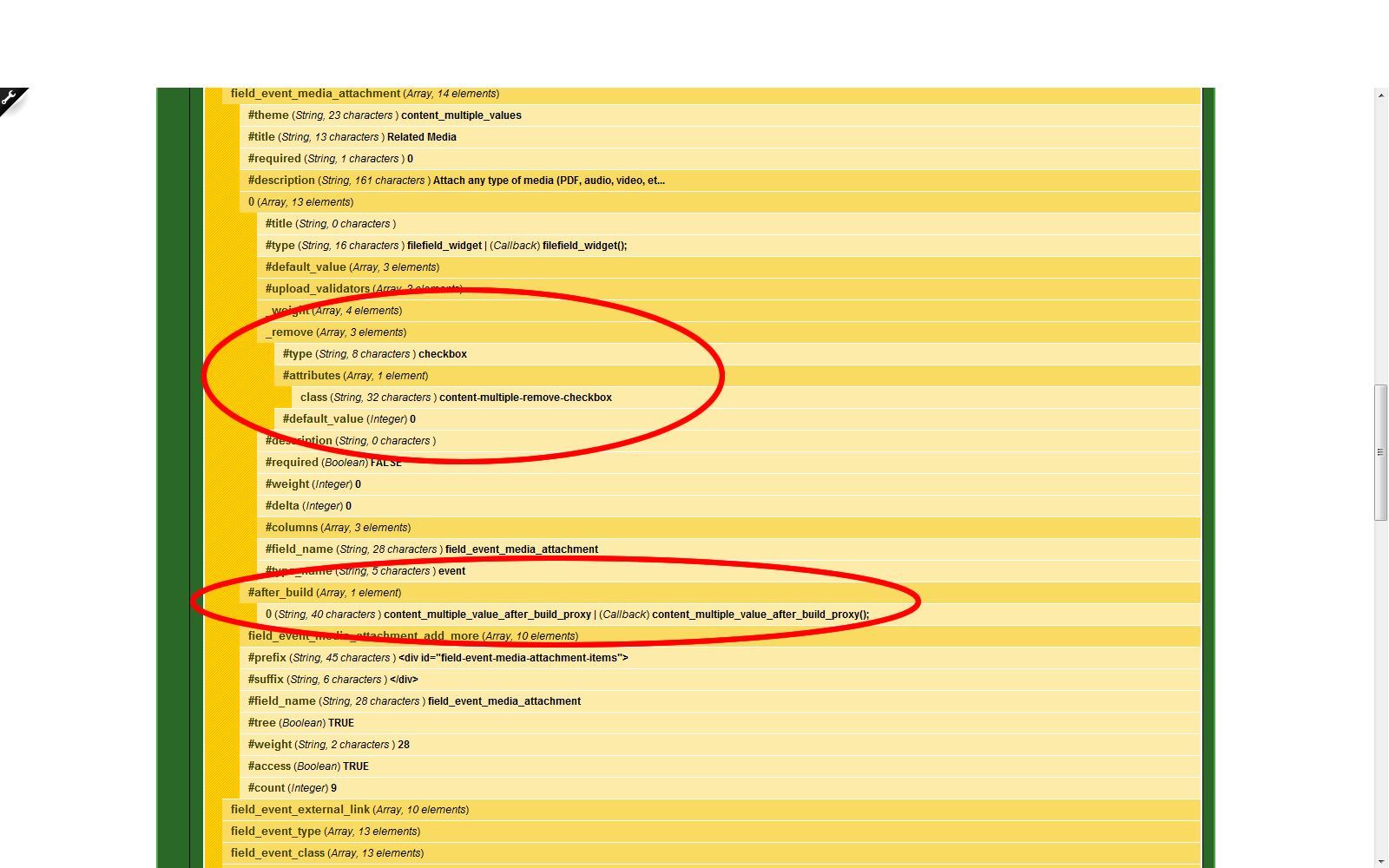
On the site with the problem, $field_event_media_attachment has an #after_build array element not present in the site without the issue which contains
0 (String, 40 characters ) content_multiple_value_after_build_proxy | (Callback) content_multiple_value_after_build_proxy();Ok, so further research reveals that this is a CCK-native function introduced in the 3.x branch, and my local machine has CCK 2.9...not sure if there is a clue here.
Also, that same field's [0] array has several extra entries not present (as shown in the image attached), but again, I assume this has to do with CCK3...
I'm still scratching my head though because again, all my other content types work without a hitch...I just wish I could figure out where that empty field was coming from.
If anyone has any ideas on where I can probe, I'm all eyes.
Thanks,
Dan
Comment #4
webdrips commentedI forgot to mention that my Features are showing as Overridden on the problem site, but I can't revert to the features code from my local machine (see attached image).
Comment #5
twodI would strongly recommend using the same versions of all modules after importing a database. There might have been database changes between versions and update hooks can not be "reversed" to downgrade data stored by a later version of a module.
Unless the extra "Input format" fieldset is appearing in conjunction with a multi-value textarea/textfield I would not worry about the #after_build callback.
An "orphan" "Input format" fieldset would confuse Wysiwyg as it expects the element immediately before it to be the textarea the editor should be attached to.
Yes, any module may change a form, but if this is a custom content type, it's likely that any form modifications done to it by other modules are done the same way as for other content types. If the content type was made using CCK I don't think examining the form code will help much, since it would be identical to that of all other content types created via CCK that Wysiwyg does work with. But if the content type was created from "scratch" by implementing Drupal's node hooks, there might be a small problem in it which leads to the creation of the extra fieldset.
If features was used to import the content type, I might be able to recreate and debug the problem locally if I knew all the versions of the modules installed on the live site and had the actual feature module(s).
Comment #6
webdrips commentedHi TwoD.
I went ahead and, one-by-one, upgraded my modules to match my local and dev environments. I also upgraded my local CKEditor version to the same version on the dev server. In the end, I'm getting the same result: the local site works fine and the dev site has the empty field. (The only other differences are now things like PHP, Linux, MySQL, etc.)
I assume Backup and Migrate might be leaving off some tables, so one thought I have is to try and re-import the exact same dB I used to create the local copy.
Other than that, I still find it strange that the dev server is displaying a different status for features (always showing overridden for events, and it can't be reverted) than the local copy. I don't really have a problem sending you my features export, but it would seem I've narrowed the problem down to that (or at least it would seem). Is there any way that you know of for determining where an empty field may be coming from?
Lastly, even though I really would like to figure out what's going on, is there any way to patch WYWIWYG/CKeditor to ignore an empty fieldset? I still can't figure out how something like this could happen since there's no
<div class="form-item" ... >...</div>before<fieldset class=" collapsible collapsed fieldset-input-format">...</fieldset>, but rather two fieldsets of class fieldset-input-format in a row.Comment #7
webdrips commentedAnother update: this may go down in my own personal history as the strangest bug I've seen.
If I export the dB using Backup & Migrate and then re-import it to the same dev instance, no dice. However, if I export the dB and import it locally, then export that and import it back on the dev instance...bingo.
What I wouldn't give to figure this out...I come back to the only difference between content types: The event content type which had the issue uses the workflow module, which has the option of displaying on the node edit form.
When I imported locally, I received this error on import:
user warning: Incorrect file format 'workflow_states' query: SELECT ws.sid, ws.state, w.name FROM workflow_states ws INNER JOIN workflows w ON ws.wid = w.wid WHERE status = 1 ORDER BY sid in /var/www/mysite/sites/all/modules/workflow/workflow.module on line 1098.Then after import, I got this error once.
warning: call_user_func_array() expects parameter 1 to be a valid callback, function 'admin_landing_page_access' not found or invalid function name in /var/www/mysite/includes/menu.inc on line 453.(Not sure what admin_landing_page is...)My best guess: the menu router is hosed on dev and somehow gets fixed (or at least "un-hosed") on local import. (I say this because I was also seeing pages where views was incorrectly trying to display a page view on the wrong path.)
If anyone has any ideas, I'm all eyes.
Thanks,
Dan
Comment #8
twodThat's strange indeed, I'm not sure where to begin debugging all that.
Messed up router tables should get fixed when clearing cache and rebuilding menus (Devel or Admin menu modules are great for this), or perhaps by truncating all "cache*" tables by hand.
I don't know Workflow well enough to say how those warnings could have been triggered or what to do about them.
As for a temporary workaround, I suppose Wysiwyg could be changed to not attempt to attach an editor if no field id is found, but I haven't had time to look at that yet.
Comment #9
webdrips commentedOne last tidbit that hopefully may lend a clue: this issue appears to only be relevant to user 1. When I log in as an admin role (which has 99% but not 100% of all privileges), the missing field is truly missing.
Between that and somehow "scrubbing" the dB by backup/migrate locally then back to the dev server, there must be a clue somewhere. Perhaps some permission is being rebuilt with that process.
Again, I come back to the workflow...let me look into the 1% and report back.
EDIT: I take part of my statement back: the JS error reported still rears its ugly head, but I no longer can see the lone "Input Format" selector when logged in as admin vs. user 1.
Comment #10
twodIf you don't mind giving me access to the site where this problem occurs, I'd be happy to try to help with debugging.
If so, please drop me a line via my contact form. Include a reference to this issue and I'll take a look as soon as I can.
Comment #11
twodI'm closing this issue since I do not have a way reproduce the problem and it's been a very long time since this was updated.
If you did send me an email and I never got back to you, I'm very sorry I missed it. If you're still having problems, please contact me again and re-open this issue and I'll have another look.
Comment #11.0
twodAdded
to make post easier to read