

Closed (fixed)
Project:
Autosave
Version:
5.x-1.x-dev
Component:
Code
Priority:
Critical
Category:
Bug report
Assigned:
Unassigned
Reporter:
Created:
2 Apr 2007 at 08:51 UTC
Updated:
11 May 2007 at 12:25 UTC
Jump to comment: Most recent file




Comments
Comment #1
Farreres commentedIn my oppinion, this is more than a normal bug. I marked another bug report as duplicate pointing here.
Is this module being maintained? One week without reply.. and such an important bug... makes me wonder.
Comment #2
edmund.kwok commentedIn the latest development snapshot, only one autosaved revision will be created and updated for the entire time you are editing a node. Hence, each time you leave the node page and enter it again, a new autosave revision will be created.
Please test it out and see if it works for you. Would it be better to have just one autosave revision for the entire lifetime of a node? I don't use autosave much, so I need your opinion on this ;)
Yes, I am still maintaining this module albeit neglecting it for quite a while. Will look into the issue queue more often given that more people are starting to find a use for it :)
Thanks
Comment #3
edmund.kwok commentedComment #4
Farreres commentedI would vote for one autosave revision for each edition. If I edit a node three times, three autosave revisions. I don't know if this is the default behaviour. But definitely, in order to keep database size low, the number of revissions should be kept low. Although, havint one autosave revision for a lifetime of a node seems quite drastic, I don't know.
Well, to be honest, this module saved my life. I once had to edit a node four times in order to have my content introduced. Somehow my browser or the server cache or who knows what removed my editions and I found myself having to edit three times each thing in order to have it into the system. Somehow autosave solved it. But autosave is one of the most important usability demands of users. Users don't like to edit something for a hour and loose the content due to session logout, for example.
Comment #5
edmund.kwok commentedHmm, this discussion might lead to something that will be a duplicate of http://drupal.org/node/123625. I suggest we close this issue after Crashtest test the latest development version and confirm that the behavior is fixed.
And yes, the current behavior should be exactly what you described; if you edit a node 3 times, there will be 3 autosaved revision. Please test out the development version and confirm that it is so.
I'm glad this module have been a life saver for you :)
Comment #6
Farreres commentedI installed the dev version in my test site and it seemed to me the bad behavior was corrected. I vote for closing this issue and generating a new official version 5.x.1.2.
Comment #7
edmund.kwok commentedHi Farreres,
There was a bug in the previous development version; autosaved information were not cleared if a node form is not submitted. It would be a problem when you edit another node as the previous autosaved nid will be used; the node will not be saved at all. On the other hand, when editing the same node again (renavigating to the edit form), the previous session's autosaved revision will be used. This is not the desirable behavior of having one revision per add/edit session.
There should be no other changes apart from the bug fix.
Please test the latest changes when the new snapshot is generated. I should be releasing a new official version if nothing else breaks and close this issue :)
Thanks
Comment #8
Farreres commentedI have installed the dev version in my test site. I edited a new node and I didn't see any autosave message that used to occur, so I don't know if it is working or not. I saved the node and no duplication took place. The bug is corrected. I don't know if there are other issues affecting this version, but I think a new official version could be posted because the most important bug, that of node duplication, is solved from my point of view.
Comment #9
edmund.kwok commentedThat's odd; the autosave message should be displayed after each autosave. What date and time of the snapshot are you using? I don't want to create a release that might be broken.
Comment #10
Farreres commentedI installed the snapshot with date 2006-Nov-18 version number 5.x-1.x-dev
You could try installing it in your test site. Do you have the same behavior.
Comment #11
edmund.kwok commentedThat release date is the date for the 5x-1.1 release. The latest development snapshot is dated 2007-Apr-18. Did you try the latest one? Well, it seems to work for me on my test server.
Comment #12
Farreres commentedSorry, I told you the date of the last official version. I looked in the available updates screen I misused this date. I have downloaded the latest dev version now to make sure. I have uncompressed it
I first checked the logs and it seems the jquery plugin now must be named jquery.form.js and not form.js as before. I renamed it and the autosave message is there now. I don't know if I had to upload it anew, I have just renamed the old one I had.
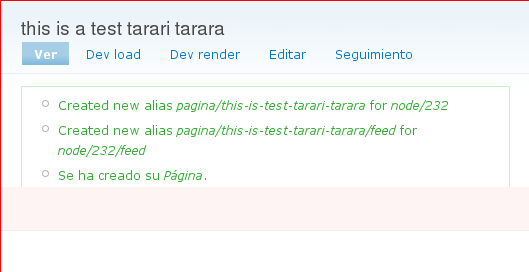
For me, the problem is still there, or maybe it's not a problem? Let me explain step by step. I will add screeshots, and probably I will need several posts so follow the story.
I start editing a new static page, and here you see the first screenshot. My web is in spanish, but I don't think language will be any problem to understand what happens.
Comment #13
Farreres commentedI see that autosave has told me he has autosaved the page. Now I check the log to see what happened. Here you have the screenshot. A new page has been added to content, although I didn't press submit page. So, it was saved even though I didn't do it myself.
Comment #14
Farreres commentedAnd yes, if I go to content listing, I see there is in fact a new page in the content.
Comment #15
Farreres commentedI continue editing the page, and I make the title longer. That's what happens when autosave tries to do his work. It generates some error saying some other user has modified the page and changes can't be saved.
Comment #16
Farreres commentedI now save the page, and I have this screenshot.
Comment #17
Farreres commentedIf I check the log, I see a new node was created with the full title. Here another screenshot.
Comment #18
Farreres commentedAnd if I check the content, I see two nodes were created, one with the partial title, another one with the full title.
Comment #19
Farreres commentedWell, this is what happes in my case. At first I thought it could be a conflict with pathauto module. I still think it could be. But well, in any case, there is some strange thing because nodes are created even though I haven't explicitly saved them. It seems that autosave is creating nodes instead of revisions. Or maybe it's pathauto, but I don't think pathauto is creating any node, it only generates path aliases, not nodes. Well, I am sure you have much more info to understand the problem.
Comment #20
edmund.kwok commentedHi Farreres,
That indeed is the intended behavior for new nodes. When you add a new node and the autosave kicks in, the node is added and set to the unpublished state. Once you submit the form, a new revision of the previous autosaved node will be created. The status (i.e. published/not published) of the submitted node depends on what is in the 'Publishing options' section. I don't think it is possible to create a revision for a node unless it exists.
As for the error in #15, I'll get a fix in ASAP and it should be in the next generated development snapshot. I can't seem to replicate the problem of having two nodes created, (i.e. partial title, and the full title nodes in your report). I will investigate and see if there are problems in the code.
Thanks a lot for the detailed report :)
Comment #21
Farreres commentedCould it be possible to add a new state, autosaved, for nodes created by autosave but not yet saved by the user? This way a cron job could be made to remove autosaved nodes. When a user presses save button then node state would change to his publishing options selection.
As I understand, autosave should be side effect free. Let me explain. I edit an existing node, and autosave keeps my editions as revisions, but if I don't press save, it doesn't modify my contents. This way, these revisions should be marked as autosave revisions, not as proper revisions. Only when a user presses the save button should the node be modified. And the same goest to newly created nodes. Only if a user creates a node it should be there. New nodes created by autosave should have an autosave state and be deleted by the proper cron job.
What do you think about this idea? Perhaps I should post it as another support request, but your reply suggested me this idea. If you consider it apropriate, I will open a new support request.
As I understand, this is the origin of this bug report, if you read the first post message. It seems it happens to more people than me. It should be easy to reproduce.
Comment #22
Farreres commentedI think the last dev build corrected the problem. I have tested it with success.
Comment #23
edmund.kwok commentedAs I understand it, the original issue is about a new revision created each time a node is autosaved which leads to too many revisions at the end of the day. I have since fixed this bug and also the recent bug which you encountered; the one where two nodes were created after you submit the node form.
I have created a new release and it is now available for download.
As for the discussion about having a new state for autosave nodes and cleaning up autosaved revisions, let us continue at http://drupal.org/node/123625; a similar related discussion. scor has asked for input in that issue.
I now consider this issue closed. Thanks a lot for the feedback :)
Comment #24
killes@www.drop.org commented