Active
Project:
Responder
Version:
7.x-1.0
Component:
Code
Priority:
Normal
Category:
Feature request
Assigned:
Unassigned
Reporter:
Created:
3 Nov 2011 at 19:44 UTC
Updated:
10 Feb 2012 at 14:15 UTC
Jump to comment: Most recent file


Responder 7.x-1.0 provides all-or-nothing functionality. Once the module is enabled all core and module CSS get wrapped in a media query, with no mechanism for selectively disabling these alterations. Alternatively, there could be times when someone only wants Responder to wrap one or two modules in MQs.
I'm thinking of a simple list of checkboxes that allow a user to choose which modules should be affected.
| Comment | File | Size | Author |
|---|---|---|---|
| #2 | responder-newadmin.png | 53.34 KB | rupl |

Comments
Comment #1
Jeff Burnz commentedChris, this would be ideal, I am working on my responsive panels ideas and this module could be a route forward.
Comment #2
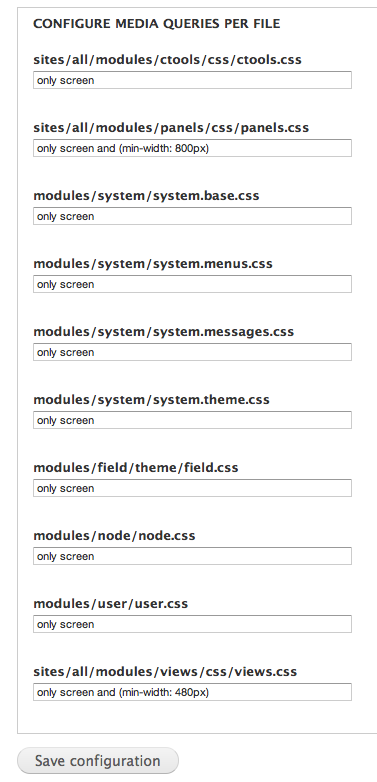
ruplHey Jeff, I am experimenting with an admin UI that satisfies both this issue and #1330982: Allow for more than one media query in Responder admin settings. I have not checked the code in yet, but I wanted to post my progress. There's still some work to be done, as customizing each file's media query results in too many aggregate files once you enable CSS preprocess. However, I wanted to get your thoughts on the UI. Enough granularity? Too much?
In the other issue referenced above, I was thinking the user would create a few media queries and assign each one a machine name, then instead of open textfields, I would render the drop-down of available MQs for each stylesheet. (Similar to how the date "types" and "formats" work in D7). This interface pictured here requires more expertise around media queries, but allows extremely granular control.
Comment #3
tjhellmannI like this module a lot – thanks for your work on it. Just trying it out now on a new project I am developing. Having the ability to set multiple media queries and assign them to the different css files would be a great addition. I would really like to include some of the css files for all screen resolutions. As for the UI above, I would lean towards the other option you mentioned – assigning a machine name to a few media queries and then have a drop down option for each one.