Hi!
I am testing the Automodal module together with the ModalFrame module to display Webforms in modal windows.
Congratulations! Until now it was the only solution I found that works without problems (1).
However, I am finding a difficulty:
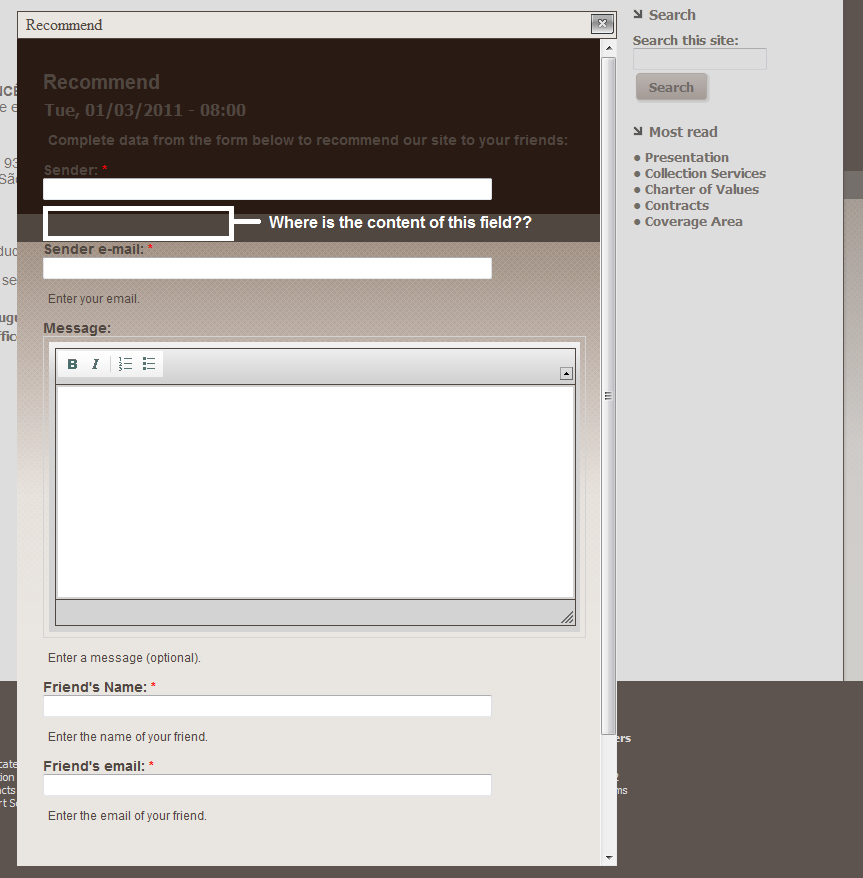
The theme of the site where I'm testing the Automodal module uses a background image. This image is loaded into the frame and is hindering the correct display of the content (see image_01.png).
I need at least set the background to white (#ffffff) for the correct display of the content of frame.
I have not found these options in Automodal. I found some options of style in the ModalFrame, but I could not adjust the background.
I could send this issue to the page of the ModalFrame module, but how I use the ".automodal" selector to show the frames, I think which the correct is here.
Can anyone help me?
(1) I would recommend a skins selector to this module. This is possible and here's an example. This would help us a lot and avoid issues like mine. Let's think about it?
Tks.


Comments
Comment #1
astutonetThe image_01.png and here is the example of modal frame with skins.
Comment #2
adrinux commentedNo solutions as such. For non automodal modals I've done with modalframeapi I found it necessary to load a seperate css file with drupal_add_css() in a custom module.
My problem right now is that the css file isn't applied to automodals :/
Comment #3
dsnopekThis will require changes to your theme to make it work well both on your main site and in the modalframe. You can copy modalframe-page.tpl.php into your theme and add some extra classes to the body or html tag if necessary.