

 Come together with the global Drupal community in Rotterdam, 28 Sept – 1 Oct 2026. Sessions, contribution, connection, and Early Bird savings until 8 June.
Not sure if I phrased that as correctly as i could have, but basically, headings dont show correctly when then display as ' published from front page'.
If I have the same page clickable from a menu, the headings display fine. check out the attached examples.
| Comment | File | Size | Author |
|---|---|---|---|
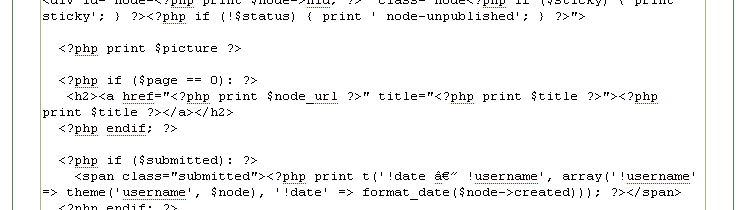
| #7 | node_tpl_php.jpg | 7.63 KB | Minna |
| #3 | m2.jpg | 143.56 KB | geremycohen |
| #1 | good.jpg | 85.62 KB | geremycohen |
| bad.jpg | 84.97 KB | geremycohen |



Comments
Comment #1
geremycohen commentedHere is what it looks like when directly clicked. Also, I'm running fckeditor if that makes any difference.
Comment #2
Minna commentedI redefined the margin in site.css by adding:
.main-content h2 {margin-top: 0.5em;}
Hope this helps.
Minna
Comment #3
geremycohen commentedHi Minna-
Thanks for the update. I added it, and it didnt seem to help. I've attached the output of the Firefox Web Developer extention "Outline Current Element" when its working and not working.
Comment #4
Minna commentedHi,
There is a difference in bad.jpg and m2.jpg. So you have some change.
You must be trying to lineup the underline. You may have to adjust margin-top more (lower).
Comment #5
geremycohen commentedHi Minna-
Adjusting the margin-top moves the heading lower, but doesnt appear to change it from an H2 to what I believe is desired, an H1?
Comment #6
geremycohen commentedAnd just to be clear, in m2.jpg, the underline on the top image is the hyperlink bar from mouse over -- its not part of the actual heading.
Comment #7
Minna commentedI agree it should be H1 style. But it calls for H2 and a hyperlink. You can see this in the attached screen of node.tpl.php where for page 0 ( I think this is for a node in the front and sticky to top only ) H2 is called.
So you would have to change it. I am not a php programmer so I'm uncomfortable suggesting. However, I can tell you what I did.
I added a class: < h2 class="front">
and then added some css in site.css:
.main-content h2.front {border-bottom:solid 2px #646464; font-family:"trebuchet ms",arial,sans-serif; }
.main-content h2.front a {color:#646464; font-weight:normal; font-size:120%; text-decoration:none;}