

Closed (fixed)
Project:
Address field for CCK
Version:
5.x-1.0
Component:
User interface
Priority:
Normal
Category:
Bug report
Assigned:
Reporter:
Created:
2 Apr 2007 at 16:24 UTC
Updated:
25 Apr 2007 at 23:46 UTC
Jump to comment: Most recent file



Comments
Comment #1
sshvetsov commentedYep, have the same problem in my Firefox as well. It looks like Apt. field is overlapping the street field.
Comment #2
rconstantine commentedWoah. What the??? I'm going to need more to go on. I am running Firefox 2.0.0.3 myself and everything looks great.
I'm on WinXP, what about you guys?
Are you using custom skins? If so, which ones and does changing the skin fix it?
Also, what values have you set for the maximum field lengths? That's the only thing I can think of that would be crazy. I am doing a little bit of hocus pocus to modify the visual lengths of the fields so that they more accurately represent the max numbers in 'ems'. If this ends up being the problem, I'll probably just take it out or make a checkbox to include it or not.
Anyway, try first to delete the contents of the css file or change it as you wish for a quick work around. Perhaps I should have a float:left in the entry for div.cck-address-apt .form-item {margin-right:1em;} as well. I don't know. If either of you try it, let me know how it goes.
Change to:
div.cck-address-apt .form-item {float: left; margin-right:1em;}
Let me know.
Comment #3
sshvetsov commentedI'm on windows XP as well. Using unmodified "minnelli" theme. I left maximum field lengths empty as they were.
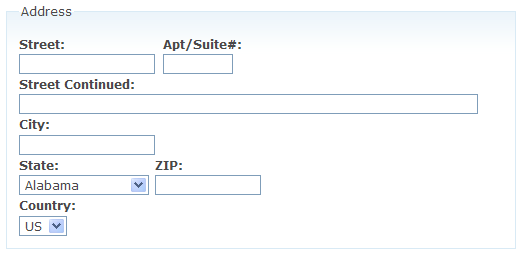
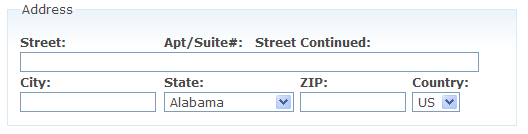
Changing CSS to have: div.cck-address-apt .form-item {float: left; margin-right:1em;} made it look like the image attached.
Comment #4
sshvetsov commentedI figured some things out. Thanks to FireBug.
Hope my explanation makes sense, I'm writing it real quick.
Comment #5
c_philip commentedI tried changing the css file and added "div.cck-address-apt .form-item {clear: left; margin-right:1em;}" which fixed the issue with line breaks. However the street 1 field is shortened compared to the street 2 field. In order to fix that I removed the "float: left" on the div.cck-address-street1 .form-item value. I played around some more and realized that I did not need the clear: left value on the address-apt field either. So here is the final css file I've been using that seems to work well in firefox and IE:
Comment #6
rconstantine commentedKindly see if the following works:
Thanks for the input. As for the state and country having the save id as city, that should be okay for testing this since the css is the same, but I am changing the module file to reflect the correct naming as above. If you test this and it works, I'll commit the changes to both the css and module files.
Thanks.
Comment #7
sshvetsov commentedSeems to be working in Firefox 2, screenshot attached.
Comment #8
rconstantine commented@sshvetsov Cool. Thanks for checking.
@c_philip How about you?
Comment #9
c_philip commentedI looked at the new code and added it. It fixes the overlap problem but if you look at the other user and my screenshot, notice that the street line is truncated in Firefox. I've attached a copy of the screenshot.
Comment #10
rconstantine commented@c_philip: what are your max length settings? Are they all 0?
Comment #11
c_philip commentedAll the maximum field lengths were left blank so that they could be unlimited.
CP
Comment #12
c_philip commentedAll the maximum field lengths were left blank so that they could be unlimited.
CP
Comment #13
rconstantine commentedOkay, I'll just change this so that 'apt' is on it's own line. I'll be finishing the recent changes on Wednesday, so by late that night, you should see the updated version posted. Meanwhile, change the css file to suit your needs.
Cheers.
Comment #14
c_philip commentedGreat! Thanks for all your work on this. I look forward to seeing the new version up.
Comment #15
rconstantine commentedI just posted the new version. Drupal's cron will put it up within 12 hours. For this issue, all I did was change the code from #6 to read
div.cck-address-apt .form-item {clear:left; margin-right:1em;}instead of
div.cck-address-apt .form-item {float:left; margin-right:1em;}I hope that does it for you.
Comment #16
(not verified) commented